What is AI Email Writer?
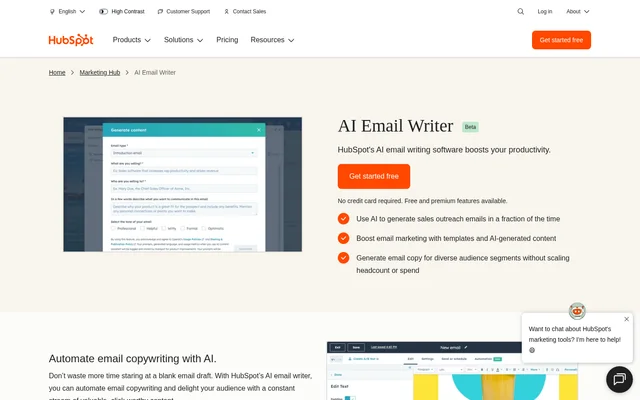
AI Email Writer is HubSpot’s AI email writing software for businesses creating marketing campaigns and sales outreach. AI Email Writer is part of HubSpot’s content assistant and is built into HubSpot’s marketing and sales tools. The software helps users generate subject lines, draft prospecting messages, and produce marketing copy without starting from a blank email.
AI Email Writer uses machine learning and natural language processing to generate text from user prompts or draft replies based on user inquiries. The product page labels AI Email Writer as beta. HubSpot combines email writing with native tools for designing, sending, tracking, and analyzing emails, keeping those activities within the same working environment.
What AI Email Writer can do
AI Email Writer supports email content creation for both marketing campaigns and sales conversations. AI Email Writer combines generated copy with template customization, editing commands, and CRM-connected personalization. HubSpot’s associated email tools also record campaign results and sales activity, allowing teams to follow the performance of the messages they create.
- AI Email Writer generates subject lines, prospecting emails, and marketing messages.
- AI Email Writer drafts replies based on user inquiries.
- AI Email Writer uses slash and highlight commands to edit length, spelling, and tone.
- AI Email Writer supports customized email marketing templates.
- AI Email Writer helps develop on-brand messaging for different audience segments.
- AI Email Writer supports personalization using CRM-based tokens.
How AI Email Writer works
AI Email Writer fits into an email workflow within HubSpot’s marketing and sales tools. Users can select and customize an email marketing template, then use slash and highlight commands to generate or revise the copy. Prompts provide the basis for generated emails, while editing commands help users adjust the resulting message.
AI Email Writer connects email creation with HubSpot CRM records. After a campaign launches, HubSpot CRM automatically records campaign data, including open rates and lead submissions. For sales outreach, HubSpot CRM automatically logs conversations and contacts. HubSpot’s native email tools are accessible on desktop and through the HubSpot mobile app.
Who AI Email Writer is for
AI Email Writer serves marketing and sales teams that need copy for campaigns, prospecting, and ongoing customer communication. AI Email Writer supports businesses addressing different audience segments and teams that want email drafting connected to CRM information. The source describes both broad email blast campaigns and more targeted sales outreach as intended uses.
- AI Email Writer helps marketers draft email campaign copy and subject lines.
- AI Email Writer helps sales teams prepare prospecting and outreach messages.
- AI Email Writer helps teams adapt messaging for distinct audience segments.
- AI Email Writer supports businesses personalizing messages with recipient-specific CRM tokens.
AI Email Writer pricing and plans
AI Email Writer’s AI writing features are available free, and HubSpot states that no credit card is required to get started. AI Email Writer is available in Marketing Hub. HubSpot also offers premium marketing features through the Starter, Professional, and Enterprise editions of Marketing Hub, but the supplied page does not list plan prices.
AI Email Writer strengths and limitations
AI Email Writer combines email generation with HubSpot’s templates, CRM data, and email tracking tools. AI Email Writer supports marketing and sales use cases without separating drafting from the surrounding email workflow. HubSpot also provides guidance on reviewing generated messages, testing formatting and personalization, and validating outputs before finalizing or publishing email content.
- AI Email Writer is labeled beta on the product page.
- AI Email Writer outputs should be proofread for spelling, brand voice, and tone.
- AI Email Writer outputs should be independently checked for accuracy before publication.
- AI Email Writer’s surrounding premium marketing features are offered through paid Marketing Hub editions.
AI Email Writer FAQ
What is AI Email Writer?
AI Email Writer is HubSpot’s AI email writing software for generating subject lines, marketing messages, prospecting emails, and replies. AI Email Writer is built into HubSpot’s marketing and sales tools, connecting copy creation with email sending, tracking, analysis, and CRM records.
Is AI Email Writer free?
AI Email Writer’s AI writing features are available free, with no credit card required to get started. HubSpot also offers premium marketing features through the Starter, Professional, and Enterprise editions of Marketing Hub. The supplied page does not list prices for those editions.
Who is AI Email Writer for?
AI Email Writer is for marketing and sales teams creating email campaigns, sales outreach, and audience-specific messaging. AI Email Writer supports businesses that want to generate copy, personalize messages with CRM-based tokens, and track email activity within HubSpot’s tools.
How do you edit emails with AI Email Writer?
AI Email Writer supports slash and highlight commands to generate and edit email copy within HubSpot’s tools. Users can customize an email marketing template and adjust message length, spelling, and tone. HubSpot recommends proofreading messages and testing personalization tokens and formatting before sending.
Does AI Email Writer integrate with HubSpot CRM?
AI Email Writer integrates with HubSpot CRM and HubSpot’s marketing, sales, service, and content features. HubSpot CRM automatically records campaign data and logs sales conversations and contacts. CRM-based tokens also support email personalization that changes from one recipient to another.
Does AI Email Writer content need to be checked?
AI Email Writer outputs should be independently checked for accuracy before finalizing or publishing. HubSpot also recommends proofreading spelling, brand voice, and tone, sending test emails to verify personalization and formatting, and testing different subject lines and body copy.
From the community
No reviews yet
Be the first to review this tool. What you write helps the next person choose.