What is AI Photo Sorter?
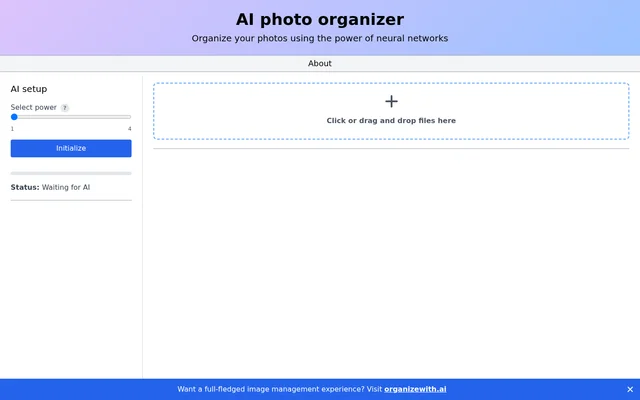
AI Photo Sorter is a photo organization tool that uses neural networks and lets users set photo classes. AI Photo Sorter is presented as an AI photo organizer and identifies WebAI as its underlying technology. The interface brings together AI setup, file input, class selection, processing controls, and script generation.
AI Photo Sorter focuses on organizing photos rather than presenting a broader image management workspace. The page directs visitors to organizewith.ai for a full-fledged image management experience. That link is presented separately from the organizer's own controls for adding files, defining classes, and starting or stopping processing.
What AI Photo Sorter can do
AI Photo Sorter provides controls for configuring an AI-assisted photo organization task. The page explicitly includes a power selector, an initialization action, photo class controls, and a file input area. AI Photo Sorter also exposes processing controls and a script-generation action alongside a status display.
- AI Photo Sorter organizes photos using neural networks.
- AI Photo Sorter lets users set and add photo classes.
- AI Photo Sorter accepts files through clicking or dragging and dropping.
- AI Photo Sorter provides a power selector and an Initialize control.
- AI Photo Sorter includes Start and Stop controls.
- AI Photo Sorter displays processing status.
- AI Photo Sorter includes a Generate script control.
How AI Photo Sorter works
AI Photo Sorter presents an AI setup area where users can select power and initialize the AI. The photo class area provides controls to set classes and add a new class. The file area accepts input through a click or drag-and-drop interaction, giving users alternative ways to supply photos.
AI Photo Sorter places Start, Stop, and Generate script actions in the interface. A status area can display Waiting for AI, making the AI state visible before processing begins. The page names these controls but does not explain the generated script's format or provide a detailed account of the classification process.
Who AI Photo Sorter is for
AI Photo Sorter is for people who want to organize photos using neural networks and their own photo classes. The stated purpose and visible controls support a photo-sorting use case. AI Photo Sorter also points people seeking a full-fledged image management experience toward the separate organizewith.ai website.
- AI Photo Sorter supports organizing photos with neural networks.
- AI Photo Sorter supports defining classes for a photo organization task.
- AI Photo Sorter supports supplying photo files through its upload area.
AI Photo Sorter strengths and limitations
AI Photo Sorter combines class configuration, file input, processing controls, and status feedback in a single interface. Click-based and drag-and-drop input offer alternative file-entry methods, while explicit Start and Stop controls expose processing actions. The supplied page text does not establish technical restrictions, supported file formats, or what the generated script contains.
AI Photo Sorter FAQ
What is AI Photo Sorter?
AI Photo Sorter is a photo organizer that uses neural networks. AI Photo Sorter provides controls for defining photo classes, supplying files, initializing AI, starting and stopping processing, and generating a script.
How do you add photos to AI Photo Sorter?
AI Photo Sorter accepts files through a clickable input area or drag and drop. AI Photo Sorter presents that input area alongside AI setup, photo class controls, processing actions, and a status display.
Can you define photo classes in AI Photo Sorter?
AI Photo Sorter lets users set photo classes and provides an Add control and a Select new class option. AI Photo Sorter therefore includes class configuration as part of its photo organization interface.
What technology powers AI Photo Sorter?
AI Photo Sorter is powered by WebAI, according to the page. AI Photo Sorter describes its photo organization method as using neural networks and provides an AI setup area with power selection and initialization controls.
Does AI Photo Sorter generate scripts?
AI Photo Sorter includes a Generate script control in its interface. AI Photo Sorter's page does not describe the script's language, contents, or execution method, so the stated capability is limited to the available script-generation action.
From the community
No reviews yet
Be the first to review this tool. What you write helps the next person choose.