What is AI Teaching Assistant Pro?
AI Teaching Assistant Pro is a free education tool that helps educators create assessments, plan courses, and prepare materials for students. The site organizes these tasks into separate tools, so an educator preparing an exam can select a question tool, while an educator planning a course can select Syllabus + Teaching Notes. The tools also cover tasks outside formal assessment, such as introducing a topic with a short video or helping students find information in a syllabus.
What AI Teaching Assistant Pro can do
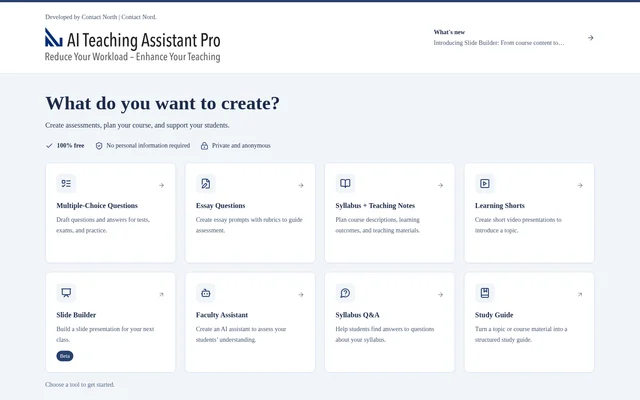
AI Teaching Assistant Pro handles both the material educators present and the questions they use to assess understanding. The assessment tools produce different outputs: multiple-choice questions come with answers, while essay prompts come with rubrics. The presentation tools also serve different purposes: Learning Shorts introduces a topic in a short video presentation, while Slide Builder creates a slide presentation for a class.
- Multiple-Choice Questions drafts questions and answers for tests, exams, and practice.
- Essay Questions creates prompts with rubrics to guide assessment.
- Syllabus + Teaching Notes helps plan course descriptions, learning outcomes, and teaching materials.
- Learning Shorts creates short video presentations to introduce a topic.
- Slide Builder builds slide presentations for class.
- Faculty Assistant creates an AI assistant to assess students’ understanding.
- Syllabus Q&A helps students find answers about the syllabus.
- Study Guide turns a topic or course material into a structured guide.
How AI Teaching Assistant Pro works
AI Teaching Assistant Pro starts with a choice of tool based on what the educator wants to make. For question generation, the site describes a workflow in which the educator chooses a topic, sets the available options, and generates a question. The quick look on the site shows a specific example of that process: a topic becomes a multiple-choice question with an answer. A separate video demonstration covers creating multiple-choice and essay questions.
Who AI Teaching Assistant Pro is for
AI Teaching Assistant Pro is aimed at educators preparing a course, teaching a class, or assessing what students understand. Its student-facing uses center on course information and review. Syllabus Q&A helps students find answers about a syllabus, while Study Guide organizes a topic or existing course material into a guide. For educators preparing a lesson, the site offers slides for class and short video presentations for introducing a topic.
- Prepare practice questions with answers before a test.
- Develop essay prompts and rubrics for an assessment.
- Draft a course description and learning outcomes.
- Turn course material into a study guide for students.
AI Teaching Assistant Pro pricing and plans
AI Teaching Assistant Pro is described as 100% free on the product page, which does not list paid plans. The site says no personal information is required and describes use as private and anonymous. The stated way to begin is to select a tool from the page. For educators who want to see the question workflow before starting, the page also provides an example and a video demonstration of question creation.
Pros and cons
What works
- Free to use
- No personal information required
- Includes an example of how a question is generated
- Supports both assessment creation and course planning
AI Teaching Assistant Pro FAQ
What is AI Teaching Assistant Pro?
AI Teaching Assistant Pro is an AI tool for educators who create assessments, plan courses, and support students. Its tools cover multiple-choice and essay questions, syllabuses and teaching notes, class slides, short video presentations, and structured study guides.
Is AI Teaching Assistant Pro free?
AI Teaching Assistant Pro is 100% free according to its product page. The page says no personal information is required, describes use as private and anonymous, and directs users to select a tool to get started.
Can AI Teaching Assistant Pro generate exam questions and rubrics?
AI Teaching Assistant Pro can draft multiple-choice questions with answers for tests, exams, and practice, and can create essay prompts with assessment rubrics. The site shows an example of turning a topic into a multiple-choice question with an answer.
Can AI Teaching Assistant Pro help plan a syllabus?
AI Teaching Assistant Pro helps educators plan course descriptions, learning outcomes, and teaching materials with Syllabus + Teaching Notes. Its separate Syllabus Q&A tool helps students find answers to questions about the syllabus.
Can AI Teaching Assistant Pro create a study guide from course material?
AI Teaching Assistant Pro can turn a topic or course material into a structured study guide. Study Guide is separate from Syllabus Q&A, which is designed to help students find answers to questions about the syllabus.
From the community
No reviews yet
Be the first to review this tool. What you write helps the next person choose.