What is AI Yearbook Art?
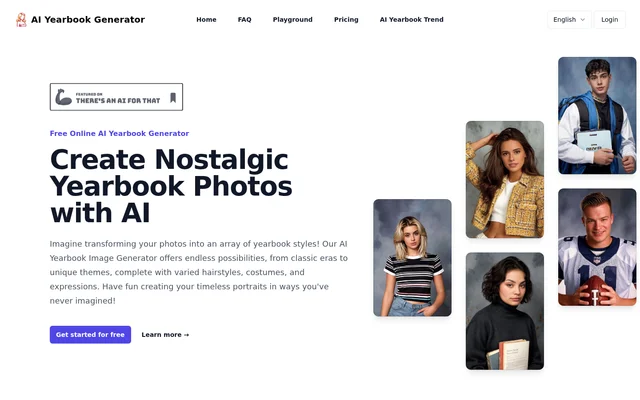
AI Yearbook Art is an online image generator that converts current photos into yearbook-style portraits. AI Yearbook Art recreates looks associated with different eras through changes to clothing, hairstyles, expressions and portrait styles. The tool is intended for people creating social media content, exploring nostalgic imagery or experimenting with visual styles.
AI Yearbook Art applies artificial intelligence to the familiar school yearbook portrait format. The website highlights retro yearbook looks alongside contemporary styles and themes from different countries. Rather than requiring users to build a photo-generation workflow themselves, AI Yearbook Art provides an upload-and-generate interface with downloadable results.
What AI Yearbook Art can do
AI Yearbook Art creates personalized yearbook portraits using an uploaded face photo and available yearbook styles. The website includes example images and templates so users can explore different looks. The available capabilities cover portrait generation, style variation, task tracking and downloading completed images through the online interface.
- AI Yearbook Art transforms uploaded portraits into yearbook-style images.
- AI Yearbook Art offers retro and contemporary looks from different countries.
- AI Yearbook Art provides templates with different clothing, hairstyles and poses.
- AI Yearbook Art offers male and female options associated with different styles.
- AI Yearbook Art displays generation task status on the History page.
- AI Yearbook Art lets users download generated photos.
How AI Yearbook Art works
AI Yearbook Art starts with a selfie or another photo containing a single clearly visible face. Users upload the image through the Choose File section of the yearbook generation tab, then select a male or female option. The website states that these options come with different yearbook photo styles.
AI Yearbook Art launches a generation task when the user presses Submit and redirects the user to the History page to check progress. Generation typically takes a few minutes. Once the image is ready, the Download Generated Photo button provides the result. The website describes yearbook generation generally as combining Stable Diffusion templates with face swapping.
Who AI Yearbook Art is for
AI Yearbook Art addresses personal, educational and professional uses for stylized portraits. The website names social media users, nostalgia enthusiasts, educators, students, marketing professionals, graphic designers, photographers and gift givers. Suggested applications range from changing a profile picture to using historical fashion imagery in a classroom lesson.
- Social media users can create yearbook portraits for Instagram or Facebook profiles.
- Educators can use yearbook imagery in history or art lessons.
- Marketers can create visuals for nostalgic or retro-themed campaigns.
- Designers and photographers can experiment with different visual aesthetics.
- Gift givers can create personalized portraits for friends and family.
AI Yearbook Art pricing and credits
AI Yearbook Art uses a credit-based model with free credits available to all users and additional credits available for purchase. Each generation costs 1 credit. Users can check their credit balance in the top-right corner of the page. The supplied page does not specify credit package prices or the amount of free credits provided.
AI Yearbook Art strengths and limitations
AI Yearbook Art combines an upload-based workflow with multiple portrait styles, progress tracking and downloadable results. The website states that no coding or manual tweaking is needed. Free credits allow users to generate photos without an initial credit purchase, while further generation is available through purchased credits.
- AI Yearbook Art requires a photo containing a single clearly visible face.
- AI Yearbook Art accepts uploaded images no larger than 10MB.
- AI Yearbook Art typically takes a few minutes to complete a generation.
- AI Yearbook Art consumes 1 credit for each generation.
AI Yearbook Art FAQ
What is AI Yearbook Art?
AI Yearbook Art is an online AI photo generator that transforms uploaded portraits into yearbook-style images. AI Yearbook Art offers retro and contemporary looks with variations in clothing, hairstyles, poses and expressions for personal, educational and marketing uses.
Is AI Yearbook Art free?
AI Yearbook Art provides free credits to all users and sells additional credits for generating more photos. Each generation costs 1 credit. The supplied page does not list credit package prices or specify how many free credits users receive.
How do you create a photo with AI Yearbook Art?
AI Yearbook Art generates a portrait after users upload a face photo, select a male or female option and press Submit. AI Yearbook Art then redirects users to the History page, where they can track progress and download the completed image after generation.
What photo requirements does AI Yearbook Art have?
AI Yearbook Art requires an uploaded photo containing a single clearly visible face, with an image size no greater than 10MB. AI Yearbook Art accepts a selfie or another face photo through the Choose File section of the yearbook generation tab.
Who is AI Yearbook Art for?
AI Yearbook Art is intended for social media users, nostalgia enthusiasts, educators, students, marketers, graphic designers, photographers and gift givers. Suggested uses include profile pictures, retro-themed campaign visuals, classroom exploration of fashion trends and personalized photo gifts.
How long does AI Yearbook Art take to generate a photo?
AI Yearbook Art typically takes a few minutes to generate a yearbook photo. AI Yearbook Art shows task status on the History page after submission, and users can select Download Generated Photo once the image is ready.
From the community
No reviews yet
Be the first to review this tool. What you write helps the next person choose.