What is AICommit?
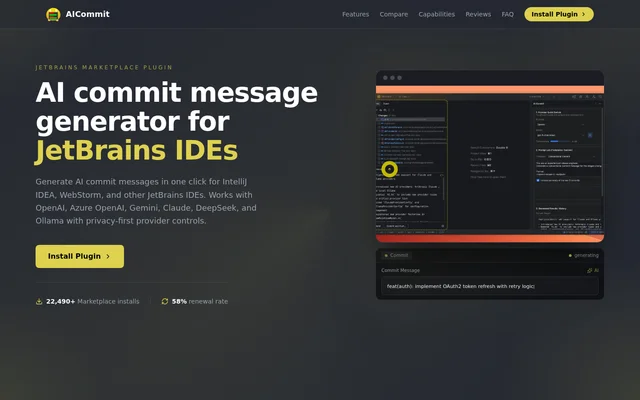
AICommit is an AI commit message generator built as a plugin for JetBrains IDEs. AICommit reads staged code changes and produces commit messages within the editor, allowing developers to review and edit the generated text before committing. The plugin fits into the JetBrains Commit tool window rather than requiring a separate writing interface.
AICommit supports IntelliJ-platform IDEs including IntelliJ IDEA, PyCharm, WebStorm, GoLand, Rider, PhpStorm, RubyMine, CLion, Android Studio, DataGrip, and RustRover. AICommit is distributed through JetBrains Marketplace and supports both cloud-based generation and local models, giving developers a choice of where staged diffs are processed.
What AICommit can do
AICommit combines staged-diff analysis with configurable models and prompt templates. AICommit includes Prompt Lab, where developers can choose a provider and model, apply templates, and review generation history. Built-in templates and custom templates support different commit-writing requirements, including Conventional Commits and Release Notes.
- AICommit generates commit messages from staged changes.
- AICommit offers one-click generation from the VCS commit panel.
- AICommit supports OpenAI, Azure OpenAI, Google Gemini, Anthropic Claude, and DeepSeek.
- AICommit supports Ollama local models and OpenAI-compatible custom endpoints.
- AICommit lets developers edit generated messages before committing.
- AICommit lets developers create custom prompt templates.
How AICommit works
AICommit starts with installation from JetBrains Marketplace. Developers configure a provider and model, verify credentials, and choose a prompt template. After staging code changes, developers generate a commit message from the IDE and can edit the result before committing. AICommit also allows provider switching without editing a configuration file.
AICommit sends staged diffs only to the configured provider when cloud generation is selected. AICommit states that code and commit messages are neither collected nor logged. Developers who want to avoid sending staged diffs to a cloud provider can configure Ollama with local models for a local-first workflow.
Who AICommit is for
AICommit is for developers working in JetBrains IDEs who want commit message generation alongside their existing Git workflow. AICommit also addresses teams with code privacy requirements by offering provider controls and a local Ollama option. Template support gives developers a way to apply their chosen message format when generating commit text.
- AICommit helps developers draft commit messages from staged diffs.
- AICommit supports developers using Conventional Commits templates.
- AICommit supports teams choosing a specific cloud provider or custom endpoint.
- AICommit supports developers who want local generation with Ollama.
AICommit pricing and plans
AICommit is a paid plugin billed through JetBrains Marketplace, with a 30-day free trial. Personal plans start at $1/month or $10/year, while commercial plans start at $3/month or $30/year. AICommit installation and trial access are available through the plugin's JetBrains Marketplace listing.
AICommit strengths and limitations
AICommit brings commit message generation into the IDE and supports multiple providers, editable output, and reusable templates. AICommit's local Ollama option provides an alternative to sending staged diffs to cloud services. The main boundaries are the required JetBrains environment, paid licensing after the trial, and external processing when a cloud provider is selected.
- AICommit requires an IntelliJ-platform IDE with the JetBrains Commit tool window.
- AICommit requires a paid plan after the free trial.
- AICommit sends staged diffs to the configured provider for cloud generation.
AICommit FAQ
What is AICommit?
AICommit is a JetBrains IDE plugin that generates commit messages from staged code changes. AICommit works inside the Commit tool window, supports configurable AI providers and prompt templates, and lets developers edit generated messages before committing.
Is AICommit free?
AICommit is a paid JetBrains Marketplace plugin with a 30-day free trial. Personal plans start at $1/month or $10/year, and commercial plans start at $3/month or $30/year, with billing handled through JetBrains Marketplace.
Which JetBrains IDEs does AICommit support?
AICommit supports IntelliJ-platform IDEs with the JetBrains Commit tool window, including IntelliJ IDEA, PyCharm, WebStorm, GoLand, Rider, PhpStorm, RubyMine, CLion, Android Studio, DataGrip, and RustRover. AICommit integrates commit message generation into the IDE workflow.
Which AI providers does AICommit support?
AICommit supports OpenAI, Azure OpenAI, Google Gemini, Anthropic Claude, DeepSeek, and Ollama for local models. AICommit also supports OpenAI-compatible custom endpoint profiles and allows developers to switch providers without editing a configuration file.
Does AICommit send code to the cloud?
AICommit sends staged diffs to the configured provider when cloud generation is used. AICommit states that code and commit messages are not collected or logged. AICommit also supports Ollama local models to keep staged diffs off cloud providers.
How do you get started with AICommit?
AICommit is installed from JetBrains Marketplace. Developers configure a provider and model, verify credentials, choose a prompt template, and stage their changes. AICommit then generates a commit message in one click inside the JetBrains IDE.
From the community
No reviews yet
Be the first to review this tool. What you write helps the next person choose.