What is Akool?
Akool is a web-based generative AI platform for creating and editing visual and audio content. Akool serves content creators, marketing teams, educators, film producers, and social media managers through tools for video generation, image creation, avatars, translation, and voice production. Akool brings these functions together with a Model Hub that includes Seedance, Kling, and Wan.
Akool covers both generated content and changes to existing media. Akool can turn prompts into images, animate photos, generate videos, and modify people or clothing in supplied footage. Akool also offers interactive avatars that respond in real time, alongside an API for businesses incorporating avatar, translation, and face-swap capabilities into their own services.
What Akool can do
Akool groups its capabilities across media generation, editing, avatars, and speech. Akool supports text-to-video, image-to-video, video-to-video, and reference-to-video creation, while dedicated swap tools change specific elements of photos or footage. Akool also lists tools for presentation conversion, background changes, and short-form video creation.
- Akool generates images from text prompts.
- Akool swaps faces in photos and videos.
- Akool maps motion from a reference video onto a character.
- Akool replaces clothing while preserving the person, pose, and background.
- Akool creates avatar videos from an avatar and script.
- Akool translates videos with support for 155+ languages.
- Akool provides text-to-speech, voice-cloning, and voice-changing tools.
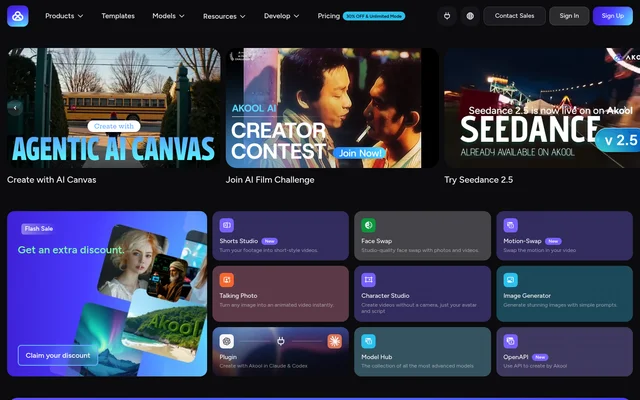
- Akool turns existing footage into short-style videos through Shorts Studio.
How Akool works
Akool provides web tools with different inputs for different tasks. Akool's Image Generator accepts prompts, Character Studio uses an avatar and script, Talking Photo animates an image, and Motion Swap uses reference video motion. Akool's Model Hub provides access to multiple image and video models rather than limiting creation to a single model family.
Akool also provides a plugin for creating content in Claude and Codex. Akool's API supports streaming avatars, video translation, talking photos, and face swaps. Akool lists API access and workspace collaboration in Pro Max, with higher plans including those capabilities through their inclusion of the preceding plan's features.
Who Akool is for
Akool identifies marketing teams, content creators, educators, film producers, and social media managers as its audiences. Akool's pricing descriptions also distinguish first-time creators, professional creators, power creators, agencies, and small businesses. Akool's tools address both content production and real-time interaction, including marketing visuals, avatar presentations, and multilingual video.
- Akool helps marketing teams create social posts and marketing visuals.
- Akool supports creators producing short-form videos from existing footage.
- Akool lets presenters create videos using avatars and scripts.
- Akool supports businesses deploying streaming avatars through an API.
Akool strengths and limitations
Akool's breadth is a practical strength for users needing image, video, avatar, and voice tools in the same service. Akool also supports several model families and offers both web-based creation and integration options. Akool's limitations depend on the selected plan, so model availability, licensing, watermarks, and usage allowances matter when comparing access.
- Akool applies full-screen watermarks on the free tier.
- Akool excludes Seedance 2.5 from Starter and Pro.
- Akool lists personal licences on Starter, Pro, and Pro Max.
- Akool sets plan-dependent limits on concurrent generations and video length.
Akool FAQ
What is Akool?
Akool is a web-based generative AI platform for video, image, avatar, translation, and voice creation. Akool includes face swaps, talking photos, streaming avatars, and a Model Hub with models such as Seedance, Kling, and Wan.
Who is Akool for?
Akool is for content creators, marketing teams, educators, film producers, and social media managers. Akool also offers plans described for agencies and small businesses, with tools for marketing visuals, short-form videos, avatar content, and translation.
Does Akool have an API or integrations?
Akool offers an API and a plugin for creating content in Claude and Codex. Akool describes API capabilities including streaming avatars, video translation, talking photos, and face swaps, and lists API access in Pro Max.
Can Akool translate videos?
Akool provides video translation with support for 155+ languages. Akool's pricing comparison lists translation-related capabilities and limits, including upload quality and video length, while Pro explicitly includes video translation proofread access.
Which Akool plans include a business licence?
Akool lists a business licence for Business and an enterprise licence for Enterprise. Akool lists personal licences for Starter, Pro, and Pro Max, making licence type an important distinction between the paid plans.
From the community
No reviews yet
Be the first to review this tool. What you write helps the next person choose.