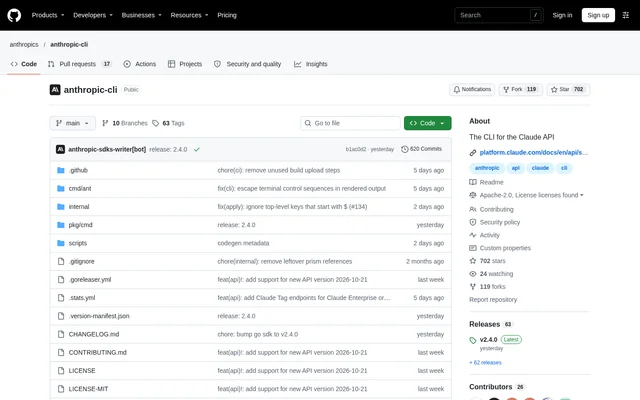
What is Anthropic CLI?
Anthropic CLI is the official command-line interface for the Claude Platform, bringing Claude API operations into the terminal. Anthropic CLI is an open-source project hosted in the anthropics GitHub repository and uses the executable name ant. The tool serves developers who want to send requests and manage API resources through commands rather than a graphical interface.
Anthropic CLI supports macOS, Linux, and Windows. The repository links to full CLI documentation on the Claude Platform documentation site and includes installation instructions, authentication examples, cloud gateway configuration, contribution guidance, and licensing information. The documented scope includes messages, agents, sessions, file uploads, and scripting against every API endpoint.
What Anthropic CLI can do
Anthropic CLI exposes Claude API capabilities through terminal commands and structured flags. Anthropic CLI accepts relaxed JSON or YAML for structured inputs, including unquoted keys. Beyond sending messages, the documented functionality includes resource management and API scripting, with additional gateway options for Google Cloud and AWS environments.
- Anthropic CLI sends messages to Claude models.
- Anthropic CLI manages agents and sessions.
- Anthropic CLI uploads files through the Claude API.
- Anthropic CLI supports scripting against every API endpoint.
- Anthropic CLI accepts relaxed JSON or YAML in structured flags.
- Anthropic CLI routes requests through supported Google Cloud and AWS gateways.
How Anthropic CLI works
Anthropic CLI can be installed with Homebrew using brew install anthropics/tap/ant or installed locally through Go. The Go installation path requires Go version 1.22 or later and places the executable in the Go bin directory. The repository explains how to add that directory to the shell PATH when commands cannot be found.
Anthropic CLI authenticates with a Claude Console account through ant auth login or with an API key from the Claude Console. Anthropic CLI also accepts a key through standard input, allowing a secret manager to supply credentials without placing the key in an environment variable. The ant auth status command identifies the credentials currently in use.
Who Anthropic CLI is for
Anthropic CLI is suited to developers working with the Claude API from a terminal or shell script. Anthropic CLI also covers workflows that use Claude through Google Cloud or AWS gateways, with documented support for cloud credentials, workspace settings, and gateway-specific configuration. These workflows require the relevant authentication and configuration described in the repository.
- Developers can use Anthropic CLI to send messages from terminal workflows.
- Developers can use Anthropic CLI to script Claude API endpoint requests.
- Developers can use Anthropic CLI to manage agents, sessions, and file uploads.
- Cloud users can configure Anthropic CLI for Google Cloud or AWS gateway requests.
Anthropic CLI licensing and access
Anthropic CLI is available as an open-source project under the Apache License, Version 2.0. Versions released before the change from the MIT License, and third-party contributions merged before that change, remain under the MIT License. Anthropic CLI can be obtained through the documented Homebrew and Go installation paths; the repository does not state Claude API usage prices.
Anthropic CLI strengths and limitations
Anthropic CLI combines official Claude API access, cross-platform support, structured command inputs, and several authentication methods. Anthropic CLI documents how Google Cloud and AWS credentials are selected and states that cloud credentials are sent only to their respective gateways. The cloud configurations also have explicit restrictions that matter when choosing a workflow.
- Anthropic CLI requires Go version 1.22 or later for the Go installation route.
- Anthropic CLI does not support ant beta:worker on Google Cloud.
- Anthropic CLI does not support ant beta:worker on AWS.
- Anthropic CLI requires the matching region when using an API key generated in the AWS Console.
Anthropic CLI FAQ
What is Anthropic CLI?
Anthropic CLI is the official command-line interface for the Claude Platform, distributed with the executable name ant. Anthropic CLI provides terminal commands for sending messages, managing agents and sessions, uploading files, and scripting against Claude API endpoints.
Is Anthropic CLI open source?
Anthropic CLI is an open-source project licensed under the Apache License, Version 2.0. Earlier releases and third-party contributions merged before the licence change remain under the MIT License. The repository does not state Claude API usage prices.
How do you install Anthropic CLI?
Anthropic CLI can be installed through Homebrew with brew install anthropics/tap/ant or through Go. The Go installation route requires Go version 1.22 or later. Anthropic CLI supports macOS, Linux, and Windows, and the repository provides PATH configuration guidance.
How do you authenticate Anthropic CLI?
Anthropic CLI supports Claude Console login through ant auth login, an API key supplied with ANTHROPIC_API_KEY, or a key piped through standard input. Anthropic CLI also documents Google Cloud and AWS credential options for requests through their respective gateways.
Does Anthropic CLI support Google Cloud and AWS?
Anthropic CLI supports Claude requests through Google Cloud and AWS gateways with workspace and credential configuration. Google Cloud support uses Application Default Credentials, while AWS support uses the default credential chain or an AWS Console API key. Anthropic CLI does not support ant beta:worker on either gateway.
From the community
No reviews yet
Be the first to review this tool. What you write helps the next person choose.