What is Auto Subtitle Generator?
Auto Subtitle Generator is Maestra’s online AI tool for generating and translating subtitles in 125+ languages. Auto Subtitle Generator combines automatic transcription, subtitle editing, translation, and file export for creators, educators, and teams working with video content. The service also includes live captioning for spoken audio.
Auto Subtitle Generator supports both recorded content and live sessions. The page describes uses ranging from movie localization and social media captions to advertisements, lectures, and online courses. Subtitle text appears over the video in the editor, where users can review wording, timing, and appearance before exporting.
What Auto Subtitle Generator can do
Auto Subtitle Generator brings subtitle production and revision into a shared editing workflow. Users can generate captions, translate them into additional languages, manage multiple subtitle tracks in the same window, and prepare files for different publishing destinations. The available controls cover both subtitle content and presentation.
- Auto Subtitle Generator generates and translates subtitles in 125+ languages.
- Auto Subtitle Generator edits subtitle text, timestamps, fonts, colors, backgrounds, and positioning.
- Auto Subtitle Generator synchronizes subtitles and shifts entire subtitle tracks.
- Auto Subtitle Generator converts SRT, VTT, SCC, STL, CAP, TXT, TTML, and SBV files.
- Auto Subtitle Generator provides live captions and real-time translation for shareable sessions.
- Auto Subtitle Generator supports enterprise subtitling workflows through custom solutions and API support.
How Auto Subtitle Generator works
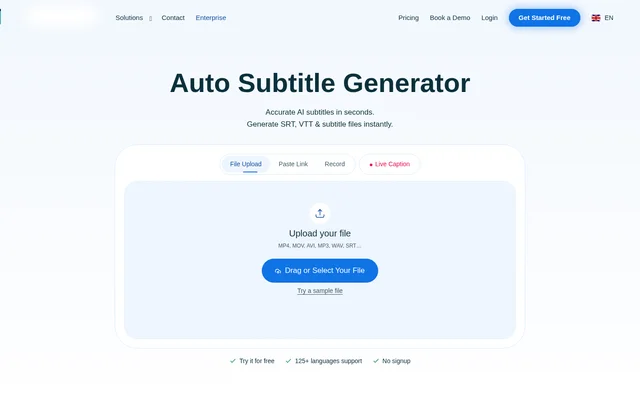
Auto Subtitle Generator accepts a video uploaded from a device or Dropbox, or content supplied through a pasted link. The input interface also lists YouTube, Vimeo, Google Drive, direct media URLs, and microphone recording. Users select the spoken language and, when translation is needed, a target language.
Auto Subtitle Generator then extracts captions for review in the browser-based editor. Users can correct words, refine timestamps, adjust styling, and translate into more languages before sharing with collaborators or exporting subtitle files. The page also describes workflows involving YouTube, OBS, Zoom, Microsoft Teams, TikTok, and Slack.
Who Auto Subtitle Generator is for
Auto Subtitle Generator addresses subtitle tasks for entertainment, marketing, education, and collaborative video production. The page specifically identifies movies, advertisements, social media content, lectures, and online courses as use cases. Live captioning extends those workflows to streams, broadcasts, and shareable online or in-person sessions.
- Auto Subtitle Generator helps movie creators prepare localized subtitles.
- Auto Subtitle Generator captions advertisements and social media content.
- Auto Subtitle Generator adds captions to lectures and online courses.
- Auto Subtitle Generator supports teams sharing generated subtitles with collaborators.
Auto Subtitle Generator pricing and plans
Auto Subtitle Generator offers a free trial that can be started without an account or credit card. The page describes trial access to subtitle generation, editing, translation, and export options, while the preview interface specifies a 1-minute limit and prompts users to sign up to download or export.
Auto Subtitle Generator offers paid plans after the trial for higher usage limits and longer videos. The supplied page does not list subscription prices or detailed plan allowances. Custom enterprise solutions and API support are available for teams looking to scale subtitling, but enterprise pricing is not specified.
Auto Subtitle Generator strengths and limitations
Auto Subtitle Generator combines multilingual generation, translation, synchronization, styling, and format conversion rather than limiting the workflow to transcription. Support for uploaded media, links, recording, and collaboration gives users several ways to prepare subtitles. The main stated access constraints concern trial length, export signup, paid usage expansion, and browser requirements.
- Auto Subtitle Generator limits the trial preview to 1 minute.
- Auto Subtitle Generator requires signup to download or export preview results.
- Auto Subtitle Generator reserves higher usage limits and longer videos for paid plans.
- Auto Subtitle Generator requires a modern browser with JavaScript enabled.
Auto Subtitle Generator FAQ
What is Auto Subtitle Generator?
Auto Subtitle Generator is Maestra’s browser-based AI tool for generating, translating, editing, and exporting subtitles. Auto Subtitle Generator supports 125+ languages and includes subtitle synchronization, visual styling, file conversion, and live captioning for recorded content and spoken audio.
Is Auto Subtitle Generator free?
Auto Subtitle Generator offers a free trial without an account or credit card to start. The preview is limited to 1 minute, and downloading or exporting requires signup. Paid plans provide higher usage limits and support longer videos.
How do you add subtitles with Auto Subtitle Generator?
Auto Subtitle Generator creates subtitles after users upload a video or provide a supported media link and select the spoken language. Users can then correct text, adjust timestamps, change subtitle styling, translate captions, and export files for a video player.
What subtitle formats does Auto Subtitle Generator support?
Auto Subtitle Generator converts subtitle files between SRT, VTT, SCC, STL, CAP, TXT, TTML, and SBV. Auto Subtitle Generator also provides export options for generated subtitles, allowing users to prepare caption files for different video publishing workflows.
Who is Auto Subtitle Generator for?
Auto Subtitle Generator serves video creators, educators, marketers, and teams producing captioned or multilingual content. The page lists movie localization, advertisement captions, social media subtitles, lectures, and online courses, alongside live captioning for broadcasts and sessions.
Does Auto Subtitle Generator have an API or integrations?
Auto Subtitle Generator offers API support and custom enterprise solutions for teams scaling subtitling workflows. The page also describes YouTube subtitle management, OBS live subtitles, Zoom captions, Microsoft Teams recording subtitles, TikTok captions, and sharing generated subtitles in Slack channels.
From the community
No reviews yet
Be the first to review this tool. What you write helps the next person choose.