What is AutoPod?
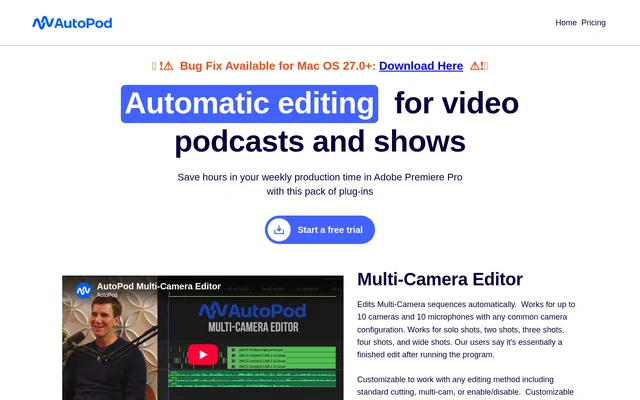
AutoPod is a pack of editing plug-ins for video podcasts and shows that automates multi-camera edits, social clips, and silence-based jump cuts. AutoPod is designed by editors for editors and is presented primarily for Adobe Premiere Pro workflows. The website also provides a separate downloader for DaVinci Resolve.
AutoPod groups these tasks into Multi-Camera Editor, Social Clip Creator, and Jump Cut Editor. Each tool addresses a different production task, from choosing camera shots during a conversation to preparing resized clips for social distribution. The individual subscription includes access to all of these editing tools.
What AutoPod can do
AutoPod combines automatic editing with controls for recurring production preferences. Multi-Camera Editor considers who is speaking, the camera layout, and conventional editing patterns. Social Clip Creator handles sequence creation and formatting, while Jump Cut Editor uses a user-specified decibel cutoff to identify silence and create cuts.
- AutoPod edits sequences with up to 10 cameras and 10 microphones.
- AutoPod supports common layouts with individual, shared, and wide shots.
- AutoPod saves presets and lets editors adjust wide-shot frequency.
- AutoPod creates social clips in 1920x1080, 1080x1350, and 1080x1920 formats.
- AutoPod optionally adds auto-reframe, watermarks, and endpages.
- AutoPod stores clips in a folder for single-click batch export.
- AutoPod creates silence-based jump cuts using a configurable decibel cutoff.
How AutoPod works
AutoPod installation for Adobe Premiere Pro starts by downloading and running the installer. After installation, editors close and reopen Adobe Premiere Pro, open a project rather than remaining on the landing page, and select the desired AutoPod app under Window, then Extensions. Adobe Premiere Pro 2023 or newer is required.
AutoPod Multi-Camera Editor needs multiple cameras and separate, unique audio tracks to make editing decisions. For social clips, editors set an in/out point and select an aspect ratio; AutoPod creates a new sequence and adjusts sequence settings and footage sizes. For jump cuts, editors enter a decibel cutoff suited to their microphones.
Who AutoPod is for
AutoPod serves editors producing video podcasts and shows, particularly productions with multiple speakers, camera angles, and separate audio tracks. AutoPod also addresses social clip workflows through resizing, optional branding elements, and batch export. Saved presets support editors who repeatedly use the same camera arrangements or editing preferences.
- AutoPod automates camera selection for multi-speaker podcast conversations.
- AutoPod creates social clips from selected parts of a sequence.
- AutoPod applies silence-based jump cuts to social footage.
- AutoPod reuses saved settings for recurring editing workflows.
AutoPod pricing and plans
AutoPod offers an individual subscription at $29 per month per license, including Multi-Camera Editor, Social Clip Creator, and Jump Cut Editor. Monthly subscriptions begin with a 30 day free trial. Annual billing includes 1 month free per year. Each license can be used on one computer, and the website provides a process for switching machines.
AutoPod does not offer enterprise pricing, although customers can purchase multiple keys using the same email address. The pricing page provides a monthly free-trial option and an annual purchase option. DaVinci Resolve users purchase a key through the usual portal and obtain the application through the separate DaVinci downloader.
AutoPod strengths and limitations
AutoPod combines several podcast production tasks in one subscription, with configurable cutting methods, saved presets, and social clip formatting. AutoPod supports standard cutting, multi-cam, and enable/disable editing methods. The main constraints concern source footage requirements, supported editing applications, and licensing rather than a stated limit on the number of projects.
- AutoPod Multi-Camera Editor does not support a single audio source or a single speaker.
- AutoPod restricts each license to one computer.
- AutoPod requires Adobe Premiere Pro 2023 or newer for its Premiere workflow.
- AutoPod is unavailable for Final Cut Pro and Avid, with no plans stated to add support.
AutoPod FAQ
What is AutoPod?
AutoPod is a pack of editing plug-ins for video podcasts and shows. AutoPod includes Multi-Camera Editor, Social Clip Creator, and Jump Cut Editor to automate camera edits, social clip formatting, and silence-based cuts.
Is AutoPod free?
AutoPod is paid software at $29 per month per individual license. AutoPod offers a 30 day free trial for monthly billing, and annual billing includes 1 month free per year. The subscription includes all three editing tools.
Does AutoPod work with DaVinci Resolve?
AutoPod is available for DaVinci Resolve through a separate downloader linked on the website. AutoPod users purchase a key through the usual portal before downloading the DaVinci version. AutoPod is not available for Final Cut Pro or Avid.
Can AutoPod edit a podcast with a single audio track?
AutoPod Multi-Camera Editor cannot work with a single audio source because separate audio tracks are required for editing decisions. AutoPod Multi-Camera Editor is designed for multiple cameras and multiple unique audio tracks, and does not support a single speaker.
How do you install AutoPod in Adobe Premiere Pro?
AutoPod is installed by downloading and running the installer, then closing and reopening Adobe Premiere Pro. AutoPod users must open a project and select the desired app under Window, then Extensions. Adobe Premiere Pro 2023 or newer is required.
Can you use an AutoPod license on multiple computers?
AutoPod allows each license to be used on one computer, assigned when the key is first activated. AutoPod provides a switch-computers page for moving to another machine. Multiple keys can be purchased using the same email address.
From the community
No reviews yet
Be the first to review this tool. What you write helps the next person choose.