What is BLUF?
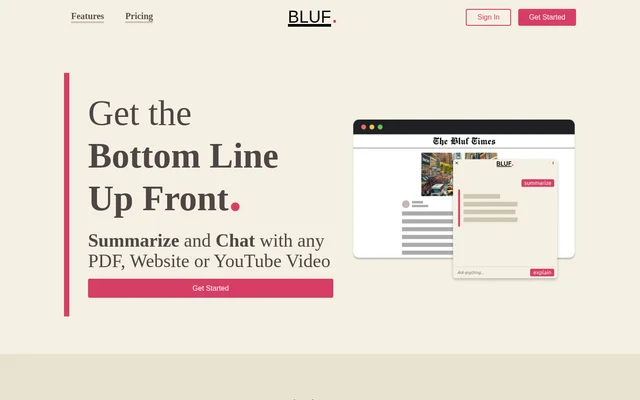
BLUF is an AI-powered browser extension that helps readers extract main points, understand complex material, and ask questions about content. BLUF stands for Bottom Line Up Front and works with websites, PDF documents, YouTube videos, and local files. The website identifies researchers, students, journalists, moderators, social media managers, and busy professionals as intended users.
BLUF combines summaries with explanations rather than treating both tasks as interchangeable. The summary option focuses on key information from material such as long news articles or emails. The explanation option addresses unfamiliar subjects and technical language by presenting concepts in simpler terms, with follow-up questions available for further detail.
What BLUF can do
BLUF provides dedicated controls for summarization and explanation alongside a question-based interface. Readers can request an overview, clarify a concept, or ask about a particular point in the source material. The website describes support across several content formats, allowing these reading tasks to remain within the browser.
- BLUF extracts key highlights from source content.
- BLUF explains complex documents and technical jargon in simpler language.
- BLUF answers follow-up questions about specific points.
- BLUF processes websites, PDFs, YouTube videos, and local files.
- BLUF can focus on a selected portion of a page.
How BLUF works
BLUF starts with the content a reader wants to understand: a website, PDF, or YouTube video. The extension can be activated by right-clicking text, clicking its toolbar icon, or pressing Shift + Alt + B. Readers then choose Summarize or Explain and can ask follow-up questions about the material.
BLUF recommends using its dedicated Summarize and Explain buttons for large content because the prompt system is not optimized for that task. A prompt includes a typed message or a summarize or explain request. Several questions in a single message count as a single prompt, and failed requests do not count toward usage.
Who BLUF is for
BLUF targets people who need to understand source material or identify useful points without reading every passage in full. The website names academic, editorial, community, and workplace audiences. Its examples range from understanding complex papers to extracting ideas for posts and keeping up with emails, reports, and news.
- BLUF helps researchers and students identify concepts in academic papers.
- BLUF helps journalists understand intricate academic texts.
- BLUF helps forum moderators identify points for discussion.
- BLUF helps social media managers extract ideas for posts.
- BLUF helps busy professionals summarize emails, reports, and news articles.
BLUF pricing and plans
BLUF offers Free, Standard, and Professional plans through sign-up and plan-selection links. Free includes 25 prompts per month and 20,000 words per page. Standard is listed at 4 per month with 200 prompts and 50,000 words per page. Professional is listed at 10 per month with unlimited prompts and 200,000 words per page. The page does not specify a currency.
BLUF defines words per page as the maximum number of words processed in a single page or document. Documents that exceed a plan's limit can be narrowed to a selected passage through right-click access. Paid plans raise the document limit, but the Professional plan still has a stated per-page word ceiling.
BLUF strengths and limitations
BLUF combines multiple source formats, separate reading modes, and follow-up questions in a browser extension. Availability information needs qualification: the supported-browser section lists Chrome, Firefox, Edge, and Opera, while the FAQ says BLUF is currently available on Chrome and Firefox. BLUF also states that prompt contents are sent to OpenAI, although BLUF itself collects usage data rather than prompt or answer content.
- BLUF applies monthly prompt allowances to Free and Standard plans.
- BLUF applies document word limits to every listed plan.
- BLUF provides inconsistent availability information for Edge and Opera.
- BLUF sends prompt contents to OpenAI, with retention described as no longer than 30 days.
BLUF FAQ
What is BLUF?
BLUF is an AI-powered browser extension that summarizes, explains, and answers questions about websites, PDF documents, YouTube videos, and local files. BLUF stands for Bottom Line Up Front and provides separate summary and explanation options.
Is BLUF free?
BLUF offers a Free plan with 25 prompts per month and a 20,000-word limit per page. BLUF also offers Standard and Professional paid plans with higher document limits; Professional includes unlimited prompts.
Which browsers does BLUF support?
BLUF confirms Chrome and Firefox availability in its FAQ, while its supported-browser section also lists Edge and Opera. BLUF therefore provides inconsistent information about Edge and Opera availability on the supplied page.
How do you use BLUF to summarize a page?
BLUF can be activated through a right-click on text, its toolbar icon, or Shift + Alt + B after opening the content. BLUF recommends selecting the dedicated Summarize button, especially for large content, and supports follow-up questions.
What counts as a prompt in BLUF?
BLUF counts a typed message, summarize request, or explain request as a prompt. BLUF counts several questions within a single message as a single prompt and does not count requests that fail to complete.
What data does BLUF collect?
BLUF collects usage data but says it does not collect the contents of prompts or answers. BLUF sends prompt contents to OpenAI to complete requests, and the website states that OpenAI retains that data for no longer than 30 days.
From the community
No reviews yet
Be the first to review this tool. What you write helps the next person choose.