What is Boords?
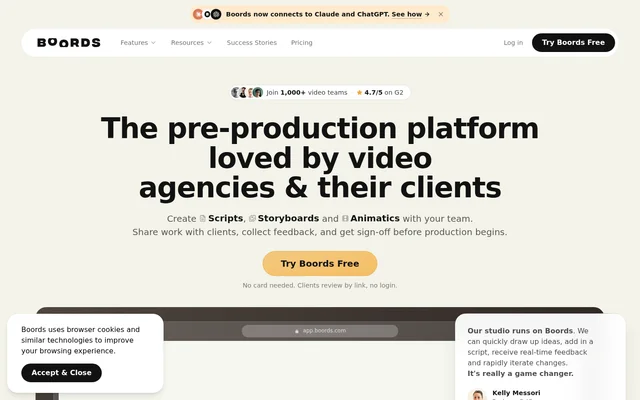
Boords is web-based storyboard and video pre-production software for video agencies, studios and brand teams. Boords combines scripts, storyboard frames, animatics and client review in a shared workflow, helping teams agree on a video before production begins. Clients can review work through a link without creating an account.
Boords was founded by James Chambers, who previously co-founded the London animation studio Animade. The website describes version tracking, scattered client notes and repeated storyboard formatting as the problems behind its creation. Boords keeps comments, storyboard versions and approval records alongside the creative work.
What Boords can do
Boords supports the steps between a script and an approved production plan. Boords combines AI frame generation with reusable visual references, contextual feedback and export options. Teams can develop the visual sequence, adjust details after feedback and prepare a timed animatic without separating review from the storyboard.
- Boords creates scripts and collaborative storyboards.
- Boords generates frames using saved characters, props and locations.
- Boords refines image details while retaining earlier frame revisions.
- Boords collects guest comments on individual frames.
- Boords records versions and storyboard approval statuses.
- Boords creates timed animatics with voiceover.
- Boords exports client documents, videos and editing timelines.
How Boords works
Boords lets teams start from an AV script and turn the script into frames, or develop a storyboard and add timing and voiceover. Saved characters, products and locations live in an asset library. Typing @ in a prompt brings those references into frame generation, while Refine changes a detail and preserves the earlier image as a revision.
Boords shares work through review links where guests comment on the relevant frame. Teams can mark an agreed version Approved and control whether guests see version numbers, storyboard status or other versions. Boords also supports passphrases, presentation mode and exports to Premiere Pro, DaVinci Resolve and After Effects at the approved timing.
Who Boords is for
Boords serves video agencies and brand teams that need to develop ideas with colleagues and obtain client approval before production. The website also features studios producing animated training videos, explainer videos and business-to-business brand and marketing work. Boords connects the producer's version record with a simpler guest review experience.
- Boords supports storyboard planning for animated training videos.
- Boords helps teams develop scripts and frames for explainer videos.
- Boords supports client review of brand and marketing videos.
- Boords lets teams agree on animatic pacing before editing.
- Boords hands approved timelines to video editors.
Boords pricing and plans
Boords offers a Free plan, and the website states that no card is needed to try Boords. Boords includes AI connections and Slack direct messages on every plan, including Free. The supplied structured pricing data lists a range of offers, but the page does not explain individual paid-plan allowances or billing periods.
Boords strengths and workflow fit
Boords brings client comments, versions and approval statuses into the same pre-production workflow rather than leaving feedback in separate email threads. Guest access removes the need for client account setup, while saved visual references support recurring characters and products. Boords also connects to Claude and ChatGPT for drafting scripts and building boards from chat, with Slack notifications for followed work.
Boords FAQ
What is Boords?
Boords is web-based storyboard and video pre-production software for video agencies and brand teams. Boords combines script creation, AI-generated storyboard frames, timed animatics, client comments, version history and approval tracking before production begins.
Is Boords free?
Boords offers a Free plan, and the website states that no card is needed to try Boords. Boords includes AI connections and Slack direct-message notifications on every plan, including Free. The supplied page does not detail individual paid-plan allowances.
Can clients review Boords storyboards without an account?
Boords lets clients open a shared review link without logging in and comment on individual frames. Boords also provides passphrase protection and controls for guest visibility, version switching and storyboard status, while teams keep versions and approvals on record.
How does Boords keep characters consistent across storyboard frames?
Boords stores characters, products and locations in an asset library so teams can reuse those references in different frames. Boords lets users type @ in a prompt to reference saved assets and use Refine to change a detail while retaining the earlier image as a frame revision.
What formats can Boords export?
Boords exports PDF and Slides for client presentations, MP4 animatics and timelines for After Effects, Premiere Pro and DaVinci Resolve. Boords also lists image, script and Google Sheets exports, supporting handoff from storyboard review to presentation and editing workflows.
Does Boords connect to ChatGPT, Claude or Slack?
Boords connects to Claude and ChatGPT so users can draft scripts and build boards from chat. Boords sends mentions, replies and comments from followed boards and scripts through Slack direct messages. These AI connections and Slack DMs are included on every plan, including Free.
From the community
No reviews yet
Be the first to review this tool. What you write helps the next person choose.