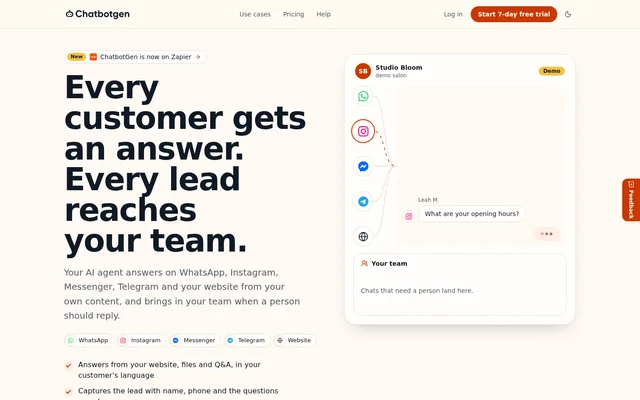
What is ChatbotGen?
ChatbotGen is a no-code AI chatbot builder for businesses that handle customer questions and sales enquiries. ChatbotGen uses supplied website pages, files and Q&A to answer customers through WhatsApp, Instagram, Messenger, Telegram and a website widget. The same agent knowledge and lead questions can serve customers across these channels.
ChatbotGen combines automated responses with a shared team inbox rather than treating every conversation as fully automated. Customers can ask for a person, and the agent can transfer conversations when a customer is ready to buy. The website presents use cases for real estate, clinics, salons, home services, gyms, coaches and agencies.
What ChatbotGen can do
ChatbotGen handles recurring questions, gathers lead details and routes conversations to a team when human input is needed. Businesses choose the questions used to qualify enquiries and decide what happens when the agent lacks an answer. Available responses include asking for contact information or passing the conversation to the team.
- ChatbotGen answers from website pages, uploaded files and Q&A in the customer's language.
- ChatbotGen collects names, phone numbers, email addresses and custom lead details.
- ChatbotGen saves leads in the inbox and supports CSV export.
- ChatbotGen supports assignments, notes, tags and quick replies in the team inbox.
- ChatbotGen sends leads through Zapier and signed webhooks.
- ChatbotGen collects appointment requests for team confirmation.
- ChatbotGen searches catalogs supplied through CSV, Google Sheets or Wasi.
How ChatbotGen works
ChatbotGen connects business content to customer-facing channels through channel-specific setup. WhatsApp uses the official WhatsApp Business Platform with guided dashboard setup and a test number. Instagram requires a professional account, Messenger connects to a Facebook Page, and Telegram setup uses a bot token. Website deployment uses a line of code or the supplied website-builder guides.
ChatbotGen sends conversations from supported channels into the same team inbox. Human handoffs trigger email and browser notifications, and teams can pause the AI in a chat. ChatbotGen also connects to ChatGPT, Claude or another MCP-compatible assistant to review missed questions, diagnose knowledge gaps, apply confirmed Q&A updates and test the resulting answers.
Who ChatbotGen is for
ChatbotGen is aimed at teams that repeatedly answer business questions and need useful contact details before following up. The website demonstrates service businesses and property enquiries, including questions about prices, opening hours, service areas and listing availability. ChatbotGen can collect the information needed for a callback while leaving confirmations and sales conversations to staff.
- Customer service teams can answer recurring questions and escalate requests for a person.
- Clinics and salons can collect requested dates, times and services.
- Home service businesses can ask about service needs and customer areas.
- Real estate teams can search listings and collect viewing requests.
- Sales teams can collect budget, timing and other qualification details.
ChatbotGen pricing and plans
ChatbotGen offers monthly plans in US dollars. Starter costs $29 per month for 3 agents and 2,000 monthly messages. Growth costs $79 per month for 10 agents and 10,000 monthly messages, adding appointment and viewing requests and catalog search. Business costs $199 per month for 50 agents and 30,000 monthly messages, with priority support.
ChatbotGen offers a 7-day Starter trial that requires a card; cancellation before day 7 avoids payment. Starter includes the supported messaging channels, lead capture, handoff, the team inbox, Zapier and webhooks. ChatbotGen charges no fee per resolved chat and adds no per-message fee of its own, although Meta may charge the WhatsApp Business account separately.
ChatbotGen strengths and limitations
ChatbotGen brings shared business knowledge, lead collection and human follow-up into a common inbox across supported channels. Unlimited team members, conversation assignments and notifications support collaborative handling. The ability to configure unanswered-question behaviour and review knowledge gaps through an MCP-compatible assistant gives teams ways to maintain answers and route exceptions.
- ChatbotGen does not connect appointment requests to a calendar, so the team must confirm them.
- ChatbotGen limits agents and monthly messages according to the selected plan.
- ChatbotGen's dashboard is available in English and Spanish.
- ChatbotGen's WhatsApp connection remains subject to Meta's terms, messaging charges and number eligibility.
ChatbotGen FAQ
What is ChatbotGen?
ChatbotGen is a no-code AI chatbot builder that answers customer questions using website pages, files and Q&A. ChatbotGen deploys agents to WhatsApp, Instagram, Messenger, Telegram and websites, with lead capture and a shared inbox for human follow-up.
Is ChatbotGen free?
ChatbotGen offers a 7-day Starter trial requiring a card, followed by paid monthly plans. Starter costs $29 per month, Growth costs $79 per month and Business costs $199 per month. Cancellation before day 7 avoids payment, and Meta may charge separately for WhatsApp messaging.
Can ChatbotGen hand conversations to a human?
ChatbotGen hands conversations to the team inbox when a customer requests a person or is ready to buy. ChatbotGen pauses the AI and alerts the team by email and browser notification. Team members can assign conversations, add notes and reply.
Can ChatbotGen book appointments?
ChatbotGen collects appointment requests with details such as date, time and service, but the team must confirm them. ChatbotGen does not connect to a calendar. Appointment and viewing requests are included in the Growth plan and carried into the Business plan.
Does ChatbotGen integrate with Zapier and other tools?
ChatbotGen integrates with Zapier to send leads, appointment requests and handoffs to Google Sheets, HubSpot, Slack and other supported apps. ChatbotGen also offers signed webhooks for Make, n8n or a server, and connects to ChatGPT, Claude or other MCP-compatible assistants for knowledge review and updates.
Which languages does ChatbotGen support?
ChatbotGen replies in the language the customer writes in, including when the supplied business content is in English. ChatbotGen's dashboard is available in English and Spanish. The source does not provide an exhaustive list of supported customer conversation languages.
From the community
No reviews yet
Be the first to review this tool. What you write helps the next person choose.