What is ChatCamel?
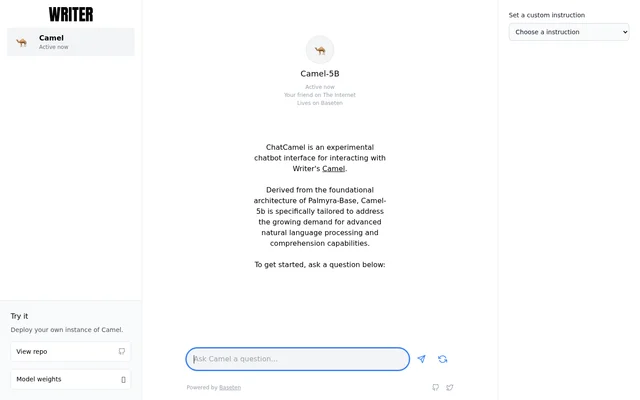
ChatCamel is an experimental chatbot interface for interacting with Writer's Camel model. The page identifies the model as Camel-5B and traces its architecture to Palmyra-Base. The distinction is that ChatCamel is the interface visitors use to ask questions, while Camel is the model they interact with. The chat is powered by Baseten.
What ChatCamel can do
ChatCamel lets visitors set their own instruction or pick one from the instruction menu. The menu includes roles for editing text, practicing a language, working through a lesson, and exploring programming topics. The names describe how the chat can be prompted, not separate applications.
- ChatCamel accepts a custom instruction for the conversation.
- ChatCamel includes a Proofreader preset for writing feedback.
- ChatCamel offers an English Translator and Improver preset.
- ChatCamel lists a Math Teacher preset for educational prompts.
- ChatCamel includes a Commit Message Generator preset.
How ChatCamel works
ChatCamel presents a question area and controls for setting or choosing an instruction. A visitor can use a named role when it fits the task or write a custom instruction when the menu does not have the role they want. The page identifies Baseten as the service powering the chat.
ChatCamel also presents an option to deploy a separate Camel instance. A repository link and a model weights link sit alongside that option. These are distinct from the on-page chat: the chat is where visitors can ask questions, while the links offer a way to explore the project and model files.
Who ChatCamel is for
ChatCamel is suited to people who want to explore how an instruction changes a chatbot conversation. Writers can try tutoring or editing roles, language learners can choose teaching or pronunciation roles, and people exploring code-related prompts can select options such as JavaScript Console or Regex Generator.
- Use the AI Writing Tutor preset to ask for help with a draft.
- Try English Pronunciation Helper for a pronunciation question.
- Use the Fill in the Blank Worksheets Generator preset to prompt for practice material.
- Try the Regex Generator preset for a regular expression question.
ChatCamel strengths and limitations
ChatCamel combines a menu of ready-made instructions with the option to write an instruction from scratch. That gives visitors a starting point for unfamiliar tasks without restricting them to the listed roles. The repository and model weights links also give visitors who are interested in the model a place to look beyond the chat interface.
- ChatCamel is presented as an experimental interface.
- The page lists console and interpreter roles as instructions rather than documenting actual code execution.
Getting started with ChatCamel
ChatCamel invites visitors to start by asking a question on the product page. For a task such as proofreading, the matching preset provides a starting instruction. For a task that does not fit a listed role, the custom instruction field is the alternative. The repository and model weights links are available separately for visitors interested in deploying an instance.
ChatCamel FAQ
What is ChatCamel?
ChatCamel is an experimental chatbot interface for interacting with Writer's Camel model. The page identifies the model as Camel-5B, describes it as derived from Palmyra-Base, and states that Baseten powers the chat.
What can you use ChatCamel for?
ChatCamel can be used to ask questions and try preset instructions for writing, language practice, learning, and technical topics. The menu includes roles such as Proofreader, Spoken English Teacher and Improver, Math Teacher, and Regex Generator.
Can you set your own instructions in ChatCamel?
ChatCamel lets visitors set a custom instruction for the conversation. Visitors who prefer a ready-made instruction can choose from the menu, which includes options such as AI Writing Tutor, Storyteller, and English Translator and Improver.
Can you deploy your own Camel instance from ChatCamel?
ChatCamel presents an option to deploy a separate instance of Camel and links to the repository and model weights. Visitors can also try Camel directly through the chat interface on the product page.
Where can you try ChatCamel?
ChatCamel can be tried on its product page, where visitors are invited to ask a question. The chat is powered by Baseten and offers both a custom instruction field and a menu of preset instructions.
From the community
No reviews yet
Be the first to review this tool. What you write helps the next person choose.