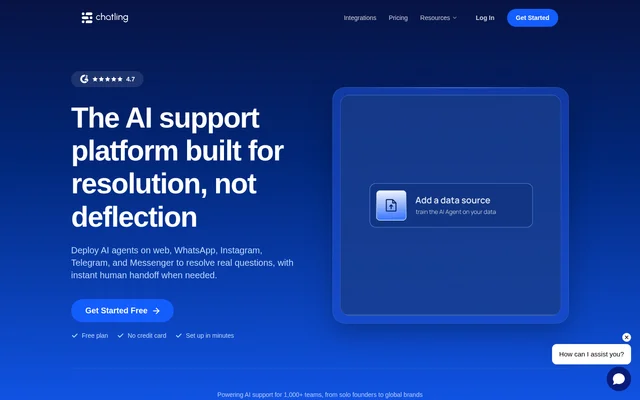
What is Chatling?
Chatling is an AI customer support tool for creating agents and chatbots that answer questions using knowledge base content. Chatling combines AI conversations with live chat features for support teams, including reusable replies, human handoffs, and assistance with drafting responses. The plans address support needs ranging from an initial AI agent to higher-volume operations.
Chatling offers controls for knowledge base capacity, team access, chatbot appearance, and automation. The page describes support for AI models from OpenAI, Anthropic, Google, Mistral, xAI, Deepseek, and Z.ai on paid plans. A customer testimonial also describes using Chatling to answer international customers in German and Italian.
What Chatling can do
Chatling combines customer-facing chatbot capabilities with tools for support staff. Available features cover answering questions, executing actions during conversations, automating follow-up work, and measuring chatbot activity. Feature access and usage allowances vary by plan, including the frequency of knowledge base synchronization and the availability of routing and customer feedback tools.
- Chatling uses knowledge base content to support AI customer conversations.
- Chatling executes actions while an AI agent converses with customers.
- Chatling triggers workflows from conversation, contact, action, or other events.
- Chatling transcribes voice messages into text.
- Chatling reports new conversations, contacts, peak chat times, and top countries.
- Chatling collects feedback through surveys displayed after chats.
- Chatling provides a copilot for drafting replies, summarizing chats, and finding knowledge base answers.
How Chatling works
Chatling provides a visual builder with blocks for sending messages, capturing responses, applying AI conditions, and running actions. Knowledge base sources can be resynchronized to fetch updated information, with scheduled synchronization available on paid plans. Chatbot appearance settings let teams align the interface with their branding, although the free plan limits customization.
Chatling lists web, WhatsApp, Instagram, Messenger, Telegram, and API channels. Chatling also lists integrations with Google Sheets, Cal.com, Zapier, Zendesk, Zoho, Hubspot, Slack, and Airtable. Chatbots can be shared through links and protected with passwords. Custom domains are offered as an add-on, and the page describes their use for widgets and sharing links.
Who Chatling is for
Chatling serves businesses and customer support teams that want AI agents alongside human conversation handling. Starter is positioned for more conversations, customization, and team participation; Growth adds collaboration and routing capabilities; Scale targets high-volume support. The available copilot, analytics, and survey features address different parts of the support workflow.
- Chatling helps support teams answer questions from knowledge base material.
- Chatling helps teams distribute handed-off conversations through round robin routing.
- Chatling helps support agents prepare replies and review conversation summaries.
- Chatling helps businesses automate multi-step work triggered by customer interactions.
Chatling pricing and plans
Chatling offers Free, Starter, Growth, and Scale plans. Free costs $0 per month and includes 200 AI credits, 1 AI agent, 1 seat, and 500,000 knowledge base characters. Monthly pricing is $25 for Starter, $75 for Growth, and $295 for Scale. Annual billing is also available.
Chatling sells add-ons for extra AI credits, knowledge base characters, agents, seats, branding removal, and custom domains. AI credit consumption depends on the model used. Higher plans increase capacity and automation allowances: Growth adds daily knowledge base synchronization and round robin routing, while Scale includes unlimited workflows and removal of the widget branding.
Chatling strengths and limitations
Chatling brings knowledge-based AI responses, automated actions, and human support tools into a single product offering. The free plan provides an entry point, while paid plans expand team capacity and feature access. The main constraints are plan-specific allowances and credit consumption that changes with the selected AI model.
- Chatling limits free-plan knowledge base file uploads to 1 MB per file.
- Chatling reserves API access and voice input for paid plans.
- Chatling offers limited chatbot customization on the free plan.
- Chatling includes branding removal in Scale and lists a separate paid branding-removal add-on.
Chatling FAQ
What is Chatling?
Chatling is an AI customer support tool for creating agents and chatbots that use knowledge base content. Chatling also provides live chat, automated workflows, conversational actions, analytics, and tools for handing conversations to human support staff.
Is Chatling free?
Chatling offers a free plan at $0 per month with 200 AI credits, 1 AI agent, 1 seat, and 500,000 knowledge base characters. Chatling also offers paid Starter, Growth, and Scale plans with higher allowances and additional features.
How much does Chatling cost?
Chatling charges $25 per month for Starter, $75 per month for Growth, and $295 per month for Scale on monthly billing. Chatling also offers annual billing, a free plan, and paid add-ons for additional capacity and branding options.
Does Chatling have an API or integrations?
Chatling offers API access on paid plans and lists integrations with Google Sheets, Cal.com, Zapier, Zendesk, Zoho, Hubspot, Slack, and Airtable. Chatling also lists web, WhatsApp, Instagram, Messenger, and Telegram among the available channels.
Can Chatling hand conversations to human agents?
Chatling supports human handoffs and conversation routing, with round robin routing included in Growth and Scale. Chatling also lists AI-generated handoff summaries that give support staff context before joining a conversation.
How do Chatling AI credits work?
Chatling uses AI credits whose consumption varies according to the selected AI model. Chatling includes a credit allowance with each plan and offers extra AI credits as a paid add-on, so usage capacity depends on both the plan and model choice.
From the community
No reviews yet
Be the first to review this tool. What you write helps the next person choose.