What is Claude HUD?
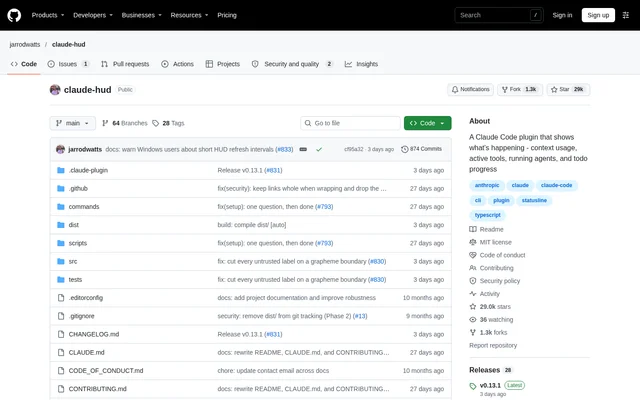
Claude HUD is an open-source status line plugin for Claude Code that keeps session information visible below the input area. Claude HUD serves developers who want to follow context consumption, subscriber limits, and coding activity while staying in the terminal. The project is published on GitHub under the MIT license.
Claude HUD combines session details with optional activity displays. The default view shows the model, project path, git branch, context usage, and subscriber rate limits. Additional lines can show active tools, running agents, and todo progress, allowing users to select which parts of the session appear.
What Claude HUD can do
Claude HUD displays information supplied by Claude Code and offers configurable views of session activity, repository state, and usage. The configuration includes visual context and usage bars, alternative context formats, optional cost reporting, and controls for arranging display elements. Activity lines are optional rather than part of the default display.
- Claude HUD shows context usage as percentages, tokens, remaining capacity, or combined values.
- Claude HUD displays subscriber usage limits when available.
- Claude HUD shows active tools, running agents, and todo progress.
- Claude HUD displays git branches, uncommitted changes, and optional repository details.
- Claude HUD supports optional Jujutsu status instead of git for eligible repositories.
- Claude HUD can display session cost, daily spending, session duration, and output speed.
How Claude HUD works
Claude HUD runs as a status line command that Claude Code invokes with session data on standard input. Claude Code supplies information such as the model, context window, cost, rate limits, and prompt cache, then displays the command's output. Optional tool, agent, and todo elements also read the session transcript.
Claude HUD installs through the Claude Code plugin marketplace, either within a session or from the terminal. After installation, users reload plugins and run /claude-hud:setup to connect the status line. Claude Code reloads settings automatically, so the HUD appears without a separate window or tmux.
Who Claude HUD is for
Claude HUD is for developers who use Claude Code and want session details alongside their coding workflow. Claude HUD supports monitoring resource consumption, following delegated agent work, and checking repository context. Configurable activity lines and layout settings let users choose between a compact display and a more detailed view.
- Claude HUD helps developers track context consumption during coding sessions.
- Claude HUD helps subscribers check usage limits and reset timing.
- Claude HUD helps users follow tool activity, agent tasks, and todo completion.
- Claude HUD helps developers view branch and working-copy information without leaving the input area.
Claude HUD licensing and access
Claude HUD is distributed as an open-source project under the MIT license, with installation instructions in the GitHub repository. Claude HUD is obtained through the Claude Code plugin marketplace rather than a separate hosted account. The repository documents installation, configuration, and updates but does not list commercial subscription plans or plugin prices.
Claude HUD strengths and limitations
Claude HUD combines session visibility with terminal compatibility and configurable presentation. The guided configuration flow previews changes before saving and preserves settings outside the questions asked. Labels are available in English, Simplified Chinese, and Traditional Chinese. Claude HUD also supports direct configuration files for settings beyond the guided flow.
- Claude HUD depends on Claude Code for session data and status line rendering.
- Claude HUD reads the session transcript for optional tool, agent, and todo displays.
- Claude HUD requires enabling plugin auto-updates or performing updates manually.
Claude HUD FAQ
What is Claude HUD?
Claude HUD is an open-source Claude Code plugin that displays session information below the input area. Claude HUD shows context usage, subscriber rate limits, model and project details, with optional lines for tools, running agents, and todo progress.
How do you install Claude HUD?
Claude HUD installs through the Claude Code plugin marketplace. Users add jarrodwatts/claude-hud as a marketplace, install claude-hud, run /reload-plugins, and then run /claude-hud:setup inside a Claude Code session to connect the status line.
Does Claude HUD require tmux or a separate window?
Claude HUD requires neither tmux nor a separate window and works in any terminal. Claude HUD runs as a status line command, receiving session data from Claude Code and returning the output shown below the input.
How do you customize Claude HUD?
Claude HUD provides /claude-hud:configure for guided customization of layout, activity lines, session information, usage, git, language, and a custom line. Claude HUD previews changes before saving, preserves settings outside that flow, and supports additional options through configuration files.
Does Claude HUD update automatically?
Claude HUD does not automatically receive third-party plugin updates under Claude Code's default settings. Claude HUD users can enable auto-update through the plugin marketplace settings or run the documented terminal update commands, then reload plugins in open sessions.
From the community
No reviews yet
Be the first to review this tool. What you write helps the next person choose.