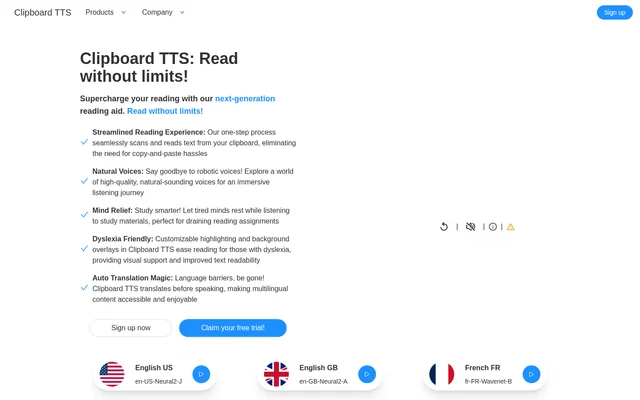
What is Clipboard TTS?
Clipboard TTS is a clipboard-based text-to-speech reading aid for Windows and Linux. Clipboard TTS detects changes in copied content and reads the text aloud, with additional tools for translation, vocabulary support and visual readability. The intended uses include listening to study materials, reading unfamiliar languages and supporting people with dyslexia or other reading difficulties.
Clipboard TTS combines spoken output with an on-screen reading experience. Word and sentence highlighting help readers follow the spoken text, while font settings and coloured overlays change how the text appears. Copied images can also supply text for speech, extending the reading workflow beyond text copied directly from a document.
What Clipboard TTS can do
Clipboard TTS provides automatic speech alongside tools that modify copied content before playback. Language detection, translation, dictionary definitions and substitutions can change what is spoken. Experimental AI Assist accepts a custom prompt to transform or generate text, with paragraph summarization given as an example.
- Clipboard TTS reads clipboard changes aloud automatically.
- Clipboard TTS detects text in copied images and converts the text to speech.
- Clipboard TTS translates copied text into the language of the selected voice.
- Clipboard TTS reads definitions of copied words aloud.
- Clipboard TTS adjusts speech speed, pitch and volume.
- Clipboard TTS stores copied text for retrieval and replay.
- Clipboard TTS customizes fonts, highlighting and background overlays.
- Clipboard TTS transforms copied text with experimental AI Assist.
How Clipboard TTS works
Clipboard TTS scans the clipboard for changes, so copying text starts the automatic reading workflow. Users choose a voice and language, and automatic translation can translate detected text into that voice's language before speech. Users can also drag text files or images onto Clipboard TTS for conversion to speech.
Clipboard TTS lets users replace words or characters through substitutions before playback. Custom Mutations Order controls the sequence of active transformations, including translation, substitutions, dictionary lookup and AI Assist. Reading settings include font type, letter spacing and size, while BoldCue makes the first half of each word bold.
Who Clipboard TTS is for
Clipboard TTS serves readers who want spoken content alongside configurable visual support. Students can listen to reading assignments, language learners can hear translated text and word definitions, and people with dyslexia can use overlays, highlighting and the OpenDyslexic font. These capabilities support different ways of following and reviewing copied material.
- Clipboard TTS lets students listen to study materials.
- Clipboard TTS helps language learners hear translated content.
- Clipboard TTS supplies spoken definitions for unfamiliar vocabulary.
- Clipboard TTS provides visual reading adjustments for people with dyslexia.
Clipboard TTS pricing and plans
Clipboard TTS offers Standard at £4.49/month and Ultimate at £14.99/month, with a 7-day free trial for each plan. Standard includes a monthly allowance of 300,000 characters and 10 substitutions. Ultimate includes 750,000 characters and 50 substitutions, along with everything included in Standard.
Clipboard TTS Standard includes AI Assist, automatic dictionary lookup, translation, image-to-text conversion, history and standard voices. Ultimate adds Neural2 voices, Wavenet voices, custom audio profiles, custom highlight colours and custom overlay colours. The pricing page also presents monthly and yearly billing options and advertises a yearly discount without specifying the yearly amount.
Clipboard TTS strengths and limitations
Clipboard TTS brings clipboard reading, image text recognition, translation and visual accessibility settings into the same reading workflow. Support for 49 languages and adjustable playback settings gives users choices in how content is heard. The main constraints are subscription allowances, differences between plan features, listed platform support and the experimental status of AI Assist.
- Clipboard TTS lists support for Windows and Linux.
- Clipboard TTS limits monthly character usage according to the subscription.
- Clipboard TTS limits the number of substitutions by plan.
- Clipboard TTS includes Neural2 and Wavenet voices only with Ultimate.
- Clipboard TTS labels AI Assist as experimental.
Clipboard TTS FAQ
What is Clipboard TTS?
Clipboard TTS is a text-to-speech reading aid that detects clipboard changes and reads copied content aloud. Clipboard TTS also supports text recognition in images, automatic translation, spoken definitions and visual reading adjustments for students, language learners and people with reading difficulties.
Is Clipboard TTS free?
Clipboard TTS offers a 7-day free trial for paid Standard and Ultimate subscriptions. Standard costs £4.49/month and includes 300,000 monthly characters, while Ultimate costs £14.99/month and includes 750,000 monthly characters plus additional voice and customization options.
Can Clipboard TTS read multiple languages?
Clipboard TTS supports 49 languages and lets users choose a language and voice for playback. Clipboard TTS can automatically detect the language of copied text and translate the content into the language of the selected voice before speaking.
Does Clipboard TTS help people with dyslexia?
Clipboard TTS includes reading adjustments intended for people with dyslexia, including the OpenDyslexic font, coloured background overlays, and word and sentence highlighting. Clipboard TTS also lets users change font type, letter spacing and size to personalize text presentation.
Which operating systems does Clipboard TTS support?
Clipboard TTS lists Windows and Linux as supported platforms. Clipboard TTS reads copied text and images through a clipboard-based workflow and also accepts text files or images through drag and drop for conversion to speech.
What does Clipboard TTS AI Assist do?
Clipboard TTS includes experimental AI Assist, which uses OpenAI's GPT-3 to transform copied text based on a custom prompt. Clipboard TTS gives generating a paragraph summary as an example and allows users to control AI Assist's order alongside other text transformations.
From the community
No reviews yet
Be the first to review this tool. What you write helps the next person choose.