What is Cmd J?
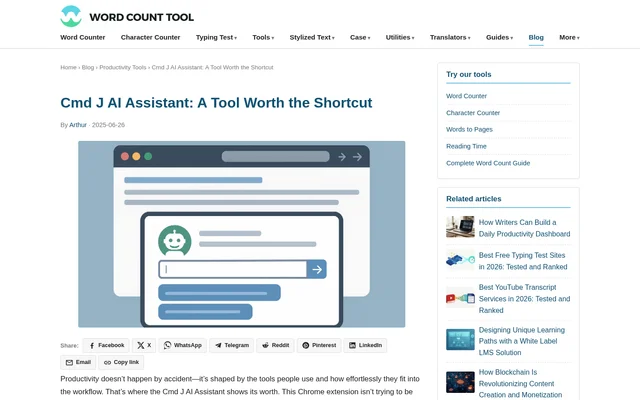
Cmd J is a browser-based AI assistant delivered as a Chrome extension and powered by ChatGPT. Cmd J helps writers, developers, and researchers produce text, understand code, and obtain answers through a compact popup. The assistant accepts natural-language prompts, making the same interface usable for editing an email, explaining a function, or condensing an article.
Cmd J centers on assistance inside the active browser tab rather than a separate workspace. The source describes no dashboard to manage and no need to open another window. This approach keeps writing, coding questions, and research assistance close to the browser task already underway.
What Cmd J can do
Cmd J responds to task-specific prompts across writing, programming, and information gathering. The stated capabilities range from generating first drafts to explaining existing material. Cmd J can adapt responses to requests such as summarizing a blog post or debugging a JavaScript loop rather than following a fixed script or template.
- Cmd J suggests grammar, tone, and clarity improvements.
- Cmd J drafts articles, emails, captions, and product descriptions.
- Cmd J explains code and suggests cleaner syntax.
- Cmd J points out likely errors to assist debugging.
- Cmd J generates boilerplate for functions or components.
- Cmd J summarizes content and provides direct answers to questions.
How Cmd J works
Cmd J opens through Cmd + J on macOS or Alt + J on Windows. The shortcut displays a compact popup inside Chrome, where the user types a prompt and presses enter to receive a response. Users can ask for content suggestions, explanations, or summaries without moving to an external chat application.
Cmd J also supports code pasted directly into the prompt box, with the source giving a broken Python snippet as an example. Browser contexts mentioned include Medium, GitHub, and a site's CMS. These examples describe where the browser assistant can be used, rather than separate dedicated integrations.
Who Cmd J is for
Cmd J serves people whose work combines writing, editing, coding, and reading in the browser. Writers can request drafts or alternate wording; developers can investigate code behavior and likely errors; researchers and knowledge workers can request concise explanations. The source also describes practical communication tasks, including revising customer support replies.
- Writers can turn a long blog draft into social media posts.
- Developers can request explanations and debugging help for pasted code.
- Researchers can summarize technical articles in plain English.
- Content creators can draft newsletters and product description variations.
Cmd J pricing and plans
Cmd J offers both free and paid access. The free tier includes fewer prompts and slower speeds, while the premium plan removes those caps and provides priority processing. The source positions the free version for casual use and the paid version for more frequent content creation, development, or research. No subscription price is stated.
Cmd J strengths and limitations
Cmd J combines several common assistance tasks in a keyboard-accessible browser interface. The main practical strengths are staying within the active tab and using the same prompt box for writing, code, and summaries. Cmd J remains focused on immediate responses rather than organizing documents or maintaining a history archive, which limits its role as a broader workspace.
- Cmd J limits prompt access and speed on the free tier.
- Cmd J does not provide a document manager.
- Cmd J does not provide a history archive.
- Cmd J is presented as a Chrome extension rather than a standalone application.
Cmd J FAQ
What is Cmd J?
Cmd J is a ChatGPT-powered Chrome extension that provides writing suggestions, code explanations, summaries, and direct answers through a keyboard-triggered popup. Cmd J works inside the browser so users can request assistance without opening a separate chat window.
Is Cmd J free?
Cmd J offers a free tier alongside a paid premium plan. The free tier has fewer prompts and slower speeds, while the premium plan removes those caps and provides priority processing. The source does not state subscription prices.
How do you open Cmd J?
Cmd J opens with Cmd + J on macOS or Alt + J on Windows. The shortcut displays a compact Chrome popup where users type a natural-language prompt, press enter, and receive a response within the active tab.
Can Cmd J help with coding?
Cmd J can explain code, suggest cleaner syntax, point out likely errors, and generate boilerplate for functions or components. Users can paste code into the prompt box and request help, including debugging assistance for Python or JavaScript.
Who is Cmd J for?
Cmd J is for writers, content creators, developers, researchers, and knowledge workers who need browser-based assistance. Supported uses include drafting emails, improving customer support replies, summarizing technical articles, creating social media posts, and understanding code.
Does Cmd J save documents or conversation history?
Cmd J does not include a document manager or history archive, according to the source. Cmd J focuses on responding to prompts within the active browser tab so users can read, edit, and continue their work.
From the community
No reviews yet
Be the first to review this tool. What you write helps the next person choose.