What is ColorMagic?
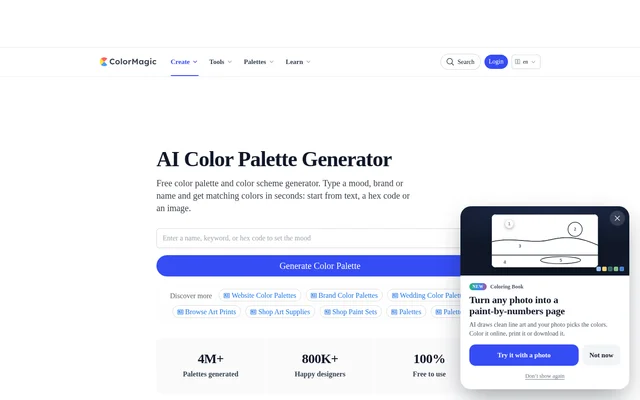
ColorMagic is a free AI color palette generator that turns descriptions, names, hex codes and images into matching color schemes. ColorMagic serves designers, artists, creative professionals and non-designers choosing colors for projects. The website combines palette generation with tools for extracting image colors, mixing colors and creating CSS gradients.
ColorMagic accepts descriptions of moods, settings, brands, audiences and materials rather than requiring users to begin with specific colors. The website also offers themed palette collections, including pastel, neutral, luxury, minimalist and Japanese palettes, alongside color theory guides that explain complementary, analogous and triadic schemes.
What ColorMagic can do
ColorMagic supports several ways to create and reuse color combinations. Users can begin with written ideas, an existing color or an uploaded image, then copy or download the result. Additional tools cover random color discovery, manual color blending and gradient backgrounds with ready-to-use CSS code.
- ColorMagic generates palettes from keywords, brand names, themes and descriptions.
- ColorMagic builds color schemes around a supplied hex code or color name.
- ColorMagic extracts color palettes from uploaded images or photos.
- ColorMagic generates random colors for exploration.
- ColorMagic mixes colors with adjustable ratios and real-time results.
- ColorMagic creates CSS code for gradient effects.
- ColorMagic supports copying HEX codes, downloading PNG palettes and sharing links.
How ColorMagic works
ColorMagic starts with a name, text description, HEX code or brand name entered into the generator. Users select Generate Color Palette to produce a scheme. For image-based palettes, users upload an image to the dedicated image tool. Generated results can be copied as colors, CSS or gradient effects, or downloaded as PNG files.
ColorMagic recommends describing a feeling together with a setting, explaining a brand and its audience, or naming materials with recognizable color relationships. Short descriptions give clearer direction than long descriptions that pull the palette toward different ideas. Repeating the same description produces a different arrangement, while including a hex code builds the scheme around an existing color.
Who ColorMagic is for
ColorMagic addresses designers and other people who need color combinations without starting from a finished palette. The website describes uses for products, characters and social media imagery, as well as brand-oriented prompts. ColorMagic also provides themed collections for users looking for visual references rather than beginning with their own description.
- Designers can generate product palettes from product names, themes or keywords.
- Artists can create character palettes from names, themes or descriptions.
- Brand projects can use prompts describing the intended audience and impression.
- Instagram users can extract a palette from a screenshot of their feed.
- Users creating backgrounds can generate CSS gradient effects.
ColorMagic pricing and access
ColorMagic is free to use, and the website states that users can generate unlimited color palettes. Generating, viewing and copying a palette does not require an account. ColorMagic requires login for saving favorite palettes with the heart button, separating that saved collection feature from the account-free generation workflow.
ColorMagic strengths and limitations
ColorMagic combines several input methods with practical output options: text and image generation sit alongside HEX copying, CSS gradients, PNG downloads and link sharing. Free unlimited generation and account-free viewing and copying make the core workflow accessible without registration. The website also explains how prompt wording affects the direction of generated palettes.
- ColorMagic requires login to save favorite palettes.
- ColorMagic warns that long descriptions can pull a palette in several directions.
ColorMagic FAQ
What is ColorMagic?
ColorMagic is a free AI color palette generator that creates matching color schemes from text, names, brand themes, hex codes or images. ColorMagic also includes tools for random colors, color mixing and CSS gradients, along with themed palette collections and color theory guides.
Is ColorMagic free to use?
ColorMagic is free to use and offers unlimited palette generation. ColorMagic does not require an account to generate, view or copy a palette. Saving favorite palettes with the heart button requires login.
Can ColorMagic generate a color palette from an image?
ColorMagic can extract a color palette from an uploaded image or photo using its AI image palette tool. ColorMagic also suggests uploading a screenshot of an Instagram feed to identify the feed's color palette.
Can ColorMagic build a palette around a hex code?
ColorMagic can generate a full color scheme around a hex code or color name entered into the generator. ColorMagic also allows users to include an existing hex code within a description to build the remaining palette around that color.
How can you export a ColorMagic palette?
ColorMagic supports copying HEX codes, CSS and gradient effects, downloading a palette as a PNG image, and sharing a link to the palette. ColorMagic does not require an account to generate, view or copy palettes.
Who is ColorMagic for?
ColorMagic is for designers, artists, creative professionals and non-designers choosing colors for projects. ColorMagic supports use cases such as generating product color schemes, developing character palettes, exploring brand colors and extracting colors from photos or social media screenshots.
From the community
No reviews yet
Be the first to review this tool. What you write helps the next person choose.