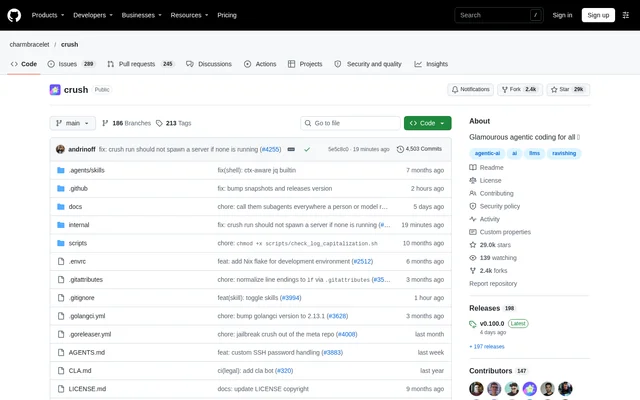
What is Crush?
Crush is an open-source AI coding agent that runs in a terminal and connects a developer’s tools, code and workflows to a chosen language model. Crush comes from Charm and supports multiple model providers rather than requiring a single service. The project combines session-based coding assistance with language server context and optional MCP extensions.
Crush targets terminal-based development across macOS, Linux, Windows, Android, FreeBSD, OpenBSD and NetBSD. Windows support includes PowerShell and WSL. Developers can choose hosted providers or configure local models, making model selection part of the workflow rather than a fixed dependency on the official provider.
What Crush can do
Crush combines model selection, project context and extensibility in a terminal interface. Crush can preserve context while changing models and maintain separate work sessions for a project. Language servers provide additional context to inform coding decisions, while MCP connections add capabilities through external servers.
- Crush switches language models mid-session while preserving context.
- Crush maintains multiple work sessions and contexts per project.
- Crush uses LSPs to obtain additional coding context.
- Crush connects to MCP servers through HTTP, stdio and SSE.
- Crush supports custom providers through OpenAI-compatible or Anthropic-compatible APIs.
- Crush offers built-in themes with live preview and editing.
How Crush works
Crush starts with a model choice and provider authentication. The documented quick-start path uses the model picker to select a Hyper model and follow authentication steps. Developers can instead open the model picker with ctrl+l, choose another provider and paste an API key, or supply credentials through supported environment variables.
Crush supports optional customization through project-level or global crushrc files. These files use Bash with Crush-specific builtins, backed by a native Bash interpreter for consistent behavior across platforms. Configuration can register providers and models, add language servers, connect MCP servers and set tool permissions. The older JSON configuration format remains supported but is deprecated.
Who Crush is for
Crush is for developers who want AI coding assistance within their existing terminal workflow. Crush suits projects that benefit from separate session contexts, different model choices or language server information. Developers who already use external tools can extend the agent through MCP rather than relying only on the built-in configuration.
- Crush supports developers comparing models within an ongoing coding session.
- Crush helps developers maintain separate contexts for project work.
- Crush connects coding workflows to local models and external MCP servers.
Crush access and model provider plans
Crush is distributed through package managers, downloadable binaries and Go installation. Documented package-manager routes include Homebrew, NPM, Winget, Scoop and Nix, alongside Linux and FreeBSD packages. Hyper is Charm’s official model provider for Crush and offers subscription and prepaid options, including zero data retention. Crush also supports other providers configured with their credentials.
Crush strengths and configuration limitations
Crush combines broad terminal support with model choice, retained session context and optional LSP and MCP connections. Crush also offers a built-in configuration skill and can run without configuration. More customized workflows introduce setup and security considerations: configuration files are trusted code, and the documentation explicitly warns against launching Crush in directories containing unreviewed configuration.
- Crush runs crushrc in a full shell and executes command substitutions in JSON configuration at load time.
- Crush custom provider, language server and MCP setups can require manual configuration.
- Crush does not provide native operating system notifications on illumos, although terminal notifications and the terminal bell work.
Crush FAQ
What is Crush?
Crush is an open-source AI coding agent for terminal-based development. Crush connects code, tools and workflows to a chosen language model, with project sessions, model switching, language server context and MCP extensions.
Which model providers does Crush support?
Crush supports Hyper, Anthropic, OpenAI, Gemini, OpenRouter and other providers listed in the repository. Crush also supports custom providers through OpenAI-compatible or Anthropic-compatible APIs, and the documentation explicitly includes support for local models.
Can Crush switch models without losing context?
Crush can switch language models during a session while preserving context. Crush also maintains multiple work sessions and contexts per project, allowing developers to keep separate coding contexts within the same project.
What operating systems does Crush support?
Crush supports terminals on macOS, Linux, Windows, Android, FreeBSD, OpenBSD and NetBSD, with PowerShell and WSL included for Windows. Crush also documents Go installation on illumos and a separate build-tag requirement for Oracle Solaris.
Does Crush support MCP and language servers?
Crush supports MCP servers over HTTP, stdio and SSE, and uses language servers for additional coding context. Crush configuration can register MCP connections and LSP commands to extend the agent’s available tools and contextual information.
How do you install and start using Crush?
Crush can be installed through supported package managers, downloaded binaries or Go. Crush’s documented quick-start path is to select a Hyper model in the model picker and authenticate; other providers can be selected with API credentials.
From the community
No reviews yet
Be the first to review this tool. What you write helps the next person choose.