What is Daystack?
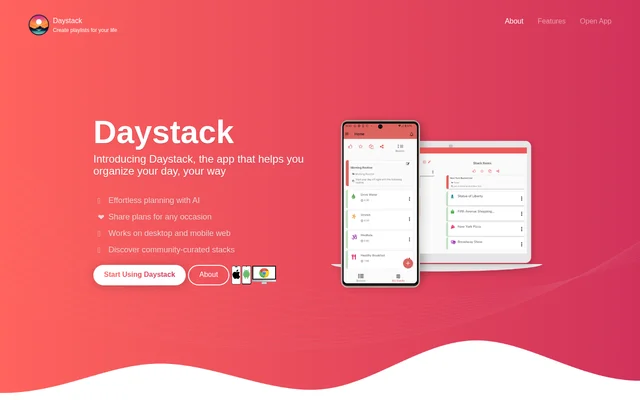
Daystack is an AI day planner that organizes activities into plans called stacks. Daystack is designed for people planning events in different contexts, whether that means putting together a trip, organizing a workout, or listing tasks for the day. Users can create a stack themselves, generate a starting point with AI, or look through community-created stacks for ideas.
What Daystack can do
Daystack supports both manual planning and prompt-based generation. A stack can hold a plan along with locations and YouTube videos that are relevant to it. The community catalog gives users a separate way to find ideas by browsing stacks that other people have created.
- Users can build custom stacks for trips, workouts, and tasks.
- Users can generate and edit stacks with AI.
- Users can browse the community stack catalog.
- Users can like stacks and share favorites with friends.
- Users can add locations to stacks.
- Users can include YouTube videos in stacks.
How Daystack works
Daystack lets users start with a custom stack or describe the plan they want in an AI prompt. After Daystack generates a stack, users can edit the result to suit their needs. The product page identifies GPT4 as the technology behind AI generation. Users can also add locations and YouTube videos to give the plan more context.
Who Daystack is for
Daystack is for people who want to organize the events of a day, whether the plan is for a trip, a workout, a set of tasks, or another occasion. Users who already know what they want to do can build a custom stack, while those looking for ideas can browse the community catalog or generate a stack from a prompt.
- Build a trip plan that includes locations.
- Put together a stack for a workout.
- Organize daily tasks in a custom stack.
- Share a plan for an occasion with friends.
Daystack pricing and plans
Daystack does not state pricing on its product page. The page describes desktop and mobile web as ready to use and points users to beta access for the native apps. The iPhone beta is available through TestFlight, and the page also mentions an Android beta. The page does not identify a free tier, a paid plan, or whether either access route requires payment.
Strengths and limitations of Daystack
Daystack gives users several ways to start a plan: build a stack manually, generate one from a prompt, or browse community examples for inspiration. Editing lets users revise AI-generated stacks, while stack sharing gives them a way to pass plans along to friends. The main access caveat is that the native apps are offered in beta, while desktop and mobile web are ready to use.
Getting started with Daystack
Daystack can be opened from a desktop or mobile web browser. To make a plan, users can create a custom stack or enter an AI prompt and edit the generated result. Users who want examples before making a plan can browse the community catalog, like stacks that fit their interests, and share favorites with friends.
Daystack FAQ
What is Daystack?
Daystack is an AI day planner for organizing activities into plans called stacks. Daystack lets users build stacks manually, generate them from prompts, and browse community-created stacks for ideas.
Is Daystack free?
Daystack does not state whether it is free on its product page. The page says Daystack is ready to use on desktop and mobile web and describes beta access for iPhone and Android, but it does not list prices or plans.
What can you use Daystack for?
Daystack can be used to plan trips, workouts, daily tasks, and other events. Users can organize activities in a custom stack, add locations or YouTube videos, and share stacks with friends.
How does Daystack generate plans with AI?
Daystack uses GPT4-powered AI to generate a stack from a prompt. Users describe the plan they want and can edit the generated stack to match their needs.
Does Daystack have iPhone and Android apps?
Daystack offers native iPhone and Android apps in beta. The iPhone beta is available through TestFlight, while users who prefer a browser can open Daystack on desktop or mobile web.
From the community
No reviews yet
Be the first to review this tool. What you write helps the next person choose.