What is Deepsheet?
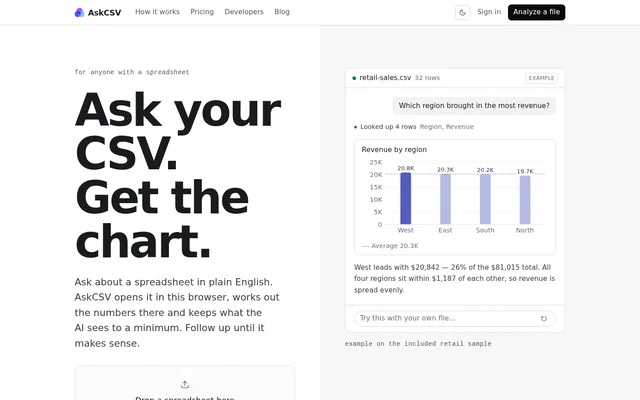
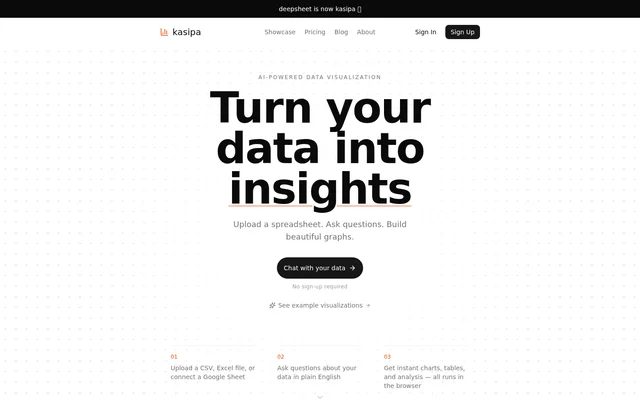
Deepsheet is an AI-powered data visualization tool for exploring spreadsheets through a conversational interface. Deepsheet lets users provide data, ask questions in plain English, and receive charts, tables, and analysis. The stated workflow runs in the browser and does not require sign-up, making account creation unnecessary before working with data.
Deepsheet brings spreadsheet input and visual output into the same question-driven workflow. The website describes the experience as chatting with data: users supply a spreadsheet and describe what they want to know. Deepsheet supports both file uploads and a Google Sheet connection, rather than presenting file upload as the only starting point.
What Deepsheet can do
Deepsheet combines spreadsheet access, natural-language questions, and data visualization. The listed outputs include charts, tables, and analysis, so the workflow is not limited to generating graphs. Deepsheet also provides a link to example visualizations, giving visitors a way to see examples alongside the description of how the tool works.
- Deepsheet accepts CSV files for analysis.
- Deepsheet accepts Excel spreadsheets for analysis.
- Deepsheet connects to a Google Sheet.
- Deepsheet accepts questions about data in plain English.
- Deepsheet generates charts, tables, and analysis.
- Deepsheet runs the described workflow in the browser.
How Deepsheet works
Deepsheet starts with a data source: an uploaded CSV file, an uploaded Excel file, or a connected Google Sheet. Users then ask questions about that data in plain English. Deepsheet returns charts, tables, and analysis in response, following the upload, question, and result sequence shown on the website.
Deepsheet does not require sign-up for the advertised chat-with-data experience. The page states that everything in the described workflow runs in the browser. That browser-based access and the choice of spreadsheet sources are the concrete usage details supplied, alongside the option to view example visualizations.
Who Deepsheet is for
Deepsheet is for spreadsheet users who want to ask questions about their data and obtain visual or tabular answers. The supported sources make Deepsheet relevant to people working with CSV files, Excel files, or Google Sheets. The plain-English interface provides a question-led way to request analysis rather than only asking users to build graphs directly.
- Deepsheet helps users explore uploaded spreadsheet data through questions.
- Deepsheet helps users build graphs from their data.
- Deepsheet helps users request tables and analysis from a connected Google Sheet.
Deepsheet strengths and stated scope
Deepsheet combines several practical capabilities in a single browser-based workflow: spreadsheet uploads, a Google Sheet connection, plain-English questions, and multiple output types. No sign-up is required. The stated scope is conversational spreadsheet analysis and visualization, with charts, tables, and analysis as the named results and example visualizations available on the website.
Deepsheet FAQ
What is Deepsheet?
Deepsheet is an AI-powered data visualization tool that lets users ask plain-English questions about spreadsheet data. Deepsheet produces charts, tables, and analysis through a browser-based workflow without requiring sign-up.
What file formats does Deepsheet support?
Deepsheet supports CSV and Excel file uploads and also lets users connect a Google Sheet. Deepsheet uses the supplied data to answer plain-English questions with charts, tables, and analysis.
Does Deepsheet require sign-up?
Deepsheet does not require sign-up for its advertised chat-with-data workflow. Deepsheet lets users upload a spreadsheet or connect a Google Sheet, ask questions, and receive results in the browser.
What can Deepsheet generate from spreadsheet data?
Deepsheet generates charts, tables, and analysis from questions about spreadsheet data. Deepsheet accepts questions in plain English after users upload a CSV or Excel file or connect a Google Sheet.
Does Deepsheet work in the browser?
Deepsheet runs its described data visualization workflow in the browser. Deepsheet combines spreadsheet input, plain-English questions, and resulting charts, tables, and analysis without requiring users to sign up.
From the community
No reviews yet
Be the first to review this tool. What you write helps the next person choose.