What is Dreamwave?
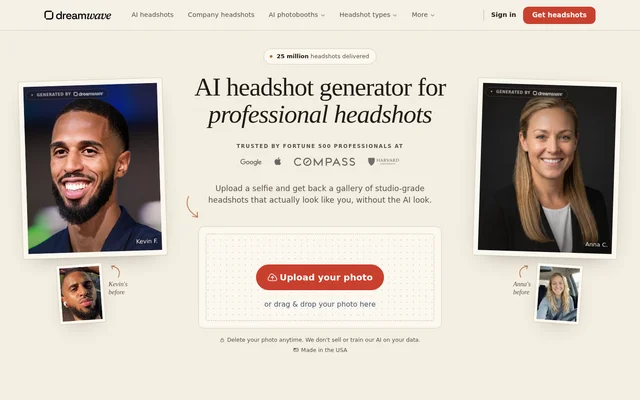
Dreamwave is an AI headshot generator for professionals and teams who want professional portraits from an existing photo. Dreamwave creates a gallery of headshots from a clear selfie, with styles including business casual, business formal, smart casual, and real estate. The service also includes tools for editing the resulting images.
Dreamwave is offered by a US-based entity in San Francisco, California. The website describes engineers with AI experience at OpenAI, DeepMind, MIT, Meta, and SpaceX. Dreamwave also emphasizes customer control over uploaded photos and generated images, stating that customers retain the rights to their likeness and images.
What Dreamwave can do
Dreamwave combines AI portrait generation with editing tools for adjusting the finished photos. Dreamwave supports changes to clothing, backgrounds, and image details after the photoshoot, rather than limiting the workflow to the initial gallery. The website also describes professional retouching support when a customer wants a small adjustment.
- Dreamwave generates professional headshots from an uploaded selfie.
- Dreamwave changes outfits using a text prompt.
- Dreamwave replaces a photo background with an uploaded image.
- Dreamwave applies backgrounds across team photoshoots.
- Dreamwave offers a magic eraser, detail enhancement, and professional filters.
- Dreamwave provides professional retouching for small changes.
How Dreamwave works
Dreamwave starts with an uploaded photo or a photo dragged into the website. The stated workflow asks for a clear image with a smile and pose that reflect the customer's preferred appearance. Dreamwave then builds a detailed AI model of the face and generates a gallery, with the overall process described as taking about two hours.
Dreamwave lets customers edit their images after generation by changing outfits, replacing backgrounds, and adjusting details. A new background can be uploaded for replacement, while clothing changes use text prompts. Dreamwave also states that customers can delete their photos and request earlier personal data deletion through support.
Who Dreamwave is for
Dreamwave serves individuals who need professional portraits and organizations arranging headshots for teams. The examples include business clothing and real estate styles, while a customer describes using the images on LinkedIn and in business announcements. Team background controls support applying a shared setting across multiple photoshoots.
- Professionals can use Dreamwave to update LinkedIn profile photos.
- Individuals can use Dreamwave portraits for business announcements.
- Real estate professionals can explore Dreamwave's real estate style.
- Teams can use Dreamwave to apply shared backgrounds across photoshoots.
Dreamwave pricing and access
Dreamwave is described as a paid service in a customer review published on the page. The supplied page does not list plan names or prices. Dreamwave is accessed through the website's photo-upload workflow, and the page also offers a route for organizations seeking headshots for their teams.
Dreamwave strengths and limitations
Dreamwave brings headshot generation, outfit changes, background replacement, and retouching into the same workflow. Dreamwave states that customer data never leaves the US, photos and personal information are not sold, and customer likenesses are not used to train future AI models. Personal data is deleted by default within 30 days of no use, with earlier deletion available through support.
- Dreamwave requires a clear uploaded photo to create headshots.
- Dreamwave describes delivery in about two hours, so the initial gallery is not immediate.
- Dreamwave is a paid service, and the supplied page does not state plan prices.
Dreamwave FAQ
What is Dreamwave?
Dreamwave is an AI headshot generator that creates professional portraits from an uploaded selfie. Dreamwave serves individuals and teams and includes tools for changing outfits, replacing backgrounds, and retouching the generated photos.
Is Dreamwave free?
Dreamwave is described as a paid service in a customer review on the product page. The supplied page does not provide plan names, subscription details, or specific prices.
How long does Dreamwave take to generate headshots?
Dreamwave describes the process from starting a photoshoot to receiving a gallery as taking about two hours. The workflow begins with a clear uploaded photo, followed by AI model creation and headshot generation.
Can Dreamwave change outfits and backgrounds?
Dreamwave can change outfits using text prompts and replace backgrounds using uploaded images after a photoshoot. Dreamwave also lets teams apply backgrounds across photoshoots and provides detail-editing tools and professional retouching support.
Does Dreamwave use uploaded photos to train AI?
Dreamwave states that customer likenesses are never used to train future AI models, even anonymously. Dreamwave also states that photos and personal information are not sold and that customer data stays in the US.
Can customers delete their Dreamwave data?
Dreamwave states that customers can delete photos anytime and that personal data is deleted by default within 30 days of no use. Individuals can email support for earlier deletion, and organizations can request custom deletion policies through sales.
From the community
No reviews yet
Be the first to review this tool. What you write helps the next person choose.