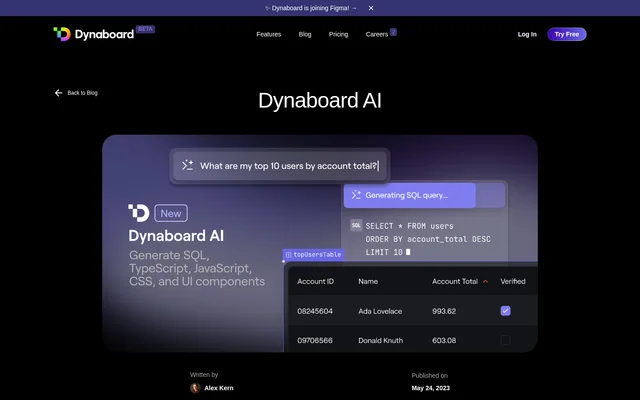
What is Dynaboard AI?
Dynaboard AI is a suite of AI features for building custom software in the Dynaboard Editor. Dynaboard AI helps developers create interfaces, generate code and database queries, and revise existing application logic through natural-language instructions. The announcement focuses on data-rich applications, including forms, charts, and interfaces connected to changing database records.
Dynaboard AI supports both initial application creation and updates to existing applications. Generated interfaces become standard Dynaboard components rather than a separate type of output. Developers can modify or move those components after generation, while contextual prompts can reference components already present in an application.
What Dynaboard AI can do
Dynaboard AI combines interface generation with code generation and refactoring inside the editor. Natural-language prompts can describe a form, a database visualization, or a change to an existing query. The stated capabilities cover both the visible interface and the code or queries that supply application data.
- Dynaboard AI generates forms and UI components with automatic configuration, placement, and names.
- Dynaboard AI generates JavaScript, TypeScript, SQL, and CSS in code or query editors.
- Dynaboard AI updates existing code and queries from descriptions of requested changes.
- Dynaboard AI creates charts with automatic titles, axis names, and dimension names.
- Dynaboard AI generates database-backed dropdowns that reflect changing data.
- Dynaboard AI modifies queries to filter results using existing component values.
How Dynaboard AI works
Dynaboard AI accepts UI-generation prompts through the command bar in the Dynaboard Editor. Developers describe the desired interface, then work with the generated components on the page. For database-backed output, developers can connect PostgreSQL, MySQL, or BigQuery and describe the chart or table they want to see.
Dynaboard AI uses context from application pages, functions, components, and database schemas. Developers can use an inline AI button to request changes to an existing query, including filtering a chart using a named dropdown. The editor also provides upvotes and downvotes for feedback on generated results.
Who Dynaboard AI is for
Dynaboard AI is aimed at developers building and maintaining custom web applications, particularly applications with substantial database interaction. The examples address repetitive interface setup and keeping application controls synchronized with underlying data. Dynaboard's broader plans also address independent developers, collaborating teams, and organizations building at scale.
- Dynaboard AI can create forms for editing database records.
- Dynaboard AI can build interfaces that display detailed user information or collect survey responses.
- Dynaboard AI can generate database charts and add dropdown-based filtering to existing applications.
Dynaboard AI pricing and plans
Dynaboard AI is available to try free in the Dynaboard Editor without a waitlist. The supplied pricing page describes Dynaboard subscriptions rather than a separate AI subscription. Dynaboard offers Free at $0, Individual from $19/mo, Team from $49/mo, Business from $249/mo, and Enterprise with custom pricing.
Dynaboard AI users choosing the Dynaboard Free plan receive unlimited collaborators, resources, and components, with 25 external end-users and 10,000 function calls. Paid plans increase included usage and add capabilities such as custom domains, staging environments, shared team workspaces, and support options, depending on the selected plan.
Dynaboard AI strengths and limitations
Dynaboard AI brings UI creation, code generation, and contextual updates into the same editor workflow. Editable generated components and awareness of existing application structure support iterative changes. However, the described workflow is tied to the Dynaboard Editor, and the broader Dynaboard subscription determines available usage allowances and deployment features.
- Dynaboard AI's documented workflow requires working in the Dynaboard Editor.
- Dynaboard Free includes caps on external end-users and function calls.
- Dynaboard custom domains and removal of branding are paid-plan features.
Dynaboard AI FAQ
What is Dynaboard AI?
Dynaboard AI is a suite of AI development features in the Dynaboard Editor for generating interfaces, code, and database queries. Dynaboard AI also lets developers describe changes to refactor existing application code and queries.
Is Dynaboard AI free?
Dynaboard AI is available to try free in the Dynaboard Editor without a waitlist. Dynaboard's broader subscription options include a Free plan at $0 and paid Individual, Team, Business, and Enterprise plans with different usage allowances and features.
What programming languages does Dynaboard AI generate?
Dynaboard AI generates JavaScript, TypeScript, SQL, and CSS in code or query editors. Dynaboard AI also supports natural-language changes to existing code and queries, using context from application pages, functions, components, and database schemas.
Which databases does Dynaboard AI support?
Dynaboard AI supports connecting PostgreSQL, MySQL, and BigQuery for SQL generation. Dynaboard AI can turn descriptions into database-backed charts or tables and generate dropdowns that reflect values in the underlying database.
Can Dynaboard AI modify existing apps?
Dynaboard AI can modify existing applications as well as generate new functionality. Dynaboard AI recognizes application context and can update an existing chart query through the inline AI button, including filtering results by a dropdown's selected value.
Can developers edit interfaces generated by Dynaboard AI?
Dynaboard AI produces standard Dynaboard components that developers can modify or move after generation. Dynaboard AI initially configures, places, and names components from the prompt, including components for database editing forms, user information, and surveys.
From the community
No reviews yet
Be the first to review this tool. What you write helps the next person choose.