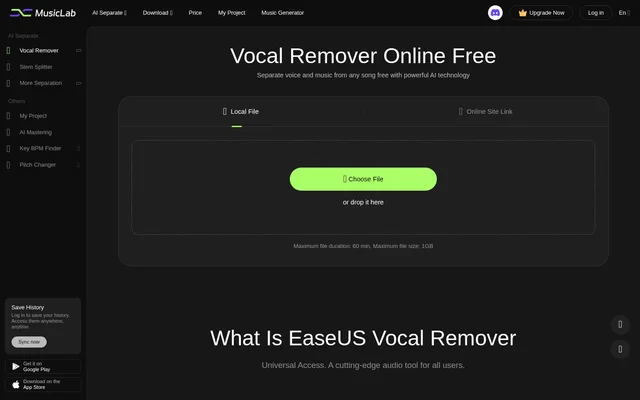
What is EaseUS Vocal Remover?
EaseUS Vocal Remover is an online AI tool for separating vocals from music in audio and video files. EaseUS Vocal Remover is designed for music makers, song creators, singers, karaoke enthusiasts, and content creators. Processing takes place in the cloud, and the website describes access across Web, Android, and iOS without requiring high-spec hardware.
What EaseUS Vocal Remover can do
EaseUS Vocal Remover automatically detects and separates the human voice or music in imported media. Input options include local audio and video files as well as supported online links. The resulting audio can provide an instrumental backing track or extracted vocals for karaoke, remixes, covers, and other music projects.
- EaseUS Vocal Remover separates vocals and music using AI.
- EaseUS Vocal Remover extracts vocals from audio and video files.
- EaseUS Vocal Remover accepts links from YouTube and SoundCloud.
- EaseUS Vocal Remover supports MP3, WAV, M4A, FLAC, MP4, and MOV inputs.
- EaseUS Vocal Remover lets users audition and download separated audio.
How EaseUS Vocal Remover works
EaseUS Vocal Remover starts with a local file upload or an online site link. For local files, users select Choose File or drop media into the upload area. The AI then recognizes vocals and separates them from the music automatically. After processing, users can audition the result and download the extracted audio.
EaseUS Vocal Remover performs separation in the cloud rather than requiring a downloaded application. The upload area specifies a maximum duration of 60 min and a maximum file size of 1GB, and warns that large files may take longer to upload. Uploading audio or video also signifies agreement to the service's Terms of Service.
Who EaseUS Vocal Remover is for
EaseUS Vocal Remover addresses both music production and casual singing uses. The website specifically names professional music makers, song creators, and people creating karaoke or background music. Singers can use instrumental versions to perform without the original vocals, while remix and cover projects can use separated material as part of their audio preparation.
- Karaoke enthusiasts can create instrumental versions of songs.
- Singers can prepare backing tracks without the original vocals.
- Music makers can separate audio for remixes and covers.
- Content creators can extract background music from audio or video.
EaseUS Vocal Remover pricing and plans
EaseUS Vocal Remover offers free access and a paid Pro membership, with the website inviting users to upgrade to process more files and unlock additional features. The comparison lists enhanced processing, AI model upgrades, and technical support. However, the displayed free-trial upload and download allowances are unclear, so the page does not provide a reliable basis for stating a free processing quota.
EaseUS Vocal Remover deducts a file's duration from purchased minutes when that file is uploaded. Uploading the same file again incurs another deduction. Users therefore need to account for repeated uploads when managing purchased processing time. The source does not provide a clear membership price to quote.
EaseUS Vocal Remover strengths and limitations
EaseUS Vocal Remover combines browser access, cloud processing, audio and video input, and online link support in a single workflow. These capabilities allow users to prepare separated audio without installing an app. The main documented constraints concern upload limits, the treatment of purchased minutes, and conflicting descriptions of available audio export formats.
- EaseUS Vocal Remover limits uploads to 60 min and 1GB.
- EaseUS Vocal Remover charges purchased minutes again for repeat uploads.
- EaseUS Vocal Remover lists WAV export in its plan comparison, but its FAQ states that only MP3 audio export is currently supported.
EaseUS Vocal Remover FAQ
What is EaseUS Vocal Remover?
EaseUS Vocal Remover is a cloud-based AI tool that separates vocals and music from audio and video files. EaseUS Vocal Remover supports karaoke backing tracks, extracted vocals, remixes, and covers through a browser-based workflow.
Is EaseUS Vocal Remover free?
EaseUS Vocal Remover offers free access alongside a paid Pro membership for additional features and file processing. The page's free upload and download allowances are unclear. Purchased processing minutes are deducted when a file is uploaded, including repeated uploads.
Can EaseUS Vocal Remover remove vocals from YouTube videos?
EaseUS Vocal Remover supports vocal removal from YouTube videos through online link input. EaseUS Vocal Remover also accepts SoundCloud links and can download source audio from supported sites for separation.
What file formats does EaseUS Vocal Remover support?
EaseUS Vocal Remover accepts audio and video inputs including MP3, WAV, M4A, FLAC, MP4, and MOV. Export guidance is inconsistent: the FAQ states that audio exports currently support only MP3, while the plan comparison lists WAV export.
Does EaseUS Vocal Remover require an app download?
EaseUS Vocal Remover can separate vocals from music in a browser without downloading an app. EaseUS Vocal Remover processes files in the cloud, and the page describes support across Web, Android, and iOS.
How does EaseUS Vocal Remover count purchased minutes?
EaseUS Vocal Remover subtracts the duration of each uploaded audio or video file from purchased minutes upon upload. EaseUS Vocal Remover counts repeated uploads of the same file separately and deducts the corresponding duration again.
From the community
No reviews yet
Be the first to review this tool. What you write helps the next person choose.