What is ECC?
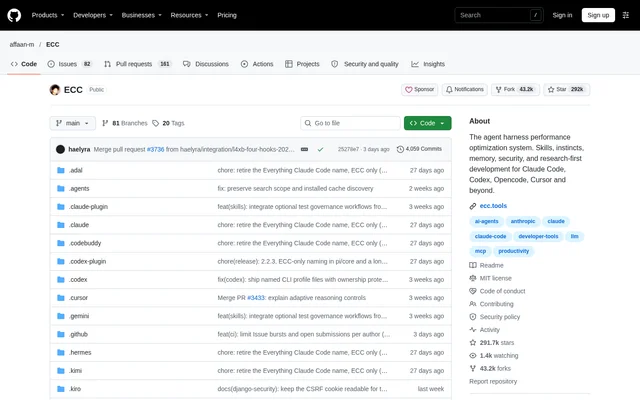
ECC is an open-source agent harness optimization system for developers working with AI coding tools. ECC adds a coordinated engineering workflow around an agent's ability to write code, covering planning, testing, implementation, review, verification, memory, and improvement. The project is MIT-licensed and available through its official GitHub repository.
ECC works best with Claude Code according to the repository, while also offering native Codex and Qoder plugin paths. ECC provides capability-limited adapters for environments including Cursor, OpenCode, Gemini, Zed, and GitHub Copilot. The repository explicitly advises checking its support status matrix rather than assuming equivalent capabilities across harnesses.
What ECC can do
ECC combines specialized agents, reusable skills, commands, hooks, rules, and memory controls. ECC's agents cover planning, review, build repair, security, architecture, and domain work, while its skills span testing, research, documentation, frontend, data, machine learning, and operations. These components support a repeatable development process instead of rebuilding instructions in every prompt.
- ECC supplies specialized agents for planning, review, architecture, and build repair.
- ECC provides reusable skills for development, research, testing, and documentation.
- ECC uses session summaries, instincts, and continuous learning to retain useful context.
- ECC offers selective rules for language-specific or project-specific standards.
- ECC includes AgentShield scanning for prompts, hooks, MCP configuration, permissions, secrets, and agent files.
How ECC works
ECC offers guided package setup and native plugin installation paths. The Claude Code setup wizard inventories the official marketplace and native installation scopes before installing, updating, or moving the ecc@ecc plugin. Developers can rerun the wizard to change the installation scope or hook profile, and the documented setup does not require cloning the repository.
ECC also provides a multi-harness wizard for Claude Code, Codex, and Kimi Code. ECC shows installation channels and destinations, checks selections before writing changes, and requests final confirmation. Claude Code receives a native plugin, Codex uses its native marketplace lifecycle, and Kimi Code receives managed project files without hook, provider, or authentication configuration.
Who ECC is for
ECC is for developers who use coding agents and want reusable engineering practices around generated code. ECC supports work ranging from planning and test-driven development to security review, documentation, and operations. Developers working across supported harnesses can install ECC in multiple environments, provided they choose a single installation method for each harness.
- ECC supports planning, testing, implementing, reviewing, and verifying code changes.
- ECC helps preserve useful context through session summaries and memory controls.
- ECC supports security checks on agent files and configuration.
- ECC lets developers select standards appropriate to their language or project.
ECC pricing and plans
ECC's open-source repository is free and MIT-licensed. ECC Pro is a separate hosted GitHub App for private repositories, with access advertised from $19/seat/mo. The page also lists free installation and sponsorship options. Sponsors and Pro subscribers fund the open-source work, while the repository states that the open-source project stays free.
ECC strengths and limitations
ECC brings workflow coordination, reusable skills, memory, and security scanning into the same development toolkit. ECC also documents installation behavior and differences between supported harnesses. Those distinctions matter: the repository identifies Claude Code as the strongest-supported environment and warns against assuming feature parity or combining overlapping installation methods within the same harness.
- ECC's universal package requires Node.js 18 or newer.
- ECC's Claude plugin setup requires Git and Claude Code 2.1 or newer on PATH.
- ECC's adapters have capability limits that vary by harness.
- ECC can produce duplicate configuration when installation methods are stacked within a harness.
ECC FAQ
What is ECC?
ECC is an MIT-licensed open-source agent harness optimization system for AI coding workflows. ECC combines specialized agents, skills, hooks, rules, memory, continuous learning, and security scanning to support planning, testing, implementation, review, verification, and reusable development practices.
Is ECC free?
ECC's open-source repository is free and MIT-licensed. ECC Pro is a separate hosted GitHub App for private repositories, with pricing advertised from $19/seat/mo. The project also accepts sponsorships to fund its open-source work.
Which coding tools does ECC support?
ECC works best with Claude Code and offers native Codex and Qoder plugin paths. ECC also provides capability-limited adapters for tools including Cursor, OpenCode, Gemini, Zed, and GitHub Copilot. The repository advises checking its support status matrix because capabilities differ across harnesses.
How do you install ECC?
ECC supports guided setup through ecc-universal and native Claude Code plugin commands. ECC's multi-harness wizard supports Claude Code, Codex, and Kimi Code. The universal package requires Node.js 18 or newer, and Claude plugin setup additionally requires Git and Claude Code 2.1 or newer on PATH.
What security features does ECC include?
ECC includes AgentShield security scanning for prompts, hooks, MCP configuration, permissions, secrets, and agent files. ECC also supplies security-focused agents and skills. The repository warns users to install only from official channels because unofficial mirrors are not maintained or reviewed by the project.
Can ECC run in multiple coding harnesses?
ECC can be used with Claude Code, Codex, and other supported harnesses at the same time. ECC requires choosing a single installation method per harness, because overlapping methods can duplicate skills, commands, hooks, or configuration.
From the community
No reviews yet
Be the first to review this tool. What you write helps the next person choose.