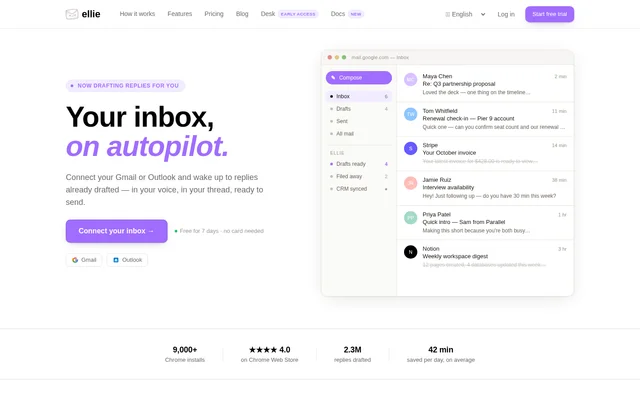
What is Ellie?
Ellie is an AI email assistant that prepares replies inside connected Gmail and Outlook accounts. Ellie learns how users write from their sent mail and uses that style when drafting responses to incoming threads. The service is intended for people and teams handling correspondence, including founders, consultants, operations staff and customer-facing teams.
Ellie focuses on preparing drafts rather than sending messages automatically. Replies appear in the existing Drafts folder and remain in the relevant email thread. Users can skim the suggested response, change the wording and send it themselves while retaining their usual email shortcuts, filters, search and signature.
What Ellie can do
Ellie combines personalised reply writing with email categorisation and business context. Users can describe categories in ordinary language, decide which messages should receive drafts and set a different tone for each category. For business correspondence, Ellie can use website content and retrieve customer-specific facts when preparing a reply.
- Ellie prepares email drafts overnight in the user's writing style.
- Ellie sorts messages into custom categories described in plain language.
- Ellie assigns category-specific voices to sales, finance and support replies.
- Ellie creates inbox tasks with due dates from action categories.
- Ellie indexes public website content and re-indexes it weekly.
- Ellie looks up live customer records and cites source fields in drafts.
How Ellie works
Ellie starts drafting automatically after a user connects Gmail or Outlook through the web app. Ellie reads sent mail to learn writing patterns and reads incoming threads to determine appropriate replies. Automatic drafting supports Gmail, Google Workspace, Outlook.com, Microsoft 365 and Exchange Online.
Ellie also supports on-demand replies through extensions for Chrome, Edge and Firefox, plus an Outlook desktop add-in. The browser extension covers Gmail Web and Outlook on the web. For other clients, including Apple Mail and Fastmail, users can generate a response in the extension popup and paste it into their email.
Who Ellie is for
Ellie serves people who want help managing email replies without moving to a different inbox. The page describes personal correspondence and business workflows, including sales enquiries, invoices, interview requests and support questions. Ellie also identifies reply anxiety, dyslexia and difficulty writing in English or another language as reasons people use the assistant.
- Ellie helps founders and consultants prepare routine correspondence.
- Ellie helps customer-facing teams draft replies grounded in company knowledge.
- Ellie helps sales teams respond using a category-specific tone.
- Ellie helps account teams include current renewal or plan details.
- Ellie helps users who find writing email replies difficult.
Ellie pricing and plans
Ellie offers a 7-day free trial without requiring a credit card. The page also states that paid plans provide more replies and explains that reply limits reflect the cost of generating content. Subscription prices and detailed plan allowances are not listed in the supplied text.
Ellie strengths and limitations
Ellie keeps drafting within existing email workflows and combines writing-style learning with company knowledge and live data lookups. Drafts remain subject to user review before sending. Ellie states that email content is not stored on its servers, shared with others or used to train AI models; threads are discarded after drafting.
- Ellie requires access to email threads and sent mail for personalised drafting.
- Ellie applies reply limits, with more replies available through paid plans.
- Ellie does not provide automatic connected-account drafting for every email client.
- Ellie requires manual copying and pasting when used with Apple Mail or Fastmail.
Ellie FAQ
What is Ellie?
Ellie is an AI email assistant that drafts replies in Gmail and Outlook using the user's writing style. Ellie learns from sent mail, can incorporate company knowledge and live customer data, and places responses in the existing Drafts folder for review before sending.
Is Ellie free?
Ellie offers a 7-day free trial with no credit card required. Ellie also has paid plans that provide more replies. The supplied page explains that reply generation is limited but does not list subscription prices or detailed plan allowances.
Which email clients does Ellie support?
Ellie supports automatic drafts for Gmail, Google Workspace, Outlook.com, Microsoft 365 and Exchange Online. Ellie also offers Chrome, Edge and Firefox extensions and an Outlook desktop add-in. For Apple Mail, Fastmail and other clients, users can generate replies in the extension popup and paste them into email.
Does Ellie read or store emails?
Ellie reads connected email threads with permission to categorise messages and draft replies, and reads sent mail to learn writing style. Ellie states that email content is not stored on its servers, shared or used to train AI models. Each thread is discarded after its draft is written.
Can Ellie use company knowledge and CRM data?
Ellie can use publicly indexable website content and live customer records to draft business replies. Ellie re-indexes website knowledge weekly and offers generic connectors for CRM, e-commerce, helpdesk and billing systems. Customer data is retrieved at draft time, and drafts cite source fields for verification.
Does Ellie send emails automatically?
Ellie prepares drafts automatically but does not send messages without the user's approval. Ellie places replies in the connected account's Drafts folder and the relevant email thread, allowing users to review the wording, make changes and send the response themselves.
From the community
No reviews yet
Be the first to review this tool. What you write helps the next person choose.