What is Ermine?
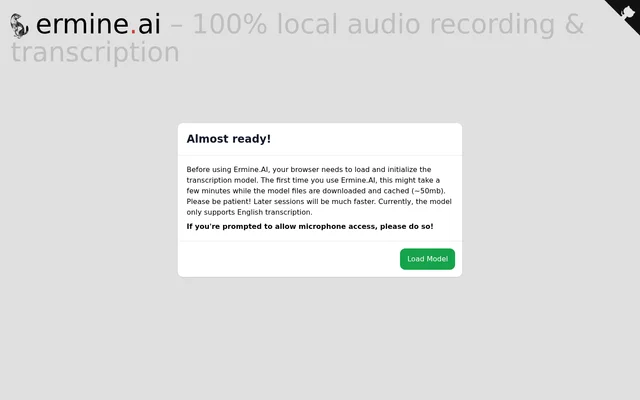
Ermine is a browser-based audio recording and transcription tool that describes its processing as fully local. Ermine supports people who want to capture spoken English and obtain both an audio recording and a written transcript. The website presents a transcription interface with model-loading and download controls.
Ermine currently supports English transcription only. Ermine also requires preparation before transcription can begin: the browser must load and initialize the transcription model. This setup is part of the website workflow, and the page explains that the first session can take longer than subsequent sessions because model files must be downloaded.
What Ermine can do
Ermine combines audio recording, English transcription, and downloads within its browser interface. Ermine presents a control to begin transcribing and another labeled Download Audio + Transcript. The page also describes local processing and cached model files, giving users a clear outline of the available functions and the preparation required before recording.
- Ermine records audio locally.
- Ermine transcribes spoken English locally.
- Ermine offers audio and transcript downloads.
- Ermine loads the transcription model in the browser.
- Ermine caches downloaded model files for later sessions.
How Ermine works
Ermine begins with browser-based model preparation. Before use, the browser downloads, loads, and initializes the transcription model through the Load Model control. The page describes the initial download as approximately 50mb and warns that the first setup may take a few minutes while those files are downloaded and cached.
Ermine may prompt the user to allow microphone access, and the page instructs users to grant that permission when requested. After model preparation, the interface provides a control to begin transcribing. Ermine also provides an audio-and-transcript download control. Later sessions are described as much faster because the model files have already been cached.
Who Ermine is for
Ermine is suited to people whose recording and transcription needs involve spoken English and a browser-based workflow. Ermine offers a local approach for capturing speech and obtaining a written version, with a download option for both outputs. The English-only model is an important consideration when deciding whether the tool matches a particular recording task.
- Ermine can be used to capture spoken English locally.
- Ermine can be used to produce an English transcript.
- Ermine can be used to download audio alongside its transcript.
Ermine strengths and limitations
Ermine brings local recording, local transcription, and downloadable outputs into the same browser workflow. Ermine also caches the transcription model, which the page says makes later sessions much faster. These capabilities come with explicit setup requirements: users must wait for initial model preparation and may need to grant microphone access before using the recording workflow.
- Ermine currently transcribes English only.
- Ermine requires an initial model download of approximately 50mb.
- Ermine may take a few minutes to prepare on first use.
- Ermine may request microphone permission.
Ermine FAQ
What is Ermine?
Ermine is a browser-based tool for local audio recording and English transcription. Ermine provides controls to load a transcription model, begin transcribing, and download both audio and a transcript.
Does Ermine process audio locally?
Ermine describes audio recording and transcription as fully local. Ermine requires the browser to download and initialize a transcription model before use, then caches the model files for later sessions.
What languages does Ermine support?
Ermine currently supports English transcription only. Ermine uses a transcription model loaded in the browser, and the page explicitly identifies English as the model's current language limitation.
Why does Ermine take time to start?
Ermine may take a few minutes on first use because the browser must download and initialize approximately 50mb of model files. Ermine caches those files, and the page says later sessions will be much faster.
Can Ermine download audio and transcripts?
Ermine provides a Download Audio + Transcript control. Ermine combines this download option with local audio recording and English transcription, allowing users to obtain both outputs from the browser interface.
Does Ermine need microphone access?
Ermine may require microphone permission for its recording workflow. Ermine instructs users to allow microphone access if prompted, alongside loading and initializing the transcription model before use.
From the community
No reviews yet
Be the first to review this tool. What you write helps the next person choose.