What is FlashFlashCards?
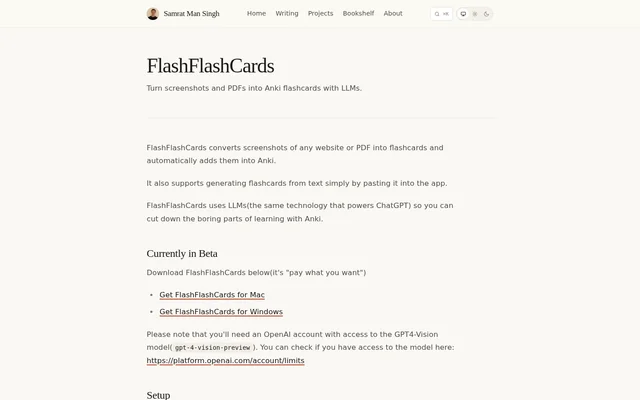
FlashFlashCards is a desktop flashcard generator for people who use Anki to study. FlashFlashCards uses language models to create cards from screenshots of websites and PDFs, and it can also generate cards from text pasted into the app. FlashFlashCards handles card generation rather than replacing Anki: users send the generated cards to Anki, where they can use them for study.
What FlashFlashCards can do
FlashFlashCards accepts screenshots and pasted text as source material. The screenshot option starts with a capture of content on a website or in a PDF. The pasted-text option starts with text placed directly in the app, so a screenshot is not necessary for that workflow. After generation, the Add to Anki button transfers the cards to Anki.
- FlashFlashCards generates Anki cards from website screenshots.
- FlashFlashCards turns screenshots of PDFs into flashcards.
- FlashFlashCards creates flashcards from pasted text.
- FlashFlashCards sends generated cards to Anki.
How FlashFlashCards works
FlashFlashCards uses the Anki-Connect add-on to add cards to Anki. Setup starts by installing Anki-Connect, installing FlashFlashCards, and entering an OpenAI API key in the app. The OpenAI account must have access to the GPT-4 Vision preview model listed on the product page as gpt-4-vision-preview.
FlashFlashCards uses Control+Command+A on Mac and Ctrl+Win+A on Windows to take a screenshot. The user then selects Generate flashcards to create cards from the captured material. Once generation is complete, the user selects Add to Anki. Taking a screenshot does not by itself generate cards or add them to Anki.
Who FlashFlashCards is for
FlashFlashCards is for learners who already study with Anki and want to reduce the work of creating cards by hand. The choice of input depends on the material: website or PDF content can be captured on screen, while text that can be copied can be pasted directly into FlashFlashCards. Both options lead to the same destination: cards added to Anki.
- Make study cards from material on a website.
- Turn a screenshot of a PDF page into Anki cards.
- Paste text directly into FlashFlashCards to generate cards.
FlashFlashCards pricing and plans
FlashFlashCards is offered as a pay-what-you-want beta download, with separate downloads for Mac and Windows. The product page does not list a fixed price. The download and the model access requirement are separate: using FlashFlashCards also requires an OpenAI account with access to the GPT-4 Vision preview model and an API key entered during setup.
Strengths and limitations of FlashFlashCards
FlashFlashCards combines flashcard generation and transfer to Anki, so users do not have to copy the generated cards into Anki by hand. Supporting pasted text as well as screenshots gives learners a way to start without using the capture shortcut. The trade-off is the initial setup: FlashFlashCards depends on an Anki add-on and access to a specific OpenAI model.
- FlashFlashCards is currently in beta.
- FlashFlashCards requires the Anki-Connect add-on.
- FlashFlashCards requires an OpenAI API key and access to gpt-4-vision-preview.
FlashFlashCards FAQ
What is FlashFlashCards?
FlashFlashCards is a desktop app for Anki learners that uses language models to generate flashcards from screenshots and pasted text. FlashFlashCards can capture material from websites and PDFs and add the generated cards to Anki.
How much does FlashFlashCards cost?
FlashFlashCards is offered as a pay-what-you-want beta download for Mac and Windows, and the product page does not list a fixed price. FlashFlashCards also requires an OpenAI account with access to the GPT-4 Vision preview model.
Can FlashFlashCards make Anki flashcards from a PDF?
FlashFlashCards can generate Anki flashcards from a screenshot of a PDF. The user takes a screenshot with the app shortcut, selects Generate flashcards, and then selects Add to Anki to send the generated cards to Anki.
What do I need to set up FlashFlashCards?
FlashFlashCards requires the Anki-Connect add-on, an OpenAI API key, and an OpenAI account with access to the GPT-4 Vision preview model. The setup instructions call for installing Anki-Connect and FlashFlashCards, then entering the API key in the app.
Can FlashFlashCards make flashcards without a screenshot?
FlashFlashCards can generate flashcards from text pasted directly into the app, so a screenshot is not required for that input. Screenshots of websites and PDFs are another way to provide source material for Anki flashcards.
From the community
No reviews yet
Be the first to review this tool. What you write helps the next person choose.