What is Flickify?
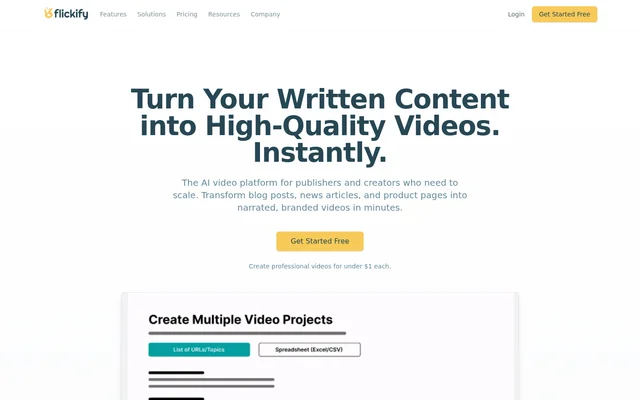
Flickify is an AI video creation tool that converts written content into narrated, branded videos for publishers and creators. Flickify supports blog posts, news articles, and product pages as source material. The workflow combines AI automation with a slide-based editor, allowing content teams to repurpose existing writing without relying entirely on manual video editing.
Flickify focuses on both individual production and larger content libraries. Publishers can create a video from a URL, supply an existing script, or start with a prompt. Flickify also provides bulk creation and background automation for teams that need to produce videos from multiple pieces of written content.
What Flickify can do
Flickify brings script creation, visual selection, narration, and publishing into the same video workflow. Flickify includes stock media, AI-generated imagery, and a gallery of video generation models, including Veo by Google, Sora by OpenAI, Kling, and LTX. Users can combine these capabilities with voice and brand customization.
- Flickify extracts article text from URLs and accepts scripts or prompts.
- Flickify automatically matches narration with stock footage and images.
- Flickify generates AI images and video clips.
- Flickify supports 29+ languages, custom characters, and voice cloning.
- Flickify creates videos in bulk from lists.
- Flickify renders videos for upload to YouTube or Humix.
How Flickify works
Flickify starts with a choice between Create One for detailed work and Generate Many for scale. Users paste a URL, script, or prompt, then choose a voice, language, and brand style. Automatch finds relevant stock footage and images, while the slide-based editor supports customization before rendering and publishing.
Flickify also offers Autopilot for background production. Flickify integrates with Google Analytics to select top-performing posts, convert those posts into videos, and publish the results automatically. This workflow extends automation beyond video assembly to include content selection, rather than requiring users to manually choose every article.
Who Flickify is for
Flickify serves publishers and content teams that want to expand video production using written material they already have. Flickify also lists hobbyists, creators, growing channels, businesses, and agencies among its plan audiences. The available workflows cover individual video projects, repeated article repurposing, and higher-volume publishing.
- Flickify converts blog posts and news articles into narrated videos.
- Flickify turns product pages into branded video content.
- Flickify helps publishers automate videos from top-performing posts.
Flickify pricing and plans
Flickify offers a free trial with possible watermark or download limitations until upgrade. Starter costs $18 per month for 15 minutes, Professional costs $49 per month for 50 minutes, and Business costs $199 per month for 250 minutes. Flickify also directs customers needing custom volume to enterprise sales.
Flickify measures usage by the final runtime of rendered videos, not by previews or editing time. Extra minutes cost $1.20 on Starter, $1.00 on Professional, and approximately $0.80 on Business. Subscriptions can be canceled at any time, with access continuing until the end of the current billing cycle.
Flickify strengths and limitations
Flickify combines content extraction, media matching, narration options, and publishing with workflows for individual and bulk production. Flickify supports brand consistency through voice cloning and brand styling, while Autopilot reduces manual content selection. The main access constraints are trial restrictions, monthly rendered-minute allowances, and additional charges when those allowances are exceeded.
- Flickify trial downloads or watermark settings may be restricted until upgrade.
- Flickify subscriptions include a defined monthly rendered-minute allowance.
- Flickify bills additional rendered minutes at the selected plan's overage rate.
Flickify FAQ
What is Flickify?
Flickify is an AI video creation tool that turns URLs, scripts, and prompts into narrated, branded videos. Flickify combines a slide-based editor with stock media matching, voice options, bulk creation, and publishing workflows for publishers and creators.
Is Flickify free?
Flickify offers a free trial that lets users sign up and explore the tool. Watermark or download limitations may apply until upgrade. Paid monthly plans include Starter, Professional, and Business, with allowances based on rendered video minutes.
How much does Flickify cost?
Flickify costs $18 per month for Starter with 15 minutes, $49 per month for Professional with 50 minutes, and $199 per month for Business with 250 minutes. Additional minutes have plan-specific charges, and custom volume is available through enterprise sales.
How does Flickify calculate video minutes?
Flickify calculates usage from the final length of each rendered video. Previews and editing time are not charged. When the monthly allowance runs out, users can continue creating videos with overage minutes charged at their plan's rate.
Does Flickify integrate with Google Analytics and YouTube?
Flickify integrates with Google Analytics through Autopilot to automatically convert top-performing posts into videos and publish them. Flickify also supports rendering and uploading videos to YouTube or Humix as part of its publishing workflow.
Which AI video models does Flickify offer?
Flickify offers a model gallery that includes Veo by Google, Sora by OpenAI, Kling, and LTX. Flickify presents these models as options for generating video clips and cinematic B-roll, including realistic text-to-video, motion, and artistic styling.
From the community
No reviews yet
Be the first to review this tool. What you write helps the next person choose.