What is GetResponse Email Generator?
GetResponse Email Generator is an AI email writing tool for creating marketing emails inside GetResponse’s email marketing suite. GetResponse Email Generator uses OpenAI technology to turn campaign details into email copy, subject lines, and templates. The tool serves beginners and experienced marketers who want a draft they can customize rather than build from scratch.
GetResponse Email Generator supports marketing campaigns, newsletters, follow-ups, promotions, and customer engagement messages. Generated content provides a starting point for editing and personalization. The source describes a workflow that combines writing and template design, with campaign keywords, business category, tone, layout, and color preferences guiding the output.
What GetResponse Email Generator can do
GetResponse Email Generator produces email content and visual templates from a small set of campaign inputs. GetResponse Email Generator tailors text to the selected industry and keywords, while tone and design controls help shape the finished message. GetResponse’s broader email tools support customization and testing after generation.
- GetResponse Email Generator creates email copy and subject lines.
- GetResponse Email Generator tailors drafts to campaign keywords and a business category.
- GetResponse Email Generator lets users select the tone of an email.
- GetResponse Email Generator applies layout and color scheme preferences.
- GetResponse Email Generator includes a relevant stock photo when the chosen layout contains an image.
- GetResponse Email Generator provides drafts that users can edit and personalize before sending.
How GetResponse Email Generator works
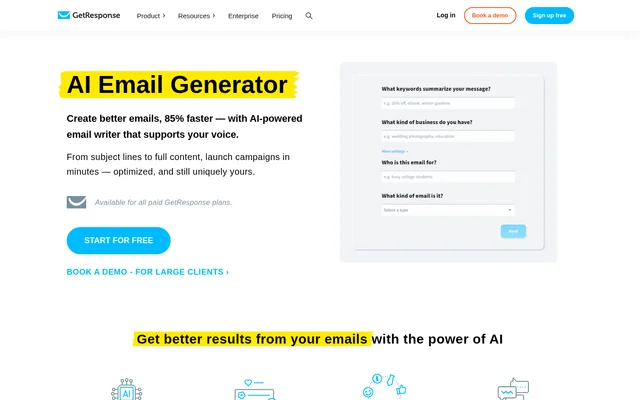
GetResponse Email Generator starts with keywords or phrases describing an email goal, such as a seasonal sale or product announcement. Users then choose a category that matches their business and select the desired tone. Layout and color choices determine the template’s design direction, including whether a stock image is included.
GetResponse Email Generator returns a template containing copy, an image where applicable, and a subject line. Users can add custom touches before sending, with a drag-and-drop editor available in the surrounding suite. The page also describes connections with marketing automation workflows and analytics, placing generated content within an email campaign workflow.
Who GetResponse Email Generator is for
GetResponse Email Generator is intended for marketers and businesses producing email campaigns, including users without technical expertise. GetResponse Email Generator also supports brainstorming when a writer needs ideas or an initial draft. The page presents GetResponse MAX separately for high-volume email marketing, with a demo route for larger clients.
- GetResponse Email Generator helps marketers draft newsletters and promotional campaigns.
- GetResponse Email Generator supports businesses announcing products or seasonal sales.
- GetResponse Email Generator helps teams create follow-up and customer engagement emails.
- GetResponse Email Generator supplies subject line ideas for ongoing testing.
GetResponse Email Generator pricing and plans
GetResponse Email Generator is available on all paid GetResponse plans rather than as a separately priced standalone tool. GetResponse offers a 14-day free trial without requiring a credit card. The pricing page lists Starter and Marketer plans, while high-volume solutions are available through a demo request.
GetResponse Email Generator strengths and limitations
GetResponse Email Generator combines copywriting, subject line creation, and template design in a single workflow. Editable output and integration with the wider email marketing suite are practical strengths for campaign production. GetResponse Email Generator still requires human judgment: the page recommends review for brand alignment, nuanced language, compliance, and sensitive legal, medical, or confidential communications.
- GetResponse Email Generator requires a paid plan after the free trial for ongoing access.
- GetResponse Email Generator lists multilingual content generation as coming soon.
- GetResponse Email Generator output should be reviewed before use in sensitive communications.
GetResponse Email Generator FAQ
What is GetResponse Email Generator?
GetResponse Email Generator is an AI email writing tool in GetResponse’s email marketing suite. GetResponse Email Generator uses OpenAI technology to create email copy, subject lines, and templates from campaign keywords, industry, tone preferences, and design choices.
Is GetResponse Email Generator free?
GetResponse Email Generator is available on all paid GetResponse plans, with trial access offered through GetResponse’s 14-day free trial. GetResponse Email Generator can be tried without a credit card, but the page does not describe a permanent free tier for the tool.
How do you create an email with GetResponse Email Generator?
GetResponse Email Generator creates an email after users enter campaign keywords, choose a business category, select a tone, and set layout and color preferences. GetResponse Email Generator then supplies copy, a subject line, and an image where applicable for users to customize before sending.
Can you edit emails created by GetResponse Email Generator?
GetResponse Email Generator produces editable drafts that users can refine and personalize for their brand and campaign goals. GetResponse Email Generator supports adjustments to tone, length, and key messaging, while the surrounding GetResponse suite includes a drag-and-drop email editor.
Does GetResponse Email Generator support multiple languages?
GetResponse Email Generator lists multilingual content generation as coming soon, rather than an available capability. GetResponse Email Generator’s page describes the planned feature as generating content in the audience’s language to reduce time spent on translations.
Should GetResponse Email Generator emails be reviewed before sending?
GetResponse Email Generator drafts should receive human review for brand alignment, nuanced messaging, and sensitive communications. GetResponse Email Generator’s page specifically recommends manual checks for legal, medical, or confidential business messages to assess tone, compliance, and adherence to company policies.
From the community
No reviews yet
Be the first to review this tool. What you write helps the next person choose.