What is Gologin Cloud Browser?
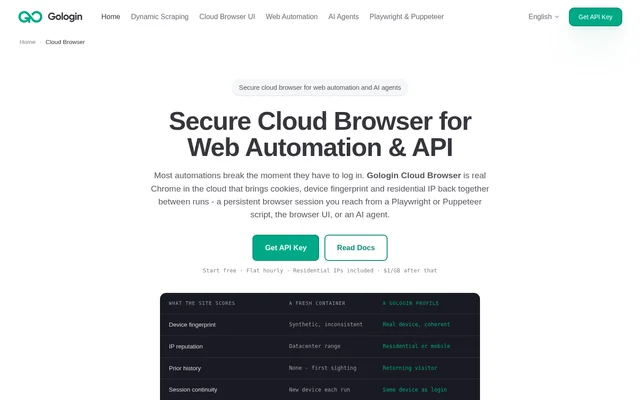
Gologin Cloud Browser is a remote Chrome browser for web automation and AI agents, designed for developers working with authenticated websites and dynamic pages. Gologin Cloud Browser runs pages on remote servers and provides access through automation scripts, a browser UI or an AI agent.
Gologin Cloud Browser uses saved profiles to retain the browser identity associated with a login. A profile brings back cookies and local storage alongside the device fingerprint and residential or mobile IP. The intended result is a returning browser identity rather than a new device on every run.
What Gologin Cloud Browser can do
Gologin Cloud Browser combines persistent browser profiles with remote automation and manual session access. The page describes capabilities for loading JavaScript-driven content, continuing authenticated workflows and intervening when a script encounters a verification step. Developers can use existing automation libraries rather than adopt a separate scripting interface.
- Gologin Cloud Browser preserves cookies, storage, device fingerprints and IP addresses between runs.
- Gologin Cloud Browser accepts Playwright, Python Playwright and Puppeteer connections.
- Gologin Cloud Browser loads JavaScript-rendered feeds and load-more pages.
- Gologin Cloud Browser provides Live View links for observation and manual control.
- Gologin Cloud Browser supports profile creation through the dashboard or API.
- Gologin Cloud Browser supports Claude workflows through the Gologin MCP server.
How Gologin Cloud Browser works
Gologin Cloud Browser access starts with Google sign-up and an API key copied from the dashboard. Users create a profile through the dashboard or an API call, install the relevant automation library, and run a script with their token and profile ID. The profile stores the device, IP and login state.
Gologin Cloud Browser replaces a local browser launch with a connection to the cloud endpoint. The page states that existing selectors, assertions, waits and CI remain unchanged. During a run, a Live View link allows a person to enter an authentication code or complete a difficult form before returning control to the script.
Who Gologin Cloud Browser is for
Gologin Cloud Browser serves developers building browser-based automation, scraping workflows and AI agents. The described use cases focus on sites that require login, pages that render content with JavaScript, and workflows that sometimes need human intervention. Claude users can also manage profiles, proxies and cloud sessions through the Gologin MCP server.
- Gologin Cloud Browser supports scheduled tasks in logged-in portals and dashboards.
- Gologin Cloud Browser supports scraping feeds and pages with load-more controls.
- Gologin Cloud Browser lets developers move Playwright and Puppeteer workloads to remote browsers.
- Gologin Cloud Browser supports agent workflows that prepare account profiles and write automation scripts.
Gologin Cloud Browser strengths and limitations
Gologin Cloud Browser combines saved browser identity, compatibility with established automation libraries and manual access to running sessions. These capabilities support workflows that need continuity after login without removing the option for human intervention. Persistent profiles do not override a website’s authentication rules: the website can still expire a login.
- Gologin Cloud Browser limits free access to 3 runs of up to 15 minutes on 1 parallel session.
- Gologin Cloud Browser charges $1/GB for residential traffic beyond the included allowance.
- Gologin Cloud Browser script access requires a token, profile ID and library setup.
- Gologin Cloud Browser cannot keep a login active beyond the target website’s own expiration.
Gologin Cloud Browser FAQ
What is Gologin Cloud Browser?
Gologin Cloud Browser is a cloud-hosted Chrome browser for web automation, scraping and AI agents. Gologin Cloud Browser preserves cookies, storage, device fingerprints and residential or mobile IP addresses in saved profiles, and supports access through scripts, a browser UI or an AI agent.
Does Gologin Cloud Browser work with Playwright and Puppeteer?
Gologin Cloud Browser supports Playwright, Python Playwright and Puppeteer through a shared cloud browser endpoint. Developers replace the browser launch call with a connection call while retaining existing selectors, assertions, waits and CI. Script access uses an API token and profile ID.
Can users watch or control a Gologin Cloud Browser session?
Gologin Cloud Browser provides a Live View link for each session so users can watch automation and take control manually. Users can complete an authentication code or a difficult form, then hand control back to the script.
How long does Gologin Cloud Browser stay logged in?
Gologin Cloud Browser retains login state for as long as the target website’s own login lasts. Saved profiles preserve cookies, the device fingerprint and IP between runs, but the target website can still expire the session.
Does Gologin Cloud Browser integrate with Claude?
Gologin Cloud Browser supports Claude through the Gologin MCP server, which gives Claude control of profiles, proxies and cloud sessions. The page describes workflows where Claude creates profiles and writes automation scripts against the Cloud Browser API.
From the community
No reviews yet
Be the first to review this tool. What you write helps the next person choose.