What is Grammar Checker?
Grammar Checker is an online English proofreading tool from StudyCrumb for checking grammar, spelling, punctuation, and wording. Grammar Checker serves students and other writers reviewing academic papers, emails, blog posts, and letters. The browser-based tool highlights possible problems and provides correction options rather than only marking text as incorrect.
Grammar Checker uses AI and syntax recognition to evaluate sentences while considering the context of the submitted text. The suggestions cover both errors and opportunities to improve expression. Users can review the highlighted passages to understand possible changes and learn from the suggested wording.
What Grammar Checker can do
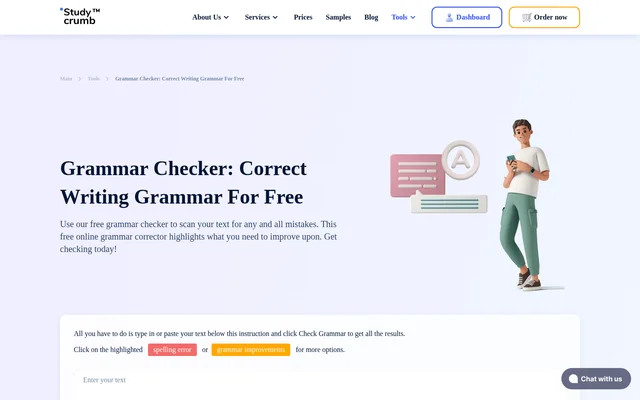
Grammar Checker separates feedback into spelling errors, grammar improvements, and writing suggestions. The color-coded results help users distinguish a misspelled word from a punctuation issue or an alternative expression. Clicking a highlighted passage reveals the available options, and selecting a spelling replacement applies that correction automatically.
- Grammar Checker highlights spelling errors in red.
- Grammar Checker marks grammar improvements in yellow.
- Grammar Checker displays wording suggestions in blue.
- Grammar Checker identifies punctuation and word-case issues.
- Grammar Checker suggests replacements for commonly confused words.
- Grammar Checker considers context when suggesting changes.
How Grammar Checker works
Grammar Checker runs through the input box on the StudyCrumb website. Users open the page in a browser, type or paste text, and press the checking button. The results appear as highlighted words or phrases, which users can click to inspect the suggested corrections and choose suitable replacements.
Grammar Checker accepts individual sentences as well as longer text, provided the submission is under 400000 characters. Users can run additional checks as needed at no charge. The workflow centers on entering text directly into the browser and reviewing the resulting suggestions.
Who Grammar Checker is for
Grammar Checker is intended for people who need assistance with English grammar or are unsure about wording. The page specifically discusses students, academic writing, and everyday written communication. Grammar Checker can support a review before submitting a paper, publishing a blog post, or sending an important message.
- Students can check essays and academic papers before submission.
- Email writers can review grammar and spelling before sending messages.
- Blog authors can inspect sentences for errors and wording improvements.
- Letter writers can check important correspondence.
- English writers can study suggestions to improve future writing.
Grammar Checker pricing and access
Grammar Checker is free to use on the StudyCrumb website, including repeated checks. Access involves opening the tool in a browser and entering text into the checking box. StudyCrumb separately offers writing, editing, and proofreading services for users who want expert assistance beyond the automated grammar check.
Grammar Checker strengths and limitations
Grammar Checker combines free access with distinct visual feedback for spelling, grammar, and expression. The clickable suggestions allow users to inspect proposed changes, while context-aware checking addresses how words fit within a passage. The main stated processing constraint concerns submission length rather than the number of times users can run checks.
- Grammar Checker requires each submitted text to be under 400000 characters.
- Grammar Checker requires users to click highlights to inspect correction options.
- Grammar Checker requires text to be typed or pasted into the browser input box.
Grammar Checker FAQ
What is Grammar Checker?
Grammar Checker is a free online English grammar and spelling tool from StudyCrumb. Grammar Checker highlights mistakes, punctuation issues, and wording improvements in submitted text, then lets users click the highlighted passages to review correction options.
Is Grammar Checker free?
Grammar Checker is free to use, and the page explicitly allows repeated checks at no charge. Grammar Checker is accessed through the StudyCrumb website by typing or pasting text into the browser-based input box.
How do you use Grammar Checker?
Grammar Checker works by checking text entered or pasted into the input box on the StudyCrumb website. Users press the checking button, review highlighted words or phrases, and click those highlights to see suggestions or select replacements.
What do the colors in Grammar Checker mean?
Grammar Checker uses red for spelling errors, yellow for grammar improvements, and blue for writing suggestions. Grammar Checker lets users click each highlighted word or phrase to inspect possible corrections, including spelling replacements, punctuation changes, and alternative wording.
Does Grammar Checker have a text length limit?
Grammar Checker requires submitted text to be under 400000 characters. Grammar Checker cannot process text that exceeds the stated submission requirement, so longer material needs to be reduced before running a check.
Who is Grammar Checker for?
Grammar Checker serves students and other people reviewing English writing, including essays, academic papers, emails, blog posts, and important letters. Grammar Checker also provides suggestions that users can study to improve their wording and learn from corrections.
From the community
No reviews yet
Be the first to review this tool. What you write helps the next person choose.