What is HitPaw Edimakor?
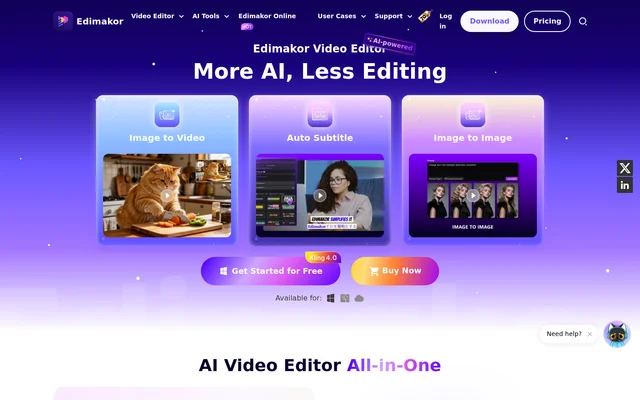
HitPaw Edimakor is an AI video editor that combines multitrack editing with tools for generating video, subtitles, and narration. Content creators, educators, and businesses can use it to build a video from a text prompt or edit footage they already have. The editor also includes stock photos and clips, templates, filters, transitions, and text effects that can be added during editing.
What HitPaw Edimakor can do
HitPaw Edimakor offers separate AI tools for generating footage, editing existing material, and adding speech. The script generator can take an idea and match a generated script with clips, voiceovers, and music. For projects with finished footage, the editor can instead add subtitles, translate the video, or extract several shorter clips.
- HitPaw Edimakor generates video from text or images.
- HitPaw Edimakor adds automatic subtitles to videos.
- HitPaw Edimakor translates and dubs videos with AI voices.
- HitPaw Edimakor creates narration from text.
- HitPaw Edimakor syncs AI avatar lip movements to supplied audio.
- HitPaw Edimakor turns long videos into multiple short clips.
How HitPaw Edimakor works
HitPaw Edimakor is available through an online studio without installing software and as a desktop editor for Windows and macOS. With existing footage, users can cut, crop, or rotate clips and add music, text, and transitions on the timeline. For AI generation, the product page lists models including Google Veo 3, Kling, Nano Banana, Hailuo, Vidu, and Pixverse.
Who HitPaw Edimakor is for
HitPaw Edimakor is suited to creators who publish on YouTube, TikTok, or Instagram, educators who need narrated course videos, and businesses that make advertising, promotional, or training content. The clip maker is aimed at creators who want several posts from a longer video, while translation and dubbing let teams publish versions of the same material in other languages.
- Turn a long video into short posts for social media.
- Add text-to-speech narration to a course video.
- Create promotional or training videos for a business.
- Translate and dub an existing video.
HitPaw Edimakor pricing and plans
HitPaw Edimakor is free to start. The product page says all non-AI features are free and videos can be exported without a limit, but free exports carry a watermark. New users receive 30 free credits to try the AI features. Users who only want AI image generation, video generation, or avatars can buy AI credits on their own.
HitPaw Edimakor strengths and limitations
HitPaw Edimakor combines timeline editing, stock media, subtitles, and voice tools in one editor. That combination lets users finish a conventional edit with cuts and transitions or add generated elements such as narration and avatars. The main differences to consider are whether exports can carry a watermark, whether the project needs AI credits, and whether browser access is suitable on a phone.
- Free video exports include a watermark.
- New users receive 30 free credits to try the AI features.
- Phone users are directed to the web version while the mobile app is under development.
HitPaw Edimakor FAQ
What is HitPaw Edimakor?
HitPaw Edimakor is an AI video editor with a multitrack timeline and tools for generating, editing, and translating videos. It supports text-to-video generation, automatic subtitles, AI dubbing, and short clip creation, alongside conventional tools for cutting and cropping footage.
Is HitPaw Edimakor free?
HitPaw Edimakor is free to start, with free access to non-AI editing features and no limit on watermarked exports. New users receive 30 free credits to try AI features, and credits are also available for purchase.
Can I use HitPaw Edimakor online without installing it?
HitPaw Edimakor can be used in a browser through its online studio without a software installation. The desktop editor is available for Windows and macOS. The product page recommends browser access for phone users because the mobile app is still in development.
Can HitPaw Edimakor translate and dub videos?
HitPaw Edimakor can translate and dub videos using a selection of 400+ AI voices. The editor also includes automatic subtitles and text-to-speech, so users can add captions or generate narration from a script.
Can I use videos made with HitPaw Edimakor commercially?
HitPaw Edimakor supports commercial use of videos created with the editor, according to the product page. The page lists marketing, advertising, training, and promotional content for social media platforms such as YouTube and TikTok as business use cases.
Can HitPaw Edimakor turn a long video into short clips?
HitPaw Edimakor can convert a long video into multiple shorter clips using its AI Clip Maker. The feature is designed for repurposing longer videos for social media platforms such as YouTube, TikTok, and Instagram.
From the community
No reviews yet
Be the first to review this tool. What you write helps the next person choose.