What is InstaWebAI?
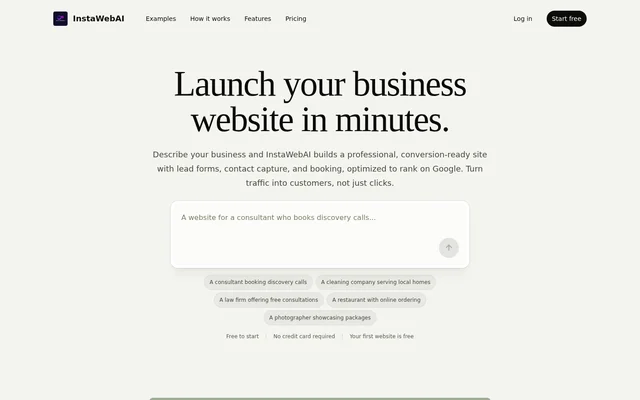
InstaWebAI is an AI website builder that turns a business description into a structured, editable business website. InstaWebAI serves businesses seeking customer inquiries, consultation requests, bookings, and other contact actions. Generated websites include business copy, calls to action, contact forms, and sections that users can refine before publishing.
InstaWebAI presents website creation around business information rather than a blank design canvas. The source describes support for service details, locations, credentials, galleries, and customer contact paths. InstaWebAI also provides responsive layouts for mobile, tablet, and desktop visitors, alongside tools for editing content and search metadata.
What InstaWebAI can do
InstaWebAI combines website generation, editing, lead capture, and search preparation in a business-focused workflow. InstaWebAI generates an initial structure and copy, then lets users change the result manually or through an AI assistant. The listed capabilities cover both the website's presentation and the information visitors need to contact a business.
- InstaWebAI generates website structure, copy, calls to action, and lead forms.
- InstaWebAI edits text, images, sections, layouts, and SEO settings visually.
- InstaWebAI accepts plain-English requests to rewrite content or change designs.
- InstaWebAI can add or regenerate pages and generate or replace images.
- InstaWebAI provides page titles, meta descriptions, and SEO and GEO editing.
- InstaWebAI offers code editing, export, and blogging support on Professional.
How InstaWebAI works
InstaWebAI starts with a brief describing what a business offers, who the business serves, where the business operates, and what visitors should do next. InstaWebAI asks focused follow-up questions when important details are missing. The generated result includes site structure, copy, calls to action, imagery direction, and lead forms.
InstaWebAI then keeps the website editable through a visual editor and AI design assistant. Users can adjust wording, colors, sections, images, layout, and search settings before launch. InstaWebAI handles hosting and updates, while paid plans allow businesses to connect their own domains without managing the technical setup described on the page.
Who InstaWebAI is for
InstaWebAI targets consultants, local service businesses, restaurants, studios, and professional services. InstaWebAI also offers an Agency plan for managing client websites from a shared workspace. The website examples emphasize concrete customer actions, including requesting quotes, scheduling consultations, exploring services, viewing menus, and submitting inquiries.
- InstaWebAI supports consultant sites with service packages and discovery-call calls to action.
- InstaWebAI supports local service sites with service areas and quote request forms.
- InstaWebAI supports restaurant and studio sites with menus, galleries, hours, and booking calls to action.
- InstaWebAI supports professional service sites with practice areas, credentials, and consultation forms.
InstaWebAI pricing and plans
InstaWebAI offers a Free plan at $0 with initial website generation, basic editor access, a built-in contact form, 150 AI credits, and 1 page. Professional costs $25/mo billed monthly and adds custom domains, branding removal, unlimited pages, code editing and export, blogging support, and advanced SEO tools and analytics.
InstaWebAI offers Agency at $49/mo billed monthly, including Professional features plus 10 website projects, up to 10 custom domains, 50,000 AI credits / month, and white-label options. InstaWebAI states that no credit card is needed to start and advertises a 14-day money-back guarantee, with cancellation or downgrading available at any time.
InstaWebAI strengths and limitations
InstaWebAI combines business-specific generation with visual editing, lead forms, and search metadata tools. InstaWebAI does not require design or coding experience for the described creation workflow. However, the page is inconsistent about free publishing: the Free plan lists subdomain publishing, while the FAQ says publishing is available on paid plans.
- InstaWebAI requires a paid plan for custom domains and branding removal.
- InstaWebAI limits the Free plan to 1 page and 150 AI credits.
- InstaWebAI provides conflicting statements about publishing on the Free plan.
InstaWebAI FAQ
What is InstaWebAI?
InstaWebAI is an AI business website builder that turns a business description into an editable website with copy, calls to action, contact forms, and SEO settings. InstaWebAI is aimed at consultants, local businesses, restaurants, studios, and professional services.
Is InstaWebAI free?
InstaWebAI offers a Free plan at $0 with initial website generation, basic editing, a contact form, 150 AI credits, and 1 page, without a credit card. The page lists free subdomain publishing in the plan table but says publishing requires a paid plan in the FAQ.
Do you need coding experience to use InstaWebAI?
InstaWebAI does not require design or coding experience for website creation. Users describe their business, receive a generated website, and edit the result visually. InstaWebAI also accepts plain-English requests to revise sections, pages, and SEO content through an AI assistant.
Can InstaWebAI use a custom domain?
InstaWebAI supports custom domain connections on paid plans. The Professional plan includes connecting a business domain and removing InstaWebAI branding, while the Agency plan supports up to 10 custom domains for managing multiple website projects.
Does InstaWebAI include lead forms?
InstaWebAI includes a built-in contact form in the Free plan and supports lead forms and calls to action in generated websites. InstaWebAI describes inquiry paths for quotes, consultations, bookings, and contact submissions, with submissions available in an inbox on paid plans.
Can you edit an InstaWebAI website after generation?
InstaWebAI keeps generated websites editable through a visual editor and an AI design assistant. Users can change copy, calls to action, sections, images, layouts, and SEO settings, or ask the assistant to rewrite content and add or regenerate pages.
From the community
No reviews yet
Be the first to review this tool. What you write helps the next person choose.