What is Kilo Code?
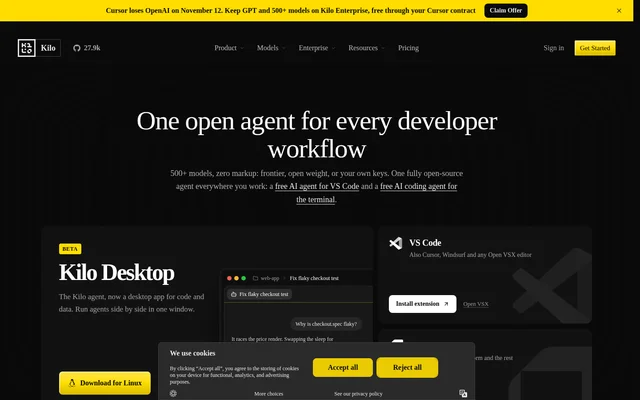
Kilo Code is an open-source AI coding agent for developers working in VS Code, JetBrains IDEs, the terminal, and cloud environments. Kilo Code combines code generation, feature planning, debugging, and remote agent workflows with access to hosted models, local models, and models accessed through existing provider keys.
Kilo Code publishes MIT-licensed source that developers can inspect, fork, modify, and self-host. Kilo Code exposes prompts and context information and states that models are not silently switched. This gives developers visibility into agent behavior alongside a choice of model providers and execution environments.
What Kilo Code can do
Kilo Code includes specialized agents for different stages of software development, allowing developers to change tasks without changing tools. Kilo Code also provides a command center for managing agents across IDEs, CLI, and cloud, including local and remote sessions and parallel work in isolated worktrees.
- Kilo Code writes and refactors code using codebase context.
- Kilo Code plans complex features before implementation.
- Kilo Code reads errors, traces issues, and suggests fixes.
- Kilo Code supports cloud agents and code review workflows.
- Kilo Code routes model requests through Free, Efficient, or Frontier strategies.
- Kilo Code supports parallel agents in isolated worktrees.
How Kilo Code works
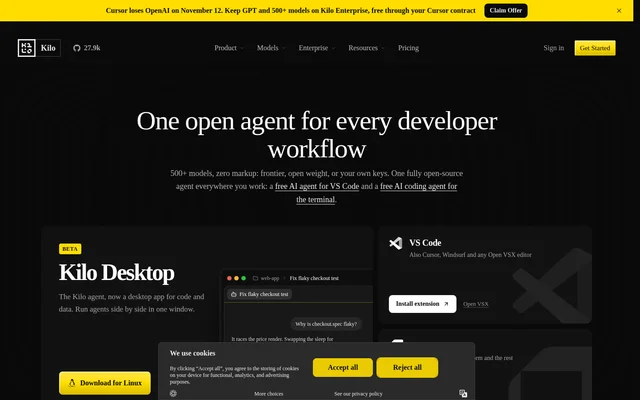
Kilo Code can be installed as a VS Code extension or JetBrains plugin, used through the CLI, or accessed through cloud agents in a browser. Kilo Code also lists Open VSX editor support, Slack access, mobile agent review, and a desktop application in beta for macOS, Windows, and Linux.
Kilo Code separates the agent interface from the choice of model. Developers can use free models, supply provider keys, connect local models through Ollama or LM Studio, or purchase hosted inference through Kilo Gateway. Auto Model selects a model strategy according to the chosen capability and cost tier.
Who Kilo Code is for
Kilo Code serves individual developers, software teams, and enterprises that use AI in development workflows. Kilo Code offers coding assistance for individual work, shared agents and centralized billing for teams, and governance controls for enterprise organizations. The available workflows cover local implementation, remote execution, debugging, and review.
- Kilo Code helps developers write and refactor application code.
- Kilo Code helps developers plan features before coding.
- Kilo Code supports teams sharing custom agents and inference billing.
- Kilo Code supports enterprise model access controls and audit logs.
Kilo Code pricing and plans
Kilo Code offers free individual platform access, while Teams costs $15/user/month and Enterprise uses custom pricing. Teams includes shared custom agents, usage reporting, centralized billing, and team management. Enterprise adds controls such as SSO, audit logs, model and provider restrictions, and SLA commitments.
Kilo Code bills AI inference and cloud compute separately from platform access. Kilo Gateway offers pay-as-you-go inference at exact provider rates without markup, while optional Kilo Pass subscriptions start at $19/mo. Free models, local models, and provider keys are supported without a paid Kilo inference plan. Credit purchases carry a 5% processing fee.
Kilo Code strengths and limitations
Kilo Code combines inspectable source, multiple development environments, and flexible model access. Kilo Code supports both local and hosted inference rather than requiring a single provider. However, free platform access does not include every usage cost or organizational feature, so deployment and billing choices affect the overall cost.
- Kilo Code charges cloud compute separately from model inference.
- Kilo Code reserves team management and enterprise controls for paid plans.
- Kilo Code labels the desktop application as beta.
Kilo Code FAQ
What is Kilo Code?
Kilo Code is an open-source AI coding agent for VS Code, JetBrains, CLI, and cloud workflows. Kilo Code provides specialized agents for code generation, feature planning, debugging, and remote coding and review tasks.
Is Kilo Code free?
Kilo Code offers free individual platform access and supports free models, local models, and existing provider keys without a paid Kilo inference plan. Kilo Code bills paid inference and cloud compute separately, and charges for Teams and Enterprise platform features.
Which editors and platforms does Kilo Code support?
Kilo Code supports VS Code, JetBrains IDEs, CLI, and browser-based cloud workflows. Kilo Code also lists Cursor, Windsurf, Open VSX editors, Slack, mobile agent review, and a beta desktop application for macOS, Windows, and Linux.
Can Kilo Code use local models or my own API keys?
Kilo Code supports local models through Ollama or LM Studio and accepts provider keys from Anthropic, OpenAI, Google, Azure, AWS Bedrock, and other providers. Kilo Code also offers hosted inference through Kilo Gateway.
Is Kilo Code open source and self-hostable?
Kilo Code publishes MIT-licensed source that developers can audit, fork, modify, and self-host. Kilo Code also provides prompt and context visibility and states that models are not silently switched.
How does Kilo Code pricing work?
Kilo Code separates platform access, AI inference, and cloud compute. Kilo Code offers a free individual plan, Teams at $15/user/month, and custom Enterprise pricing. Hosted inference is available through pay-as-you-go Kilo Gateway or optional Kilo Pass subscriptions starting at $19/mo.
From the community
No reviews yet
Be the first to review this tool. What you write helps the next person choose.