What is LegalOn?
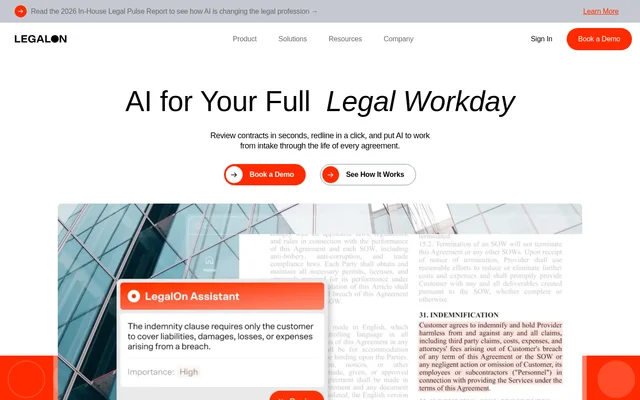
LegalOn is a legal AI platform for in-house legal and contracting teams that need to manage work from the first request through review, negotiation, and post-signature management. LegalOn combines an assistant for legal questions and drafting with contract review, matter tracking, and a searchable agreement repository. LegalOn also lists a review plan for solo attorneys and fractional general counsel.
What LegalOn can do
LegalOn covers both document-level tasks and work across a collection of contracts. The assistant can summarize an agreement or compare versions, while playbook-guided review applies defined positions to contract language. After signature, Vault extracts key fields from agreements and lets teams narrow their analysis to a set of contracts for a specific project.
- LegalOn answers legal questions and drafts contract clauses.
- LegalOn flags contract risks and generates redlines in Microsoft Word.
- LegalOn applies attorney-built or custom playbooks during contract review.
- LegalOn tracks cycle times, attorney workloads, and overdue matters.
- LegalOn extracts contract fields and tracks key dates in Vault.
How LegalOn works
LegalOn gathers missing information from requests that arrive through email, Slack, Microsoft Teams, or forms. The Intake Agent screens requests against the team's standards so standard agreements can move forward automatically. In Microsoft Word, reviewers can check flagged risks and generate redlines using an attorney-built playbook or the team's own guidelines.
LegalOn gives teams a Matter Dashboard with filters for team, matter type, priority, or date. Once an agreement is signed, Vault makes its contents searchable and tracks key dates for tasks such as managing renewals. Teams can also create a project workspace in Vault and generate tables from the agreements in that project.
Who LegalOn is for
LegalOn primarily serves in-house legal and contracting teams, with the site also listing legal operations, procurement, sales, and law firms. The workflows vary by team: a procurement group can review vendor agreements against liability limits, while a technology company's legal team can review data processing agreements against its privacy requirements.
- In-house lawyers can review NDAs and master services agreements against standard positions.
- Legal operations teams can monitor workload and identify overdue matters.
- Procurement teams can review vendor agreements against liability guidelines.
- Healthcare legal teams can review clinical trial agreements and vendor contracts.
LegalOn pricing and plans
LegalOn presents Core Review and Contracting Suite as paid plans and directs prospective customers to book a demo. The provided pricing page text does not state dollar amounts or describe a free plan. Core Review targets solo attorneys and fractional general counsel, while Contracting Suite covers contract work before and after signature for in-house legal teams.
LegalOn lists unlimited assistant chat, AI contract review and redlining, and a searchable document repository under Core Review, along with web access and a Microsoft Word add-in. Contracting Suite adds My Playbooks for custom review guidelines, a Playbook Agent that turns precedents into playbooks, and the Vault Repository for contract intelligence.
LegalOn strengths and limitations
LegalOn combines Word-based redlining with playbooks that help teams apply consistent negotiation positions. The built-in playbooks give reviewers a starting point, and the site says agent outputs are sourced so legal teams can verify them and retain final judgment. Teams comparing plans need to distinguish the standard review features from the options listed under Contracting Suite.
- The provided pricing text does not show dollar amounts.
- The standard Core Review feature list does not include My Playbooks.
- Core Review specifies DOC, DOCX, and PDF support without listing other file formats.
LegalOn FAQ
What is LegalOn?
LegalOn is an AI platform for contract review and legal matter management. LegalOn helps teams triage incoming requests, review and redline agreements, apply negotiation playbooks, and search signed contracts for key information.
How much does LegalOn cost?
LegalOn does not show dollar amounts in the provided pricing page text. LegalOn lists Core Review for solo attorneys and fractional general counsel and Contracting Suite for in-house legal teams, with a demo as the next step.
Who is LegalOn designed for?
LegalOn is designed primarily for in-house legal and contracting teams. LegalOn also lists solutions for legal operations, procurement, sales, and law firms, and offers its Core Review plan for solo attorneys and fractional general counsel.
Does LegalOn work in Microsoft Word?
LegalOn works in Microsoft Word through an add-in included with Core Review. LegalOn can flag risks, generate redlines, and apply an organization's contract standards directly in Word. Core Review also includes access to the web platform.
Can LegalOn use custom contract playbooks?
LegalOn supports custom contract review playbooks through My Playbooks, which is listed under Contracting Suite. LegalOn also provides a Playbook Agent that turns precedents into playbooks, alongside attorney-built playbooks for agreements such as NDAs, MSAs, and DPAs.
Can LegalOn track renewal dates in signed contracts?
LegalOn tracks key dates in signed agreements through its Vault repository to help teams manage renewals. LegalOn also extracts key fields from stored agreements, makes the information searchable, and lets teams analyze selected contracts in a project workspace.
From the community
No reviews yet
Be the first to review this tool. What you write helps the next person choose.