What is LightPDF?
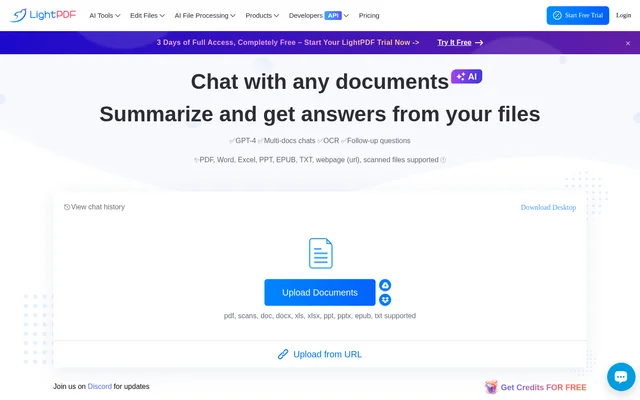
LightPDF is an AI document chatbot for asking questions about files, summarizing content, and extracting information. LightPDF supports research, business analysis, and learning through conversations grounded in uploaded documents. The chat page lists GPT-4, OCR, multi-document conversations, and follow-up questions among its capabilities. Supported material includes searchable PDFs, scanned documents, office files, ebooks, plain text, and webpages.
LightPDF provides clickable references or footnotes alongside answers so users can locate the material behind a response. LightPDF can also present information as paragraphs, lists, outlines, and tables. These output options support tasks such as reviewing reports, organizing learning materials, and turning document data into structured answers.
What LightPDF can do
LightPDF combines document questions and answers with text extraction and content organization. LightPDF supports conversations involving multiple uploaded files rather than restricting every exchange to a single document. Users can request brief summaries, ask follow-up questions, or specify the response format in a prompt. Scanned documents and webpages are supported alongside common document formats.
- LightPDF answers questions about uploaded documents.
- LightPDF summarizes content and generates notes or outlines.
- LightPDF extracts text from scanned files and webpages.
- LightPDF generates tables from data in documents.
- LightPDF links answers to source references.
- LightPDF supports communication in 100+ languages.
How LightPDF works
LightPDF starts with a file upload followed by a clear, specific question about the document. LightPDF provides direct upload controls, URL imports, and access to Google Drive and Dropbox. Users can add files for multi-document conversations and ask follow-up questions. The source guidance emphasizes that more specific prompts produce better results.
LightPDF is available as an online application for Windows, Mac, Android, and iOS devices. LightPDF also offers a Google Chrome extension for access to PDF chat and a G Suite add-on for chatting while opening a PDF in Google Drive. Uploaded files are stored in encrypted cloud storage, and users can completely delete their files at any time.
Who LightPDF is for
LightPDF serves people who need to understand, organize, or question document content. LightPDF describes business analysis using financial reports, laws, business proposals, market trends, and industry news. For learning, LightPDF extracts requested information, organizes materials, and creates outlines. The document chat page also describes brainstorming and exploring ideas as supported uses.
- LightPDF helps business users question uploaded reports and proposals.
- LightPDF helps learners organize materials into structured outlines.
- LightPDF supports research conversations across multiple documents.
- LightPDF supports brainstorming and exploring ideas.
LightPDF pricing and plans
LightPDF offers a limited free version and monthly, yearly, and lifetime paid plans. LightPDF lists the monthly plan at $5.99/mo and the yearly plan at $15.99/yr, alongside a limited-offer lifetime plan at $39.99 one-time. The document chat page states that users can upload a file within 100 pages for free and must upgrade for more.
LightPDF uses AI credits for AI-powered features, with consumption varying by feature. LightPDF provides 1000 credits/month on monthly and yearly plans and 40000 Lifetime Credits on the lifetime plan. Unused monthly credits expire monthly, while lifetime credits remain valid until used. Additional credits are available for purchase, and the yearly plan includes a 3-day free trial.
LightPDF strengths and limitations
LightPDF combines source-linked answers, support for scanned and searchable documents, and conversations across multiple files. LightPDF offers several ways to bring content into a chat, including direct uploads, URLs, cloud storage services, and browser or Google Drive add-ons. The free version provides access with limits, while paid access involves plan-specific credit allowances and device restrictions.
- LightPDF requires an upgrade for document chat uploads beyond 100 pages.
- LightPDF charges AI credits at rates that vary by feature.
- LightPDF expires unused monthly credit allowances each month.
- LightPDF restricts Premium feature use to one device at a time.
LightPDF FAQ
What is LightPDF?
LightPDF is an AI document chatbot that answers questions, summarizes files, and extracts information from uploaded content. LightPDF supports multi-document conversations, OCR for scanned documents, and clickable source references for locating the material behind answers.
Is LightPDF free?
LightPDF offers a free version with limited access to selected features. LightPDF allows free document chat uploads within 100 pages and requires an upgrade for more. Monthly, yearly, and lifetime paid plans are available, and AI-powered features use credits.
Which file types does LightPDF support?
LightPDF supports PDF, scanned files, Word, Excel, PowerPoint, EPUB, and TXT, as well as webpages added by URL. LightPDF can extract text from uploaded content and answer questions across multiple documents.
How do you use LightPDF to chat with documents?
LightPDF requires users to upload a file and enter a clear, specific question about the document. LightPDF then returns an answer and provides source references. Users can ask follow-up questions, add more documents, and request responses as paragraphs, lists, or tables.
Does LightPDF work with Google Drive?
LightPDF supports Google Drive uploads and offers a G Suite add-on for chatting with a PDF while opening the file in Google Drive. LightPDF also lists Dropbox uploads and a Google Chrome extension for accessing PDF chat.
Are documents uploaded to LightPDF private?
LightPDF states that uploaded files are stored in encrypted cloud storage and are never shared with anyone. LightPDF states that users retain ownership and control of their data and can completely delete their files at any time.
From the community
No reviews yet
Be the first to review this tool. What you write helps the next person choose.