What is Little Artist?
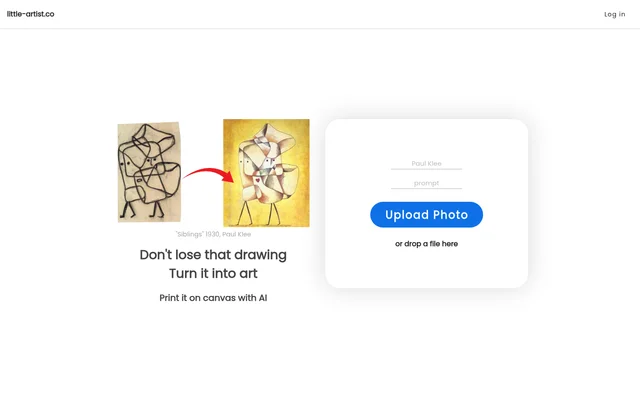
Little Artist is an AI art tool that turns children's drawings into artwork. The site presents it as a way for families to keep a drawing they do not want to lose, with a canvas print as a way to display the finished piece. The starting point is a photo of a drawing the child has already made, rather than a blank canvas on which the child draws directly.
What Little Artist can do
Little Artist combines image upload with an AI transformation of the drawing in the image. The page presents that transformation and canvas printing as parts of the same use case: taking a drawing a child has made and turning it into something that can be kept and displayed. The named examples on the page are Spring by Olivia and Summer by Lucas.
- Little Artist accepts photo uploads through its website.
- Little Artist accepts image files by drag and drop.
- Little Artist uses AI to turn children's drawings into artwork.
- Little Artist presents canvas printing as an option for the finished artwork.
How Little Artist works
Little Artist starts with a photo of a child's drawing. A visitor can select the Upload Photo control or drop an image file onto the page. The site describes AI as the part of the process that transforms the drawing into artwork. Canvas printing is presented as a use for the result, although the page does not explain what happens between uploading the image and getting a print.
Who Little Artist is for
Little Artist is aimed at families who want to preserve or display a child's drawing. A parent might use a favorite drawing as the basis for a canvas print, while a family might use the finished artwork as a keepsake. Testimonials on the page describe displaying children's work as a way to recognize their creativity and encourage further drawing. Those comments reflect individual experiences rather than promised outcomes.
- Preserve a favorite drawing as a keepsake.
- Make artwork based on a drawing for display on canvas.
- Showcase a child's work in a finished piece.
Little Artist pricing and website access
Little Artist provides a photo upload entry point on its website, but the page does not state pricing for either the artwork conversion or canvas printing. The presence of an upload control establishes where the process starts, not whether completing it costs anything. The page also does not list any plans or explain how a visitor obtains a canvas print after the artwork is generated.
Little Artist strengths and what the page leaves open
Little Artist gives visitors two ways to submit an image and shows named examples so they can see how the site presents work based on children's drawings. The page is less specific about the steps after upload. It does not describe the controls available for changing the finished artwork or the arrangements for canvas printing. These are gaps in what the page explains, not evidence that any particular option is unavailable.
Little Artist FAQ
What is Little Artist?
Little Artist is a website that uses AI to turn photos of children's drawings into artwork. The page shows Spring by Olivia and Summer by Lucas as examples and presents canvas printing as a way to preserve and display the finished art.
Is Little Artist free?
Little Artist does not state on its page whether the AI artwork conversion or canvas printing is free. The website provides a photo upload control, but the page does not give prices or list any plans.
Who is Little Artist for?
Little Artist is for parents and families who want to keep or display children's drawings. The website focuses on turning drawings children have already made into finished artwork and presents canvas printing as a way to preserve that work.
How do you upload a drawing to Little Artist?
Little Artist accepts a photo through the Upload Photo control or an image file dropped onto the website. The uploaded image is the starting point for the AI transformation of the child's drawing into artwork.
Can Little Artist turn a child's drawing into a canvas print?
Little Artist presents canvas printing as a way to display the artwork its AI creates from a child's drawing. The website describes starting with a photo or dropped image file, but does not explain the steps for obtaining the print.
From the community
No reviews yet
Be the first to review this tool. What you write helps the next person choose.