What is Looking Glass Blocks?
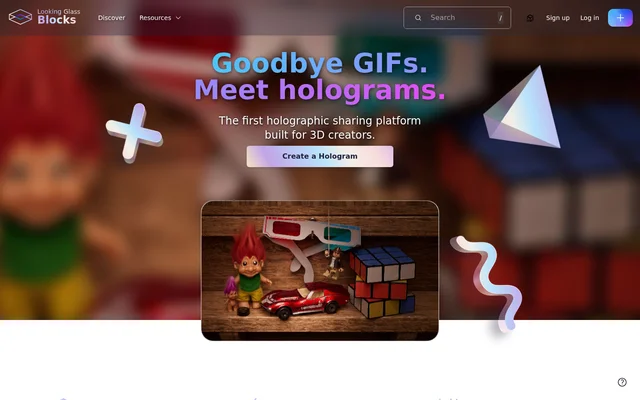
Looking Glass Blocks is a holographic sharing platform for 3D creators. Its built-in AI conversion tool turns 2D images into holograms and generates depth maps from uploaded images. The product page describes uses for art, photographs and stills, as well as ways to share the resulting holograms online or display them on Looking Glass displays.
What Looking Glass Blocks can do
Looking Glass Blocks combines image conversion with tools for presenting and sharing holograms. Creators can upload images, generate depth maps and place the resulting holograms on the web. The product page also describes a discovery area where people can find holograms made by other creators.
- Looking Glass Blocks converts 2D images into holograms using a built-in AI tool.
- Looking Glass Blocks generates a depth map from an uploaded image.
- Looking Glass Blocks lets creators share holograms across devices.
- Looking Glass Blocks embeds holograms on the web with a single line of code.
- Looking Glass Blocks casts holograms directly to Looking Glass displays.
- Looking Glass Blocks presents 3D scenes without lighting or texture adjustments.
How Looking Glass Blocks works
Looking Glass Blocks starts with an image upload. The product page says the service generates a depth map and hologram within seconds, after which the hologram can be shared. For web presentation, creators can use a single line of code to embed holograms in places such as websites and galleries. The page also says holograms can be cast directly to Looking Glass displays.
Who Looking Glass Blocks is for
Looking Glass Blocks is aimed at 3D creators who want to make and share holograms. Its image conversion workflow also applies to artwork, photographs and stills named on the product page. The sharing and embedding options provide ways to present that work online, while the discovery area lets creators explore holograms from others.
- Turn artwork into a hologram for online sharing.
- Convert a photograph or still into a hologram with a depth map.
- Embed a hologram on a website or in a gallery.
- Cast a hologram to a Looking Glass display.
Strengths and limitations of Looking Glass Blocks
Looking Glass Blocks brings image conversion and hologram sharing together in a single service. The product page says holograms can be viewed on any device, embedded with a single line of code and cast to Looking Glass displays. It also says 3D scenes can be presented without adjustments to lighting or texture. The page does not state pricing or plan details.
Getting started with Looking Glass Blocks
Looking Glass Blocks provides a Create a Hologram option on its product page. The described workflow is to upload an image and let the built-in conversion tool generate a depth map and hologram. Creators can then share the hologram or embed it on the web. The page also offers a way to discover holograms from other creators.
Looking Glass Blocks FAQ
What is Looking Glass Blocks?
Looking Glass Blocks is a holographic sharing platform for 3D creators. Its built-in AI tool converts 2D images into holograms and generates depth maps, with options to share or embed the results online.
How does Looking Glass Blocks create a hologram from an image?
Looking Glass Blocks uses a built-in AI conversion tool to turn an uploaded image into a hologram. The product page says the service generates a detailed depth map and hologram within seconds.
Can you embed Looking Glass Blocks holograms on a website?
Looking Glass Blocks supports embedding holograms on the web with a single line of code. The product page gives websites and galleries as examples of places where creators can present their holograms.
Can Looking Glass Blocks holograms be viewed on different devices?
Looking Glass Blocks says its holograms can be shared and embedded across the internet on any device. Creators can also cast holograms directly onto Looking Glass displays, according to the product page.
Who is Looking Glass Blocks for?
Looking Glass Blocks is designed for 3D creators who want to create and share holograms. The product page identifies art, photographs and stills as examples of images that can be given another dimension.
From the community
No reviews yet
Be the first to review this tool. What you write helps the next person choose.