What is Magic Patterns?
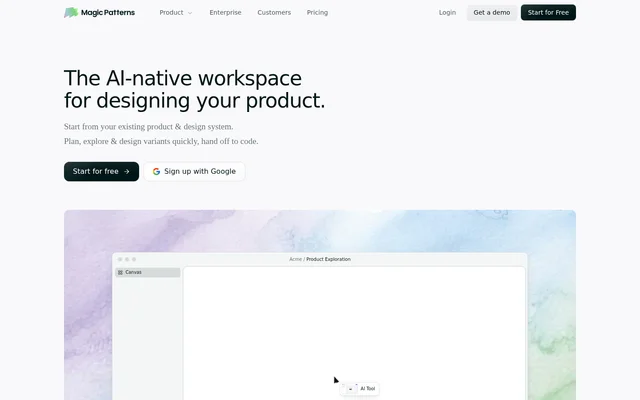
Magic Patterns is an AI design workspace that helps product teams generate interfaces and build prototypes from feature ideas, prompts, or requirements. Magic Patterns supports the work between early exploration and implementation: planning a feature, comparing possible designs, collecting user feedback, and handing a selected direction to a coding agent.
Magic Patterns focuses on designing within the context of an existing product rather than treating each concept as an isolated mockup. Teams can supply their product context and design system so generated concepts reflect existing styling, components, and design rules. The workspace also brings design and engineering into the same live collaboration process.
What Magic Patterns can do
Magic Patterns combines UI generation, design-system matching, and collaborative prototyping in a shared canvas. Magic Patterns lets teams explore alternatives before committing to a full build, while keeping product references and design context alongside the work. The stated capabilities cover both creating prototypes and moving a chosen design toward implementation.
- Magic Patterns generates high-fidelity UI from prompts, requirements, or feature ideas.
- Magic Patterns imports design systems and matches existing app styling.
- Magic Patterns brings PRDs, repositories, and references onto one canvas.
- Magic Patterns lets teams compare design directions side by side.
- Magic Patterns supports live editing, sharing, and iteration with teammates.
- Magic Patterns supports handing a selected design to a coding agent.
How Magic Patterns works
Magic Patterns starts with the context a team brings to a design task, including an existing product, components, design rules, a PRD, a repository, or references. A prompt, requirement, or feature idea becomes the basis for generated UI. Teams can then explore variants and compare directions on the shared canvas.
Magic Patterns supports an iterative workflow in which design and engineering edit and review prototypes together through real-time multiplayer collaboration. Teams can test prototypes directly with customers before committing to full implementation. Once a direction has been selected, the workflow includes a handoff to a coding agent.
Who Magic Patterns is for
Magic Patterns is aimed at product teams, including designers and engineers working on new features and existing interfaces. Magic Patterns supports teams that want to gather customer feedback from prototypes, explore alternatives before development, or maintain visual consistency with an established product. Shared editing also supports collaborative design reviews.
- Product teams can prototype feature ideas for customer experiments.
- Design teams can explore variants using existing components and styling.
- Designers and engineers can review and revise prototypes together.
- Teams can compare directions before handing a design to a coding agent.
Magic Patterns pricing and plans
Magic Patterns offers a limited free tier alongside paid per-seat plans. Starter costs $20/seat/month, Business costs $100/seat/month, and Enterprise uses custom pricing. Magic Patterns provides a Google sign-up option and directs visitors to its pricing page for plan information. The supplied page does not specify the free tier’s usage allowance or detailed differences between paid plans.
Magic Patterns strengths and limitations
Magic Patterns combines existing-product styling, design-system imports, and live team editing with AI-generated prototypes. These capabilities support consistent interface exploration and customer testing before a full build. Magic Patterns also states that it is SOC 2 and ISO 27001 certified, with reports available through its Trust Center. Access remains subject to the limited free tier or the relevant paid pricing model.
- Magic Patterns limits access on the free tier.
- Magic Patterns charges per seat for Starter and Business plans.
- Magic Patterns uses custom pricing for Enterprise.
Magic Patterns FAQ
What is Magic Patterns?
Magic Patterns is an AI design tool for product teams that generates UI and helps create prototypes from prompts, requirements, or feature ideas. Magic Patterns supports design exploration, customer feedback, real-time collaboration, and handoff to a coding agent.
Is Magic Patterns free?
Magic Patterns offers a limited free tier, plus paid per-seat plans. Starter costs $20/seat/month, Business costs $100/seat/month, and Enterprise has custom pricing. Magic Patterns does not specify the free tier’s usage limits in the supplied page text.
Can Magic Patterns match an existing design system?
Magic Patterns can copy an existing app’s styling and import a design system so generated UI stays consistent with existing components. Magic Patterns also accepts design rules to keep new concepts aligned with a team’s product style.
Does Magic Patterns support team collaboration?
Magic Patterns supports real-time multiplayer collaboration so design and engineering teams can edit, share, and iterate on prototypes together. Magic Patterns also provides a shared canvas for product context, references, and side-by-side comparison of design directions.
Can Magic Patterns be used for customer testing?
Magic Patterns supports creating prototypes of new features and testing them directly with customers. Magic Patterns positions this workflow as a way for product teams to explore ideas, iterate quickly, and gather feedback before committing to full implementation.
Is Magic Patterns SOC 2 and ISO 27001 certified?
Magic Patterns states that it is SOC 2 and ISO 27001 certified for enterprise AI design. Magic Patterns makes certification reports available through its Trust Center and describes its design workspace as secure and compliant.
From the community
No reviews yet
Be the first to review this tool. What you write helps the next person choose.