What is MakeLanding?
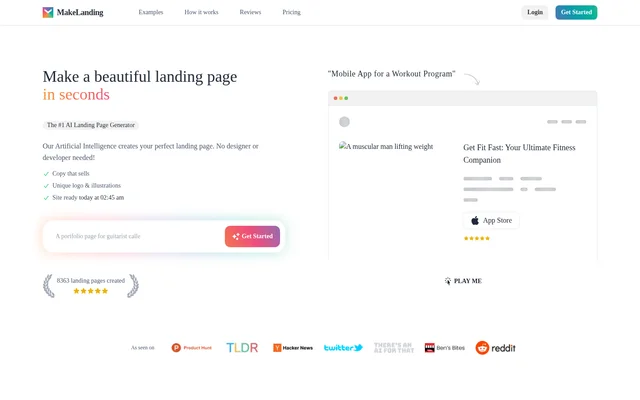
MakeLanding is an AI landing page generator that turns a short project description into a website with copy, branding and illustrations. MakeLanding is intended for people who want a business or project page without hiring a designer or developer. The website presents examples for mobile apps, sales funnels, courses, podcasts and other promotional pages.
MakeLanding generates a functional landing page containing a logo, favicon, illustrations, buttons and written content. MakeLanding also provides editing tools rather than limiting users to the initial generated result. The site describes its pages as responsive and SEO friendly, and offers pre-made components for portfolios, SaaS products, communities and courses.
What MakeLanding can do
MakeLanding combines page generation, copywriting and image creation with tools for revising the result. MakeLanding supports headlines in 50+ languages, including English, Spanish, Chinese and Hindi. Visual options include generated illustrations, uploaded business pictures and a stock photo library, while buttons can link to destinations such as an app listing, crowdfunding campaign or course.
- MakeLanding generates landing page copy, logos, favicons and illustrations.
- MakeLanding offers 6 illustration art styles and 12 color themes.
- MakeLanding provides a library of 5M stock photos.
- MakeLanding lets users change text, buttons, links, colors and fonts.
- MakeLanding allows users to add or remove page sections.
- MakeLanding provides analytics and custom domains on selected plans.
- MakeLanding offers public API generation on Premium.
How MakeLanding works
MakeLanding starts with a description of a business, its activities or its products. MakeLanding then generates the landing page and logo, which the FAQ says takes up to a minute. Users can subsequently upload pictures, revise copy, edit buttons and adjust sections before sharing the generated site through a MakeLanding link.
MakeLanding also supports landing page generation through a public API instead of the user interface, with API access listed under Premium. MakeLanding states that generated code uses HTML, CSS with Tailwind classes and DaisyUI, and JavaScript. The page does not describe a separate installation process or specify code export options.
Who MakeLanding is for
MakeLanding addresses entrepreneurs and people building pages without a technical background. Customer accounts on the page also describe founders testing ideas and freelancers or digital marketers creating client landing pages. MakeLanding's templates and examples cover product promotion, audience building and directing visitors toward a specific external call to action.
- MakeLanding supports promotional pages for mobile apps and SaaS products.
- MakeLanding supports sales funnels and business campaign pages.
- MakeLanding supports pages promoting courses, podcasts and communities.
- MakeLanding supports portfolios and links to crowdfunding or charity campaigns.
MakeLanding strengths and limitations
MakeLanding brings page layout, generated branding, multilingual headlines and content editing into the same workflow. MakeLanding also states that users fully own generated landing pages and AI images and may resell them. These capabilities support both personal business pages and client work, but continued page access depends on maintaining the subscription.
- MakeLanding does not offer refunds, but states that credits can be offered for another attempt.
- MakeLanding retains page data after cancellation but prevents anyone from accessing those pages.
- MakeLanding restricts analytics and custom domains to Pro and Premium.
- MakeLanding lists API access only under Premium.
MakeLanding FAQ
What is MakeLanding?
MakeLanding is an AI landing page generator that creates a website from a short project description. MakeLanding generates copy, a logo, a favicon, illustrations and buttons, then lets users edit content and share the finished page through a site link.
Is MakeLanding free?
MakeLanding is a paid subscription service and does not offer free previews. MakeLanding lists Starter, Pro and Premium subscriptions, but its displayed monthly prices conflict with its structured pricing offers. MakeLanding also states that refunds are unavailable, although credits may be offered for another attempt.
Can you edit a MakeLanding page after generation?
MakeLanding includes a site editor for changing copy, buttons, links and illustrations. MakeLanding also allows uploaded pictures, added or removed sections, and changes to colors and fonts, so users can revise the generated page before sharing its link.
Does MakeLanding have an API or support custom domains?
MakeLanding offers a public API for generating landing pages instead of using the user interface, with API access listed under Premium. MakeLanding lists custom domains under Pro and Premium, alongside analytics and customer support.
What happens to MakeLanding pages after cancellation?
MakeLanding keeps generated landing pages and their associated data after a subscription is cancelled, but those pages become inaccessible. MakeLanding states that neither the subscriber nor anyone else can access the pages after cancellation.
Can you resell pages and images created with MakeLanding?
MakeLanding states that users have full ownership of their generated landing pages and AI-generated images, including permission to resell them. MakeLanding's ownership statement covers both the landing page and the images generated with AI.
From the community
No reviews yet
Be the first to review this tool. What you write helps the next person choose.