What is Miro AI?
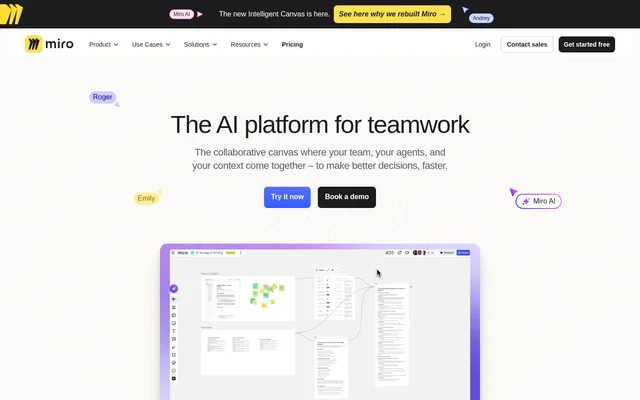
Miro AI is an AI platform for teamwork that combines a collaborative canvas with team context and AI agents. Miro AI uses work already on the canvas to support planning, problem-solving, and decision-making. The intended workflows include brainstorms, design sprints, retrospectives, and other activities where teams develop ideas and organize information together.
Miro AI presents the canvas as a prompt rather than treating each request as an isolated instruction. Existing team contributions become visual context for AI assistance. Miro AI describes this approach as building on work already available, with Sidekicks able to create and organize canvas outputs rather than only generate content.
What Miro AI can do
Miro AI combines canvas-aware assistance with AI Playbooks for specific team workflows. Miro AI describes Sidekicks as working with Miro structures, including frames, timelines, kanbans, and diagrams. The playbooks extend this approach to planning, product development, prototyping, research, architecture, campaigns, and service design through Flows and Sidekicks.
- Miro AI turns planning workshops into aligned OKRs and traction dashboards.
- Miro AI turns brainstorms and bullet points into strategy, requirements, and metrics.
- Miro AI transforms sketches and concepts into clickable prototypes.
- Miro AI synthesizes research into insights.
- Miro AI converts engineering discussions into diagrams and decision records.
- Miro AI turns campaign briefs into concepts, content plans, and assets.
How Miro AI works
Miro AI uses the team’s canvas as context for AI-assisted work. Brainstorms, design sprints, and retrospectives contribute information that Miro AI can build on when addressing a challenge. Miro AI describes a process of understanding the work, asking questions, and helping create a plan rooted in the team’s context and goals.
Miro AI uses Sidekicks to work within the canvas, including structured elements such as frames and timelines. Miro AI also offers AI Playbooks showing how Flows and Sidekicks apply to particular tasks. These examples connect starting materials, such as workshop notes or sketches, with outputs such as dashboards, prototypes, and decision records.
Who Miro AI is for
Miro AI is for teams that collaborate on planning, product development, research, design, and engineering work. Miro AI also addresses campaign creation, competitor analysis, process transformation, and service blueprints. The listed use cases focus on turning shared material into structured outputs that teams can review, develop, and align around.
- Miro AI supports planning teams developing OKRs from workshops.
- Miro AI supports product teams developing requirements from brainstorms.
- Miro AI supports design teams testing and iterating on clickable prototypes.
- Miro AI supports engineering teams documenting architecture discussions.
Miro AI strengths and scope
Miro AI connects existing visual collaboration with AI-generated canvas outputs. Miro AI’s stated strengths include reusing team context, working with structured visual elements, and providing playbooks across different business workflows. The examples cover both exploratory activities, such as brainstorming and research, and more structured deliverables, such as requirements, dashboards, and service blueprints.
Getting started with Miro AI
Miro AI provides a trial entry point and an option to book a demonstration on the product page. Miro AI also links to AI Playbooks for exploring specific workflows. The playbook topics include planning and strategy, product development, rapid prototyping, competitor analysis, research synthesis, technical architecture, campaign creation, and service blueprints.
Miro AI FAQ
What is Miro AI?
Miro AI is an AI platform for teamwork built around a collaborative canvas. Miro AI uses team context from activities such as brainstorms, design sprints, and retrospectives to help teams solve problems and create structured outputs.
What can you use Miro AI for?
Miro AI supports planning, product development, rapid prototyping, competitor analysis, research synthesis, technical architecture, campaign creation, and service blueprints. Miro AI’s playbooks describe outputs including OKRs, requirements, clickable prototypes, diagrams, decision records, and campaign assets.
How does Miro AI use canvas content?
Miro AI uses the entire canvas as a prompt, drawing on existing team work as visual context. Miro AI builds on brainstorms, design sprints, and retrospectives to help address challenges and create plans rooted in team goals.
What are Sidekicks in Miro AI?
Miro AI includes Sidekicks that generate content and work with Miro canvas structures. Miro AI describes Sidekicks as using frames, timelines, kanbans, and diagrams, while AI Playbooks show workflows involving both Flows and Sidekicks.
Can Miro AI create prototypes?
Miro AI includes a Rapid Prototyping playbook that transforms sketches and concepts into clickable prototypes. Miro AI describes these prototypes as outputs that teams can test and iterate on.
How can teams access Miro AI?
Miro AI offers a trial entry point and a demonstration booking option on the product page. Miro AI also provides links to AI Playbooks that explain workflows for planning, product development, research, and other team activities.
From the community
No reviews yet
Be the first to review this tool. What you write helps the next person choose.