What is Mix Check Studio?
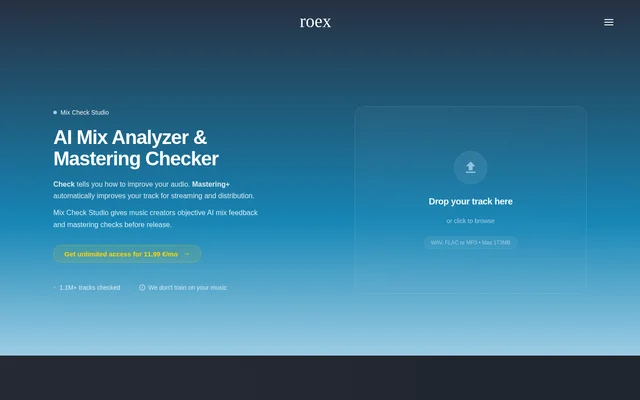
Mix Check Studio is a web-based AI mix analyzer and mastering checker from RoEx for music creators. Mix Check Studio reviews uploaded audio and provides feedback on a mix or master before release. The service supports producers, independent artists, mixing engineers and record labels, with free analysis and optional paid mastering enhancements.
Mix Check Studio separates checking a track from applying audio processing. The Check feature produces an easy-to-read report identifying areas to improve, while Mastering+ optionally applies AI-powered changes to clarity, loudness and stereo imaging. This gives music creators access to analysis without requiring a mastering download purchase.
What Mix Check Studio can do
Mix Check Studio examines several technical aspects of a track rather than reporting on loudness alone. Mix Check Studio evaluates frequency balance, dynamics, stereo presentation and tonal profile, and adapts the analysis to the selected musical genre. Supported genre examples include electronic, hip-hop, rock, jazz and orchestral music.
- Mix Check Studio evaluates EQ balance across frequency bands.
- Mix Check Studio assesses dynamic range and compression levels.
- Mix Check Studio checks integrated loudness relative to streaming targets.
- Mix Check Studio analyzes stereo width and imaging.
- Mix Check Studio evaluates the track's tonal profile.
- Mix Check Studio offers optional Mastering+ processing for clarity, loudness and stereo imaging.
How Mix Check Studio works
Mix Check Studio starts with a drag-and-drop track upload in the web application. Mix Check Studio accepts WAV, FLAC and MP3 files up to 173 MB, analyzes the audio and returns instant AI feedback in a report highlighting what to improve. The analysis takes the selected genre into account.
Mix Check Studio then offers an optional enhancement step through Mastering+. Music creators can use the analysis to identify problems before release or choose AI-powered processing to adjust clarity, loudness and stereo imaging automatically. Mastering+ downloads are available through individual purchases or the Studio Pro monthly subscription.
Who Mix Check Studio is for
Mix Check Studio serves music creators at both mix-review and release-preparation stages. Mix Check Studio identifies bedroom producers, independent artists, mixing engineers and record labels as intended users. The stated use cases range from testing a personal mix to reviewing a master before release, with the free Check feature available across those audiences.
- Bedroom producers can use Mix Check Studio to test their mixes.
- Independent artists can use Mix Check Studio when preparing tracks for distribution.
- Mixing engineers can use Mix Check Studio for a second opinion.
- Record labels can use Mix Check Studio to check masters before release.
Mix Check Studio strengths and limitations
Mix Check Studio combines free, unlimited checking with genre-adapted feedback across several audio characteristics. Mix Check Studio also offers a separate processing option for creators who want mastering enhancements after reviewing their audio. The main practical constraints are the upload size limit and the distinction between free analysis and paid Mastering+ downloads.
- Mix Check Studio accepts uploads up to 173 MB.
- Mix Check Studio charges for individual Mastering+ downloads.
- Mix Check Studio reserves unlimited Mastering+ downloads for Studio Pro subscribers.
Mix Check Studio FAQ
What is Mix Check Studio?
Mix Check Studio is a free online AI mix analyzer and mastering checker from RoEx. Mix Check Studio evaluates uploaded audio for EQ balance, dynamics, loudness, stereo width and tonal profile, then provides a report highlighting areas to improve.
Which file formats does Mix Check Studio support?
Mix Check Studio supports WAV, FLAC and MP3 uploads up to 173 MB. Mix Check Studio uses a drag-and-drop upload workflow and returns an easy-to-read analysis report with feedback on the submitted mix or master.
Who is Mix Check Studio for?
Mix Check Studio is for bedroom producers testing mixes, independent artists preparing tracks for distribution, mixing engineers seeking a second opinion and record labels checking masters before release. Mix Check Studio makes its Check analysis feature available for free.
What does Mastering+ do in Mix Check Studio?
Mix Check Studio offers Mastering+ as optional AI-powered processing to enhance clarity, loudness and stereo imaging automatically. Mix Check Studio provides Mastering+ downloads through individual paid purchases or a Studio Pro subscription with unlimited monthly downloads.
Does Mix Check Studio adapt its analysis to music genres?
Mix Check Studio adapts its AI analysis to the selected musical genre. Mix Check Studio lists electronic, hip-hop, rock, jazz and orchestral as examples and checks EQ balance, dynamics, loudness, stereo width and tonal profile.
From the community
No reviews yet
Be the first to review this tool. What you write helps the next person choose.