What is Morgen?
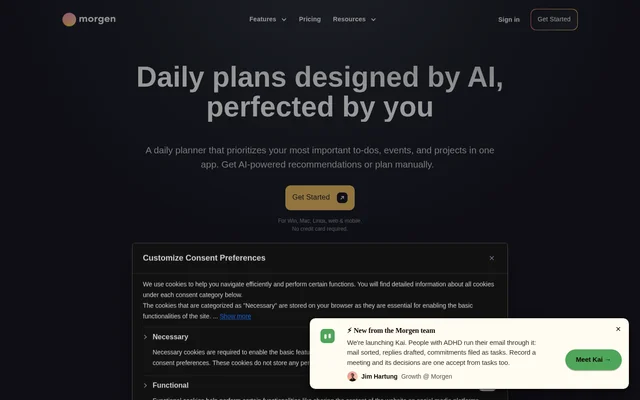
Morgen is an AI-powered daily planner for professionals and teams who want to manage calendars, tasks, and scheduling together. Morgen brings work and personal commitments into a shared planning view and lets users choose between AI recommendations and manual scheduling. The focus is on turning tasks into scheduled time while retaining control over the plan.
Morgen connects calendar services and task management tools rather than requiring users to keep switching between them. Morgen is available for Windows, macOS, Linux, iOS, Android, and the web. Paid individual and team subscriptions provide access, with a full-access trial available before subscribing.
What Morgen can do
Morgen combines daily planning with calendar and task management. The AI Planner recommends when to work on tasks, considers capacity, and highlights deadlines at risk. Calendar features cover meeting booking, availability, reminders, and automatic time reservations around events, while connected task tools supply work to schedule.
- Morgen schedules tasks from Notion, ClickUp, Linear, and Todoist into calendars.
- Morgen uses Frames to guide AI recommendations around an ideal week.
- Morgen helps reprioritize plans when scheduling conflicts occur.
- Morgen displays due dates and reminds users about unfinished tasks.
- Morgen provides booking links with real-time availability checks.
- Morgen shows colleagues' availability and recommends meeting times.
- Morgen synchronizes selected events between calendars.
- Morgen automatically reserves travel time and custom meeting buffers.
How Morgen works
Morgen brings connected calendars and tasks into the same app. Users can combine calendars from services such as Google, Outlook, Apple, and Fastmail, then filter and schedule tasks from connected tools. Calendar Sets provide customizable shortcuts for viewing all calendars together, individually, or in selected groups.
Morgen uses Frames to represent an ideal week and guide the AI Planner. Recommendations appear directly in the calendar for review. Users can move tasks or change their duration, and the AI Planner adapts in real time. Users then confirm the plan to schedule tasks and reserve the corresponding calendar time.
Who Morgen is for
Morgen serves professionals and teams coordinating tasks, meetings, and personal commitments across different tools. Morgen also offers discounts for students, academics, and nonprofits. The combination of calendar consolidation, task scheduling, and availability management supports people who need to plan focused work alongside meetings and deadlines.
- Morgen helps professionals reserve calendar time for important tasks and projects.
- Morgen helps teams find meeting times that respect colleagues' focus time.
- Morgen helps users coordinate work and personal commitments across multiple calendars.
- Morgen helps users monitor deadlines and reschedule unfinished work.
Morgen strengths and limitations
Morgen combines broad calendar and task integrations with a planning workflow that leaves final scheduling decisions to the user. Morgen supports Linux as well as Windows, macOS, mobile devices, and browsers. Automatic travel time, buffers, and calendar synchronization extend the app beyond task placement into managing availability around events.
- Morgen provides a time-limited free trial rather than a stated ongoing free plan.
- Morgen requires yearly billing for the lower-priced individual yearly plan.
- Morgen requires a minimum of 2 seats for team subscriptions.
Morgen FAQ
What is Morgen?
Morgen is an AI-powered daily planner that combines calendars, task management, time blocking, and meeting scheduling. Morgen lets professionals and teams schedule manually or review AI recommendations before confirming tasks in their calendars.
Is Morgen free?
Morgen offers a 14-day full-access free trial with no credit card required, followed by paid individual or team subscriptions. Morgen lists monthly and yearly billing options and a 30-day money-back guarantee.
Which calendars and task managers does Morgen integrate with?
Morgen lists integrations with Google Calendar, Outlook, iCloud, Fastmail, and Zoho, alongside Notion, Todoist, Linear, ClickUp, Obsidian, Google Tasks, and Microsoft To-Do. Morgen states that all plans include unlimited calendar and task integrations.
How does Morgen's AI Planner work?
Morgen uses Frames, templates of an ideal week, to guide AI scheduling recommendations shown in the calendar. Users can move tasks or adjust durations before confirming the plan. Morgen also helps reprioritize conflicts and highlights tasks at risk of missing deadlines.
Does Morgen work on Linux and mobile?
Morgen supports Windows, macOS, Linux, iOS, Android, and the web. Morgen brings calendars and tasks into the same planning app, with AI-assisted time blocking, manual scheduling, reminders, and meeting scheduling features.
Can Morgen automate travel time and meeting buffers?
Morgen automatically blocks travel time around events using location, travel mode, and time of day. Morgen can also schedule custom meeting buffers and synchronize selected events between calendars to reflect availability and help avoid double bookings.
From the community
No reviews yet
Be the first to review this tool. What you write helps the next person choose.