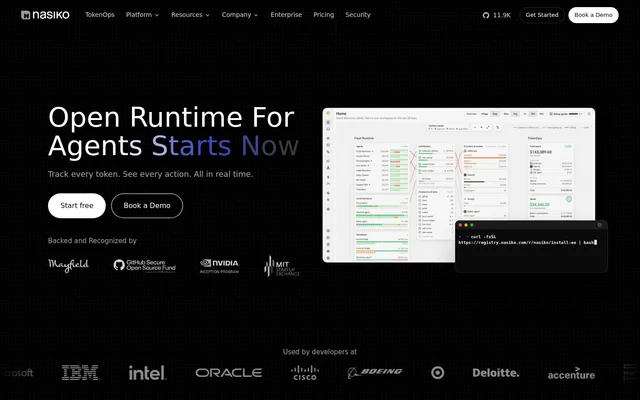
What is Nasiko?
Nasiko is an AI agent runtime for developers and engineering teams that need to see what their agents spend and control which tools they can call. Nasiko sits between agents and the models and tools they already use. Nasiko traces runs, records tool-call decisions, and provides a registry for managing and deploying agents, skills, and MCPs.
What Nasiko can do
Nasiko combines model routing, cost monitoring, and tool policies in one runtime. The Agent Gateway handles model calls across providers, while the MCP gateway connects agents to tools and data. The runtime also compresses tool output, such as logs or search results, before passing it to the model.
- Nasiko traces agent runs and tracks token usage and costs.
- Nasiko routes model requests through a shared gateway.
- Nasiko applies policies that allow, require approval for, or block tool calls.
- Nasiko lets teams set spending limits and receive alerts.
- Nasiko publishes, versions, and deploys artifacts through its registry.
How Nasiko works
Nasiko connects to model providers directly or through routing services such as OpenRouter, exposing them through one API. Users supply their own model keys and can keep their existing agent frameworks and MCP servers. Nasiko says its CLI can take an existing agent from a local machine to a registered and traced deployment without code changes. The desktop app supports local agents on macOS, Windows, and Linux.
Who Nasiko is for
Nasiko serves individual builders deploying agents and teams that need a shared view of usage, spending, and access. Developers can run agents locally or deploy them in the cloud. Teams can use Pro to manage access through access control lists, coordinate multi-agent flows, and view their agents together.
- Developers can trace agent runs and see where model costs accrue.
- Teams can define which tools agents are allowed to call.
- Builders can publish and share agents and MCPs on paid plans.
- Engineering teams can route requests across model providers.
Nasiko pricing and plans
Nasiko offers a free plan with no card requirement, 2 cloud agents, and unlimited local agents in the desktop app. Individual costs $20 a month and supports up to 10 cloud agents. Pro costs $99 a month per team, has no per-seat fee, and supports unlimited cloud agents within the team’s compute. Enterprise is quoted separately and uses a yearly license for dedicated infrastructure. Model providers bill users directly for usage on every plan.
Strengths and limitations
Nasiko includes its model gateway, MCP gateway, and monitoring on every plan. In Nasiko’s gpt-4o test on system logs, tool output compression reduced input tokens by 42% and cost per correct answer by 40%, with both settings answering 44 of 50 questions correctly. The record lookup test showed a trade-off: correct answers fell from 100 of 102 without compression to 96 of 102 with compression.
- Free cloud agents sleep when idle and wake on demand.
- The free plan does not include writable or public agents.
- Access control lists and multi-agent flows require Pro or Enterprise.
- Model usage is billed separately by providers.
Nasiko FAQ
What is Nasiko?
Nasiko is a runtime for AI agents that tracks token usage and costs, routes requests to model providers, and governs tool access. Nasiko works with existing agent frameworks and MCP servers and records decisions about which tool calls are allowed or blocked.
Is Nasiko free?
Nasiko offers a free plan with no time limit or card requirement, including 2 cloud agents and unlimited local agents in the desktop app. Nasiko also offers paid plans, and model providers bill users directly for model usage.
Can Nasiko work with an existing model gateway?
Nasiko can work alongside an existing gateway or router rather than replacing it. Nasiko connects to model providers directly or through routing services such as OpenRouter and handles requests through one API while applying token optimization and access controls.
Can Nasiko run AI agents locally?
Nasiko can run unlimited local agents through its desktop app on macOS, Windows, and Linux. Nasiko includes local agents on every plan, so developers can use the desktop runtime without paying for a cloud agent plan.
How does Nasiko reduce token usage?
Nasiko reduces token usage by compressing tool output before the model reads it. In Nasiko’s gpt-4o test on system logs, compression used 42% fewer input tokens and preserved the same 44 correct answers out of 50. A separate record lookup test produced fewer correct answers with compression enabled.
From the community
No reviews yet
Be the first to review this tool. What you write helps the next person choose.