What is Notability?
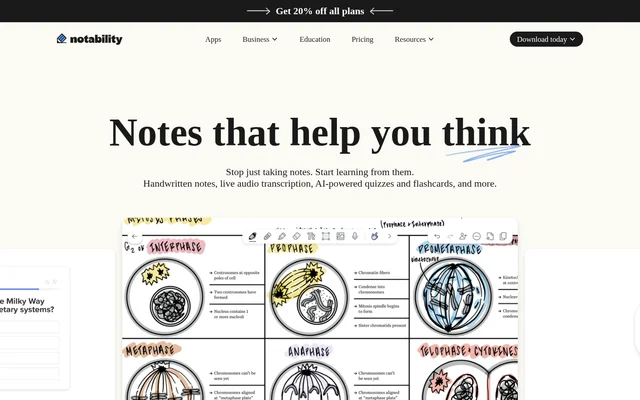
Notability is a note-taking app for handwriting, document annotation, audio recording, and AI-assisted learning. Notability serves personal note-takers, people studying from lectures and documents, and teams sharing work materials. The product combines note creation with tools that turn existing notes and recordings into summaries, practice materials, explanations, and action items.
Notability lists support for iOS, iPadOS, macOS, Windows, Android, and the web. Its feature list includes synced notes across devices, cloud storage, folders, version history, and link sharing. Individual plans focus on personal note-taking and learning, while business plans add administration, shared libraries, and live collaboration.
What Notability can do
Notability supports both capturing information and reviewing the resulting material. Notes can contain handwriting, imported documents, and recorded audio, while AI features generate study aids or help explain note content. The available capabilities span personal study and meeting follow-up, although access and usage limits depend on the selected plan.
- Notability imports PDFs, documents, and slides for note-taking and annotation.
- Notability records audio and supports transcription, live transcription, and audio playback sync.
- Notability generates summaries, quizzes, and flashcards from notes.
- Notability answers questions about notes through note chat.
- Notability creates action-item checklists from meeting notes or recordings.
- Notability converts YouTube videos into notes with transcripts and summaries.
- Notability searches handwriting and converts handwritten math to LaTeX.
How Notability works
Notability lets users take notes, import documents, or record audio, then use that material for summaries and other AI features. Users can ask questions about a note to receive explanations or generate quizzes and flashcards for practice. A separate YouTube link-to-note capability converts video content into a note containing a transcript and summary.
Notability also supports document scanning, custom templates, and a note gallery. The Starter plan includes access to 20,000+ note-taking templates. For shared work, business plans provide shared note libraries and real-time team collaboration. Business Pro additionally lists an Audit Log and Intune MAM integration for mobile application management.
Who Notability is for
Notability addresses individual learning, everyday note-taking, and business document workflows. Lecture recording, practice questions, and flashcards support people studying from their own materials. Meeting summaries and action items address work follow-up, while business plans bring notes, document markup, forms, shared libraries, and live collaboration into the same tool.
- Notability helps learners turn lecture notes into quizzes and flashcards.
- Notability lets everyday note-takers combine handwriting, documents, and audio.
- Notability helps meeting participants extract summaries and action items.
- Notability gives business teams shared note libraries and document collaboration.
Notability pricing and plans
Notability offers a free Starter plan with 5 free notes, editing tools, document imports, templates, and 7-day version history. Listed annual individual prices are $11.99 for Lite, $15.99 for Plus, and $79.99 for Pro. Lite adds unlimited notes, Plus includes limited AI study features and transcription, and Pro includes unlimited quizzes, flashcards, transcription, and AI summaries.
Notability lists Business at $60 per year per user and Business Pro at $180 per year per user, with a 30-day free trial for each. Custom contracts offer custom payment terms and dedicated support. Prices are stated in USD and may vary. The pricing page says plans can be canceled anytime and notes remain secure and accessible.
Notability strengths and limitations
Notability combines several related workflows: writing notes, annotating documents, recording audio, generating study materials, and collaborating with colleagues. The free plan provides an entry point for basic note-taking, while paid plans extend capacity and AI access. The main constraints are plan-dependent usage allowances, differences in version history, and a stated platform restriction on third-party backups.
- Notability Starter limits users to 5 free notes.
- Notability Plus limits YouTube conversions, quizzes, flashcards, and audio transcription.
- Notability third-party backups are restricted to iOS.
- Notability provides 90-day version history on Pro and Business Pro, compared with shorter histories on lower tiers.
Notability FAQ
What is Notability?
Notability is a note-taking app for handwriting, document annotation, audio recording, and transcription. Notability also includes AI summaries, quizzes, flashcards, note chat, and YouTube link-to-note conversion, with individual and business plans.
Is Notability free?
Notability offers a free Starter plan with 5 free notes, all editing tools and content, document imports, access to 20,000+ templates, and 7-day version history. Paid individual and business plans add capacity, AI capabilities, and collaboration features.
Can Notability create quizzes and flashcards from notes?
Notability generates practice questions, quizzes, and flashcards directly from notes. Notability Plus includes limited AI-powered quizzes and flashcards, while Pro includes unlimited quizzes and flashcards alongside other AI study and transcription features.
Which devices does Notability support?
Notability lists iOS, iPadOS, macOS, Windows, Android, and web support in its product information. Notability also lists syncing across devices, although third-party backups are specifically restricted to iOS in the pricing details.
Does Notability support team collaboration?
Notability business plans include shared note libraries for real-time team collaboration, unlimited note-taking and PDF annotation, centralized user administration and billing, and admin-based feature controls. Business Pro adds an Audit Log and Intune MAM integration.
Can Notability turn YouTube videos into notes?
Notability converts YouTube videos into notes containing transcripts and summaries. Notability Plus includes limited YouTube link-to-note conversions, while Pro lists unlimited conversions with transcripts and summaries.
From the community
No reviews yet
Be the first to review this tool. What you write helps the next person choose.