What is PaletteBrain?
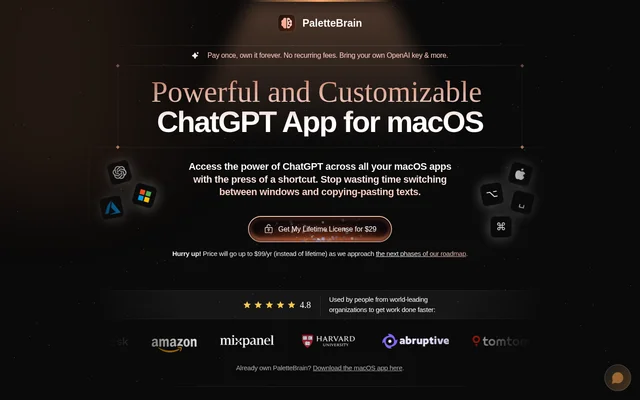
PaletteBrain is a macOS AI productivity app that makes ChatGPT commands available across Mac applications and websites. PaletteBrain is designed for people who want to work with selected text without repeatedly moving between their current application and a separate chat window. The website identifies founders, creators, and employees as users and describes applications in writing, coding, and problem-solving.
PaletteBrain runs in the background and uses a command palette to bring prompts into existing workflows. PaletteBrain is described as a bootstrapped, self-funded project. The website states that license purchases support ongoing work and research at the Abruptive Institute, but does not provide further organizational details.
What PaletteBrain can do
PaletteBrain combines selected-text processing with reusable AI commands. PaletteBrain lets users configure prompts, models, and creativity settings rather than relying only on fixed actions. The website gives examples ranging from grammar correction to code refactoring and also describes keeping conversations together and deleting conversations.
- PaletteBrain corrects grammar and spelling in selected text.
- PaletteBrain translates text into English.
- PaletteBrain summarizes text into bullet points.
- PaletteBrain converts text into a blog post.
- PaletteBrain supports custom commands for refactoring code.
- PaletteBrain binds AI commands to keyboard shortcuts.
- PaletteBrain manages and deletes conversations.
How PaletteBrain works
PaletteBrain starts with text highlighted in an application or website. Users open the AI command palette with Option-Space, then run a command to send the highlighted text into AI chat. PaletteBrain provides a Command-Shift-Return shortcut to paste the last reply into the original application, reducing manual movement between windows.
PaletteBrain uses a user-supplied API key and supports both OpenAI and Microsoft Azure OpenAI. PaletteBrain names Notion, Google Docs, Slack, Discord, and Gmail as examples of compatible apps and sites. Custom commands can have their own keyboard bindings, prompts, and model settings for repeated tasks.
Who PaletteBrain is for
PaletteBrain targets Mac users who regularly transform text or reuse prompts during their work. PaletteBrain's examples include founders, creators, and employees, while the described tasks also cover writing and software development. Customer testimonials on the page mention client blog writing and podcast scripting, including episode outlines and guest questions.
- Writers can reuse prompts while drafting client blog posts.
- Creators can prepare podcast outlines and guest questions.
- Developers can run code-refactoring commands on selected text.
PaletteBrain pricing and plans
PaletteBrain lists a $29 lifetime license with no recurring app subscription fees. PaletteBrain separately requires users to pay OpenAI for API usage on a pay-as-you-go basis; a ChatGPT Plus subscription is not required. The website announces a future change to $99/yr as the roadmap progresses and provides a macOS download link for existing owners.
PaletteBrain strengths and limitations
PaletteBrain's strengths are its selected-text workflow, reusable commands, and keyboard-based response insertion. PaletteBrain brings those actions into existing Mac applications rather than requiring a separate writing environment. The distinction between the app license and model-provider charges is important: purchasing PaletteBrain does not remove the need for an API key or separate OpenAI usage payments.
- PaletteBrain is offered as a macOS app.
- PaletteBrain requires users to supply their own API key.
- PaletteBrain charges for the app separately from OpenAI usage.
PaletteBrain FAQ
What is PaletteBrain?
PaletteBrain is a macOS AI command app that brings ChatGPT to selected text across applications and websites. PaletteBrain supports rewriting, grammar correction, translation, summarization, and code refactoring through customizable prompts and keyboard shortcuts.
Is PaletteBrain free?
PaletteBrain is paid software with a listed $29 lifetime license. PaletteBrain requires a user-supplied API key, and OpenAI usage is billed separately on a pay-as-you-go basis. The website also announces a future move to $99/yr pricing.
Does PaletteBrain require ChatGPT Plus?
PaletteBrain does not require a ChatGPT Plus subscription. PaletteBrain uses the user's own OpenAI API key, with usage paid directly to OpenAI, and also supports Microsoft Azure OpenAI for running AI commands and conversations.
Which apps does PaletteBrain work with?
PaletteBrain states that selected-text AI commands work across macOS apps and websites. PaletteBrain specifically names Notion, Google Docs, Slack, Discord, and Gmail as examples, with keyboard shortcuts used to open commands and return responses to the original app.
Can PaletteBrain run custom prompts?
PaletteBrain supports custom AI commands with configurable prompts, models, and creativity settings. PaletteBrain lets users bind commands to keyboard shortcuts for repeated tasks such as correcting grammar, summarizing text, translating content, and refactoring code.
How do you use PaletteBrain on selected text?
PaletteBrain uses highlighted text as context for AI commands. PaletteBrain opens its command palette with Option-Space, runs a chosen prompt in AI chat, and lets users paste the last response into the original application with Command-Shift-Return.
From the community
No reviews yet
Be the first to review this tool. What you write helps the next person choose.