What is Paraphrasing Tool?
Paraphrasing Tool is an AI paraphrasing assistant for rewriting sentences, improving clarity and adapting writing style. Paraphrasing Tool serves students, writers, bloggers, marketers, professionals and researchers working on academic, professional or creative material. The service combines rewriting modes with tone controls, vocabulary assistance and several ways to supply source content.
Paraphrasing Tool supports rewriting goals that range from preserving meaning to simplifying language or making explanations more detailed. The page lists languages including English, Spanish, German, Arabic and Hindi. Beyond the website, browser extensions and mobile apps provide additional ways to access the writing assistant.
What Paraphrasing Tool can do
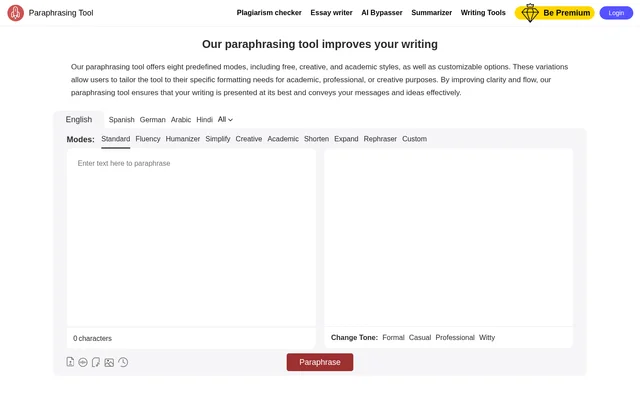
Paraphrasing Tool provides named modes for different rewriting tasks, including Standard, Fluency, Humanizer, Simplify, Creative and Academic. Shorten and Expand address passage length, while Rephraser changes individual sentences. Selected modes require premium access. Separate tone controls let writers adjust how a message sounds without relying solely on the selected mode.
- Paraphrasing Tool rewrites text while preserving meaning in Standard mode.
- Paraphrasing Tool adjusts messages to formal, casual, professional or witty tones.
- Paraphrasing Tool extracts written content from uploaded audio before paraphrasing.
- Paraphrasing Tool extracts text from screenshots and images for rewriting.
- Paraphrasing Tool suggests contextual synonyms and explains word meanings.
- Paraphrasing Tool provides a research panel for references, article summaries and previews.
How Paraphrasing Tool works
Paraphrasing Tool accepts text in an input box and provides document upload, audio upload, speech-to-text and image text extraction options. For spoken input, the page instructs users to select speech to text, speak their message and then press the paraphrase button. Recorded audio is converted into written text before rewriting.
Paraphrasing Tool also supports output-level editing. Clicking a word in the paraphrased output displays synonym suggestions suited to the context, while double-clicking a word displays its definition and usage examples. The page directs users to the research panel button to find references and read summaries or previews of online articles.
Who Paraphrasing Tool is for
Paraphrasing Tool addresses writing tasks across education, publishing, marketing and professional communication. The page describes student use for difficult sentences, writer and blogger use for clarity and consistent style, and professional use for reports, proposals and presentations. Researchers can use the tool to make difficult language easier to understand.
- Paraphrasing Tool helps students simplify difficult sentences and ideas.
- Paraphrasing Tool helps writers and bloggers reduce repetition and maintain tone.
- Paraphrasing Tool helps marketers adapt messages for target audiences.
- Paraphrasing Tool helps professionals revise reports, proposals and presentations.
- Paraphrasing Tool helps researchers simplify language in articles.
Paraphrasing Tool pricing and plans
Paraphrasing Tool offers free paraphrasing alongside premium modes. The interface marks Simplify, Creative, Academic, Shorten, Expand, Rephraser and Custom with unlock prompts and includes an Unlock Premium Modes option. The page advertises a money-back guarantee, but provides no subscription prices or detailed plan comparison. Custom mode creation is also presented as a locked option.
Paraphrasing Tool strengths and limitations
Paraphrasing Tool combines several input formats with rewriting controls and vocabulary explanations. Browser extensions are listed for Chrome, Firefox, Edge, Opera and Safari, and mobile apps are listed for Android and iOS. Access is not uniform across the available writing options: several named modes and custom mode creation are presented as premium features.
- Paraphrasing Tool requires an unlock for Simplify and Creative modes.
- Paraphrasing Tool requires an unlock for Academic, Shorten, Expand and Rephraser modes.
- Paraphrasing Tool requires an unlock to create a custom mode.
Paraphrasing Tool FAQ
What is Paraphrasing Tool?
Paraphrasing Tool is an AI writing assistant that rewrites text to improve clarity, flow and style. Paraphrasing Tool includes rewriting modes, tone controls, contextual synonyms and word definitions, with input options for documents, audio, speech and images.
Is Paraphrasing Tool free?
Paraphrasing Tool offers free paraphrasing, while selected modes require premium access. The page marks options such as Simplify, Creative, Academic and Custom for unlocking and advertises a money-back guarantee, but does not provide subscription prices.
Can Paraphrasing Tool rewrite audio and image text?
Paraphrasing Tool can paraphrase recorded audio, spoken input and text extracted from screenshots or images. Recorded audio is converted into text before rewriting. For speech input, users select speech to text, speak their message and then click the paraphrase button.
Does Paraphrasing Tool have browser extensions or mobile apps?
Paraphrasing Tool lists browser extensions for Chrome, Firefox, Edge, Opera and Safari. Paraphrasing Tool also lists Android and iOS apps, giving users access through supported browsers and mobile devices in addition to the website.
Who is Paraphrasing Tool for?
Paraphrasing Tool is designed for students, writers, bloggers, marketers, professionals and researchers. The page describes uses including simplifying difficult ideas, maintaining a consistent writing style, adapting marketing messages and improving reports, proposals, presentations and research articles.
How does Paraphrasing Tool help with word choice?
Paraphrasing Tool provides contextual synonym suggestions when users click a word in the paraphrased output. Double-clicking a word displays a detailed definition and examples of usage, helping writers understand vocabulary while revising their text.
From the community
No reviews yet
Be the first to review this tool. What you write helps the next person choose.