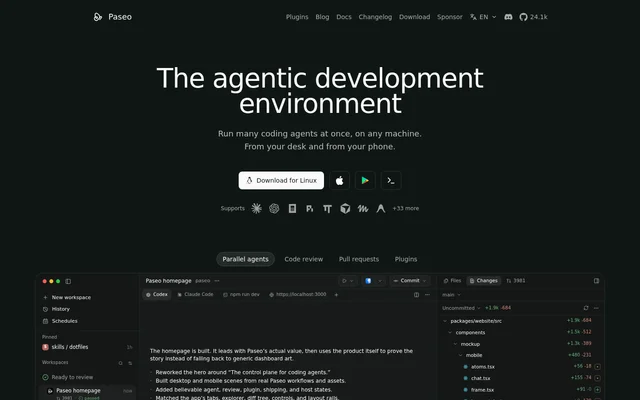
What is Paseo?
Paseo is an open-source coding agent orchestrator for developers who want a common interface for different providers. Paseo connects desktop and mobile clients to agents running on a laptop or server. The project is independently maintained, shaped by its community, and funded through sponsorship and Paseo Hub rather than investors.
What Paseo can do
Paseo brings existing coding tools into a shared workflow while retaining their subscriptions, skills, and configuration. Supported providers include Claude Code, Codex, OpenCode, Pi, OMP, Antigravity, and Muse Code, with additional support through ACP. Beyond provider access, Paseo includes remote connections, customization, voice input, and interfaces for programmatic automation.
- Paseo runs agents in optional git worktrees on isolated branches.
- Paseo transcribes speech locally and sends the resulting text to an agent.
- Paseo exposes automation through MCP, a CLI, and a TypeScript SDK.
- Paseo lets agents change the UI through plugins without a restart, including on mobile.
- Paseo Hub supports shared access and work triggered from GitHub, Slack, and Discord.
How Paseo works
Paseo runs providers already installed on the user's machine without modifying their behavior. The desktop app bundles the daemon with a UI, while a headless daemon can serve other clients. Remote access can use the hosted end-to-end encrypted relay, a direct local-network connection, or a user-managed tunnel such as Tailscale or Cloudflare Tunnel.
Paseo does not send code anywhere itself; local agents communicate with their own APIs as they normally would. The hosted relay is optional, and Paseo states that relay traffic cannot be read by Paseo. Developers can also run the daemon on a home lab or cloud machine and connect from another device.
Who Paseo is for
Paseo serves developers who use coding agents and want to move between providers or devices without adopting a separate interface for each workflow. Native mobile access supports checking and managing agent progress away from a computer. Remote-machine support also suits developers whose agents run on servers rather than their current device.
- Paseo supports managing agent progress from a phone.
- Paseo can distribute ready GitHub issues to agents in separate worktrees.
- Paseo lets developers use Pi and other supported providers through a common interface.
Paseo pricing and plans
Paseo is free and open source under the Apache 2.0 licence. Developers must supply installed agent providers and their own credentials. The project is self-funded through sponsorship and Paseo Hub, but the page does not specify Paseo Hub pricing. Optional cloud speech providers can be configured instead of the default local voice workflow.
Paseo strengths and limitations
Paseo combines provider choice, desktop and mobile access, and extensibility with no telemetry, tracking, or forced login. The bundled desktop experience avoids requiring a separate server, while headless operation accommodates remote setups. Paseo does not replace provider installations or credentials, and some capabilities depend on the user's chosen tools and configuration.
- Paseo requires installed agent providers and user-supplied credentials.
- Paseo worktrees are optional and apply only to git workflows.
- Paseo requires configuration to use optional OpenAI speech providers.
Getting started with Paseo
Paseo offers a downloadable desktop app for a bundled UI and daemon experience, plus a native mobile client. Developers should have their chosen agent providers installed with their own credentials. For remote operation, the documentation covers daemon configuration and connection options; separate documentation covers voice, worktrees, plugins, MCP, the CLI, and the SDK.
Paseo FAQ
What is Paseo?
Paseo is a free, open-source coding agent orchestrator for developers using local or remote machines. Paseo provides desktop and native mobile access to supported providers, including Claude Code, Codex, OpenCode, and Pi.
Is Paseo free?
Paseo is free and open source under Apache 2.0. Paseo requires users to install their own agent providers and supply their own credentials. The project is funded through sponsorship and Paseo Hub.
Can Paseo connect to agents outside a local network?
Paseo supports remote access through an optional hosted end-to-end encrypted relay, a user-managed tunnel such as Tailscale or Cloudflare Tunnel, or direct daemon port exposure. Paseo can also connect directly over a local network.
Does Paseo send code off the user's machine?
Paseo does not send code anywhere itself. Paseo runs installed agents locally, and those agents communicate with their own APIs as usual. Paseo also offers an optional end-to-end encrypted relay for remote access.
Does Paseo require git or GitHub?
Paseo does not require git or GitHub and works in any directory. Paseo optionally creates git worktrees when launching agents, allowing an agent to work on an isolated branch without touching the main working directory.
Does Paseo support automation?
Paseo supports automation through MCP, a CLI, and a TypeScript SDK. Paseo also supports plugins for interface changes, while Paseo Hub provides shared access and ways to start work from GitHub, Slack, and Discord.
From the community
No reviews yet
Be the first to review this tool. What you write helps the next person choose.