What is Peacasso?
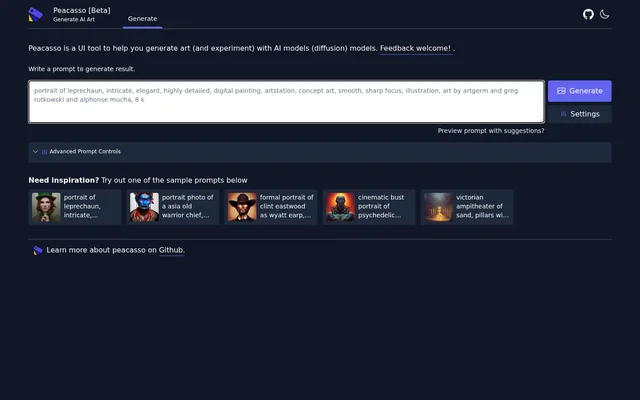
Peacasso is a user interface for generating art and experimenting with diffusion AI models. Peacasso centers the experience on a written prompt: the page asks users to write a prompt to generate a result. The stated purpose covers both creating images and experimenting with how descriptions guide AI-generated art.
Peacasso supplies examples rather than presenting an empty prompt workflow alone. The examples include a leprechaun portrait, a warrior portrait, a cinematic robot portrait and a Victorian amphitheater scene. These examples show the kinds of subjects and descriptive language provided on the page, rather than establishing separate image-generation modes.
What Peacasso can do
Peacasso combines prompt-based art generation with controls for exploring prompts and settings. Peacasso displays a prompt preview option with suggestions, a Generate control, Settings and Advanced Prompt Controls. The page names these interface elements but does not describe the individual settings or explain what each advanced control changes.
- Peacasso generates art from written prompts using diffusion models.
- Peacasso offers sample prompts as starting points for experimentation.
- Peacasso displays a prompt preview option with suggestions.
- Peacasso provides access to Settings and Advanced Prompt Controls.
- Peacasso includes a React Flow area with node and edge keyboard interactions.
How Peacasso works
Peacasso presents a workflow that starts with writing a prompt and continues with the Generate control. Peacasso also invites users to try a sample prompt when they need inspiration. The examples combine a subject with additional instructions about visual style, lighting, framing, composition and detail, providing concrete models for constructing a descriptive prompt.
Peacasso includes React Flow instructions for keyboard interaction. Users can select a node with Enter or Space, move a selected node with the arrow keys, remove it with Delete and cancel with Escape. Edges can also be selected and removed. The page does not explain how these graph elements connect to the art-generation workflow.
Who Peacasso is for
Peacasso is for people who want to generate art or experiment with diffusion models through a prompt-based interface. Peacasso's examples are relevant to users exploring portraiture, fictional characters and imagined environments. The supplied prompts demonstrate ways to describe a desired image, without identifying a specific professional audience or a required level of technical experience.
- Peacasso provides portrait prompts with descriptions of subjects, poses and lighting.
- Peacasso provides a robot character prompt with cinematic and painting references.
- Peacasso provides an architectural scene prompt describing an amphitheater, statues and lamps.
- Peacasso supports experimentation with prompts that combine subjects and stylistic descriptions.
Peacasso strengths and documented scope
Peacasso's documented strengths are its direct prompt-entry workflow, its collection of example prompts and its visible generation controls. Peacasso also supplies explicit keyboard instructions for the React Flow area. The source identifies diffusion models as the underlying model category, but leaves the specific models, advanced settings and relationship between graph controls and generated results unexplained.
Peacasso FAQ
What is Peacasso?
Peacasso is a user interface for generating art and experimenting with diffusion AI models. Peacasso uses written prompts and provides sample prompts, a Generate control, Settings and Advanced Prompt Controls.
How do you generate art with Peacasso?
Peacasso asks users to write a prompt to generate a result and provides a Generate control. Peacasso also offers sample prompts for inspiration, alongside a prompt preview option with suggestions and settings controls.
What sample prompts does Peacasso provide?
Peacasso provides sample prompts for portraits, a cinematic robot character and a Victorian amphitheater scene. Peacasso's examples combine subjects with descriptions of artistic style, lighting, composition, visual detail and other image characteristics.
Does Peacasso support keyboard controls?
Peacasso includes React Flow keyboard instructions for selecting nodes and edges with Enter or Space. Peacasso's instructions also cover moving selected nodes with arrow keys, deleting selected elements and cancelling with Escape.
From the community
No reviews yet
Be the first to review this tool. What you write helps the next person choose.